Free Online Storage

  • Subscribe to our RSS feed.
  • Twitter
  • StumbleUpon
  • Reddit
  • Facebook
  • Digg

Wednesday, 25 March 2009

Find (and replace) my favo(u)rite colo(u)r and much, much more

Posted on 10:25 by Unknown

I'm Canadian. And although I've lived and worked here in the U.S. quite some time now, the Canadian spellings of certain words still often slip into my documents. Favourite, colour, neighbour, centre, etc. -- you get the idea. This week, we've added a new find and replace toolbar (for documents) which will make it easier for me to catch those Canadian spellings when I'm writing for an American audience.

If you want to locate a word or phrase in your document, it's as easy as choosing "Find & Replace" in the "Edit" menu, or hitting Ctrl+F.
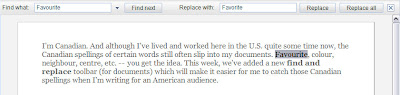

Then type the text you want to find, and click Find Next (or press Ctrl+G). If it appears more than once in your document, you can click Find Next again to select the next occurrence.

If you want to change some or all of the occurrences in your document, just type the replacement text in the second box. Click the Replace button to change a selected occurrence to the replacement text, or click Replace All to change all the occurrences in your document in one shot.

Find and Replace also supports additional options for controlling the search, which you can see by clicking the arrow next to the search box. Options such as case-sensitive matching and regular expressions. Find out more about this feature in this help center article.

Pretty useful tool, eh?

Posted by: Vivian Leung, Product Marketing Manager (and proud Canuck)
Email ThisBlogThis!Share to XShare to Facebook
Posted in Google Apps Blog | No comments
Newer Post Older Post Home

0 comments:

Post a Comment

Subscribe to: Post Comments (Atom)

Popular Posts

  • Merge cells vertically in Google spreadsheets
    There are many times when you want to format your spreadsheets in a certain way to make your data easier to read and understand. Starting to...
  • Hosting a viewing party for the OSCARS®
    Last year, I planned an OSCARS® viewing party with my friends. To add some friendly competition and figure out who was coming, I collected p...
  • Collaboration worldwide
    Posted by: Ken Norton, Product Manager, Google Docs & Spreadsheets Whether you're sitting in the same room, across campus, or in dif...
  • Summarize your data with pivot tables
    Starting today, we're rolling out pivot tables in Google spreadsheets. Pivot tables make it easy to process and summarize large data set...
  • The Google Docs for students page
    We recently launched the Google Docs for students page which highlights how various student populations can use Google Docs in their daily ...
  • Tips & Tricks: Using the new Subtotal function in Google spreadsheets
    This week, we added the Subtotal function to our list of functions in Google spreadsheets. One of the benefits of the Subtotal function is...
  • Happy holidays from the Picasa team
    A lot of people who Google Docs also use Picasa Web Albums, so we wanted to let you know about a special offer. We made extra storage for Gm...
  • New Gmail Keyboard Shortcuts
    Here are some new Gmail keyboard shortcuts : d - open a compose window in a new tab (Shift+c opens it in a new window) , - moves the curso...
  • Google Docs and college life
    As the start of the academic year draws close, students are always looking for new ways to make life at school run more smoothly, whether it...
  • New Templates: Embedding spreadsheets in your website
    Did you know that you can publish a spreadsheet and embed it in your website or blog? An embedded spreadsheet is a perfect way to display a...

Categories

  • Acquisitions
  • Ads
  • Android
  • Annoyances
  • April Fools Day
  • attachments
  • back to school
  • Blogger
  • charts
  • chat
  • Chrome
  • Chrome extensions
  • chrome web apps
  • Cloud Connect
  • collaboration
  • comments
  • community
  • discussions
  • DMCA
  • docs
  • document list
  • documents
  • documents list
  • drawings
  • drivebacktoschool
  • Easter Egg
  • education
  • Faces of Docs
  • forms
  • gmail
  • gone google
  • Google Alerts
  • Google Analytics
  • Google Apps Blog
  • Google Apps Script
  • Google Calendar
  • Google Cast
  • Google Checkout
  • Google Chrome
  • Google Chrome OS
  • Google Cloud Connect
  • Google Contacts
  • Google Dictionary
  • Google Docs
  • Google Docs Viewer
  • google documents
  • google drive
  • Google Earth
  • Google Goggles
  • Google Hangouts
  • Google Instant
  • Google Keep
  • Google Latitude
  • Google Local
  • Google Maps
  • Google Music
  • Google News
  • Google Notebook
  • Google Now
  • Google Pack
  • Google Photos
  • Google Play
  • Google Plus
  • Google Reader
  • Google Sites
  • Google Suggest
  • Google Takeout
  • Google Talk
  • Google Toolbar
  • Google Translate
  • Google Trends
  • Google Voice
  • Google Wallet
  • Google+
  • googlenew
  • Greasemonkey
  • Guest Post
  • holiday
  • iGoogle
  • Image Search
  • images
  • InOut
  • iOS
  • Keep
  • Knowledge
  • mobile
  • OCR
  • offline
  • OneBox
  • paperless
  • pdfs
  • photo
  • photos
  • Picasa Web Albums
  • presentations
  • product ideas
  • profiles
  • quickoffice
  • Reddit
  • research
  • save to drive
  • scripts
  • Security
  • sharing
  • sheets
  • shortcut
  • slides
  • spell check
  • spreadsheets
  • stock photos
  • storage
  • students
  • tables
  • teachers
  • templates
  • Tips
  • User interface
  • videos
  • Viewer
  • Visualization
  • Voice Search
  • Web Search
  • Yahoo
  • YouTube

Blog Archive

  • ►  2013 (519)
    • ►  December (33)
    • ►  November (44)
    • ►  October (64)
    • ►  September (50)
    • ►  August (63)
    • ►  July (60)
    • ►  June (57)
    • ►  May (62)
    • ►  April (49)
    • ►  March (33)
    • ►  February (1)
    • ►  January (3)
  • ►  2012 (34)
    • ►  December (4)
    • ►  November (4)
    • ►  October (5)
    • ►  September (4)
    • ►  August (2)
    • ►  July (1)
    • ►  June (3)
    • ►  May (2)
    • ►  April (2)
    • ►  March (2)
    • ►  February (5)
  • ►  2011 (80)
    • ►  December (4)
    • ►  November (1)
    • ►  October (7)
    • ►  September (10)
    • ►  August (11)
    • ►  July (8)
    • ►  June (9)
    • ►  May (1)
    • ►  April (8)
    • ►  March (8)
    • ►  February (8)
    • ►  January (5)
  • ►  2010 (118)
    • ►  December (11)
    • ►  November (16)
    • ►  October (6)
    • ►  September (13)
    • ►  August (13)
    • ►  July (7)
    • ►  June (15)
    • ►  May (11)
    • ►  April (7)
    • ►  March (7)
    • ►  February (6)
    • ►  January (6)
  • ▼  2009 (82)
    • ►  December (14)
    • ►  November (4)
    • ►  October (10)
    • ►  September (10)
    • ►  August (4)
    • ►  July (6)
    • ►  June (6)
    • ►  May (5)
    • ►  April (4)
    • ▼  March (8)
      • Just to clarify...
      • Drawing on your creativity in Docs
      • Find (and replace) my favo(u)rite colo(u)r and muc...
      • Custom views give you more control of your spreads...
      • New Template: 2009 College Basketball Tournament B...
      • On yesterday's email
      • Which is faster, warp or hyperdrive?
      • New Templates: Embedding spreadsheets in your website
    • ►  February (7)
    • ►  January (4)
  • ►  2008 (97)
    • ►  December (6)
    • ►  November (4)
    • ►  October (6)
    • ►  September (8)
    • ►  August (5)
    • ►  July (7)
    • ►  June (11)
    • ►  May (20)
    • ►  April (13)
    • ►  March (6)
    • ►  February (6)
    • ►  January (5)
  • ►  2007 (25)
    • ►  December (1)
    • ►  November (1)
    • ►  October (2)
    • ►  September (3)
    • ►  August (3)
    • ►  July (4)
    • ►  June (3)
    • ►  May (2)
    • ►  April (2)
    • ►  March (1)
    • ►  February (2)
    • ►  January (1)
  • ►  2006 (10)
    • ►  December (2)
    • ►  November (4)
    • ►  October (4)
Powered by Blogger.

About Me

Unknown
View my complete profile