Free Online Storage

  • Subscribe to our RSS feed.
  • Twitter
  • StumbleUpon
  • Reddit
  • Facebook
  • Digg
Showing posts with label sheets. Show all posts

Wednesday, 11 December 2013

New Google Sheets: faster, more powerful, and works offline

Posted on 09:02 by Unknown
(Cross-posted from the Official Google Blog)

Whether you’re crunching big data or tracking your family budget, you don’t want to waste time waiting for files to load or re-doing edits that were lost because your Internet connection dropped. You can now get more done by switching to the new version of Google Sheets. It’s faster, supports larger spreadsheets, has a number of new features, and works offline.
Bigger, faster spreadsheets
The new Sheets supports millions of cells and kicks many of the old size and complexity limits to the curb. Scrolling, loading and calculation are all snappier, even in more complex spreadsheets.

New features based on your feedback and requests 

Filter views is a new feature unique to Google Sheets that lets you quickly name, save and share different views of your data. This comes in handy when you’re collaborating so you can sort a spreadsheet without affecting how others see it.
Whether you’re new to formulas or a whiz at running complex functions, it’s now easier to set up and perform calculations. New function help and examples guide you as you type, and error highlighting and coloring make it easy to spot and fix mistakes.

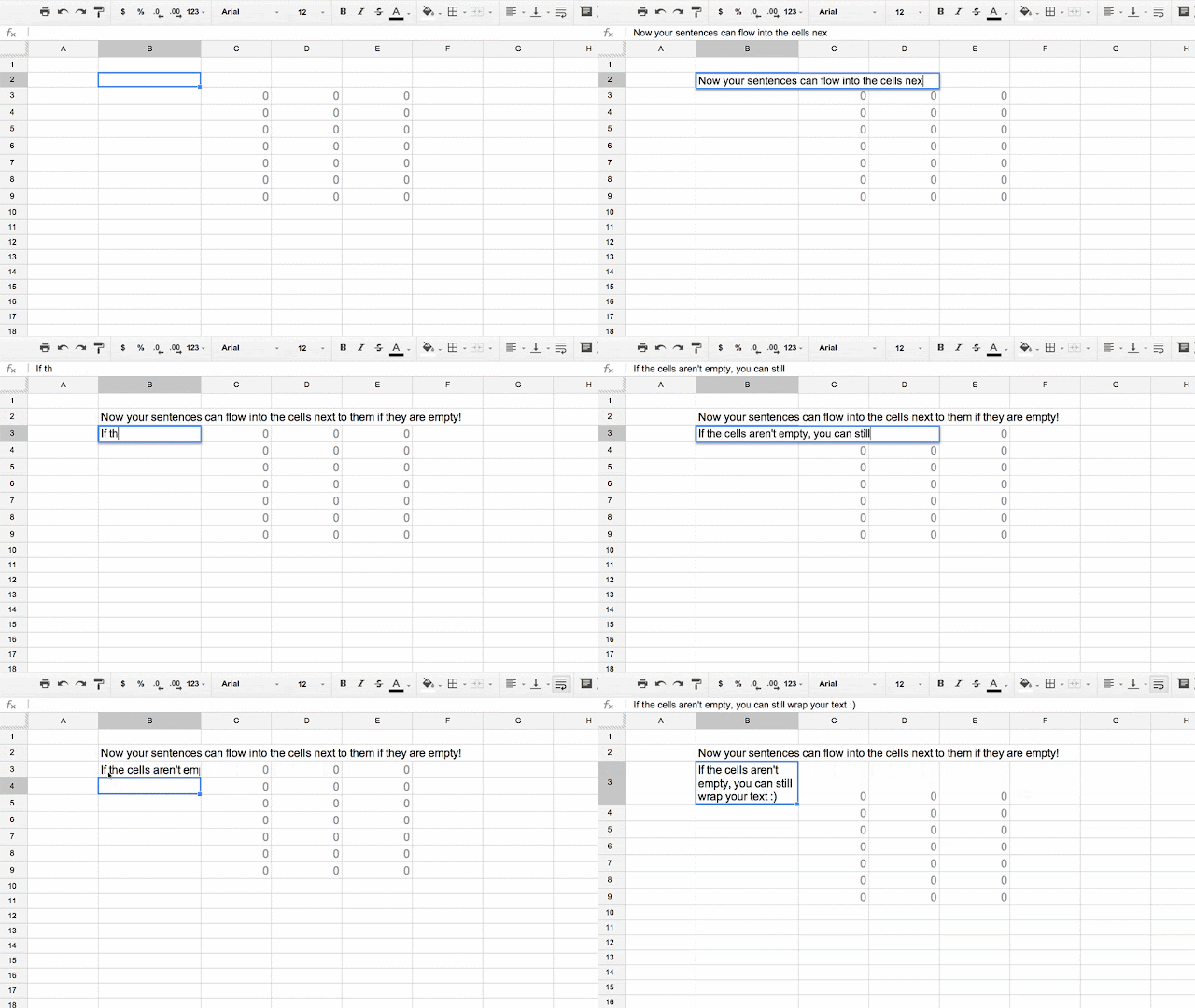
As another time-saving improvement, text now automatically flows into empty adjacent cells—no manual merge needed.
With the improved conditional formatting, you can add rules to change the colors and styles of cells in your spreadsheet based on custom formulas.

No internet connection? Work offline with Chrome 
You shouldn’t have to think about whether you have a WiFi connection when you want to work. So just like Google Docs and Slides, you can now make edits to Sheets offline. When you reconnect to the Internet, your edits will automatically sync. If you've edited Docs or Slides offline in the past, then you’re already set up to edit Sheets offline. If not, follow these one-time instructions for setting up offline in Chrome.

Ready to try it out? 
Turn on the new Sheets by checking the “Try the new Google Sheets” box in Google Drive settings. From then on, all new spreadsheets you create will work offline and include these new features. We’ll be adding a small list of missing features in the coming months, so if you rely on any of them, you may want to wait a little longer before opting in.

We hope you enjoy these and the many other updates that come along with the new Google Sheets, including colored sheet tabs, custom number formatting, paste transpose and more. Let us know what you think on our Google+ page!

Posted by: Zach Lloyd, Software Engineer
Read More
Posted in sheets, spreadsheets | No comments

Monday, 30 September 2013

Content & Color: An updated look for Docs, Sheets & Slides

Posted on 13:57 by Unknown
Starting today, things are about to get cleaner—and more colorful—in Docs, Sheets, Slides, Drawings, Forms and Apps Script. First, you’ll notice each editor’s product icon displayed in the header, which doubles as a quick link back to all your files in Drive. Next, you’ll see that the header is more streamlined and compact, helping you to focus on what matters most—your content.

We hope these updates make your creation and collaboration experience just a bit more delightful. Enjoy!

Posted by Sarah Cooper, User Experience Designer
Read More
Posted in docs, drawings, forms, scripts, sheets, slides | No comments

Monday, 19 August 2013

Head back to school with Drive: Teacher Edition

Posted on 10:43 by Unknown
Posted by guest blogger Wendy Gorton

Wendy Gorton is an education consultant for organizations around the world. She’s a former classroom teacher, Google Certified Teacher and Trainer, and is passionate about creating learner-centered environments using tools like Google Apps for Education. 

Follow the Drive Google+ page this and next week for daily tips and suggestions for using Drive in the classroom.

Google Drive is the all-in-one tool I wish I had my first year of teaching. It not only keeps all of your lesson plans, activities, and research organized, but it's an outstanding way to engage your students, give them feedback, and give their writing a real audience—like their peers or classrooms around the world.

Here are 3 tips to help teachers prepare for going back to school with Docs, Sheets, Slides, and Forms. 

1. Use Slides to get to know your students 
A great first-week introductory activity is to create a single slide deck, and then invite each of your students to share a bit about themselves on their own personal slide. It’s a fantastic get-to-know-you activity for the first week of school and you’ll be amazed by the creativity that comes out of your students! 

The screenshot below shows how Google Student Ambassadors from 9 different countries used Slides to introduce themselves before gathering to meet each other at an event in Indonesia this summer.

Want to get this going with your students? Easy—create a new Slides deck on the first week of school, click the blue Share button to invite your students, and give them a little direction for their individual slide by adding comments.

2. Use Docs to create a classroom “Bill of Rights” 
The first week of class is that precious transition from the “honeymoon” period of angelic children to learning the norms of your classroom culture. Help start the year off right by inviting students to co-create their ideas of citizenship and a happy learning environment, Docs style.

Start by creating a copy of this template and then invite students to join in with you to add their ideas, ratify by adding a comment, and use their editing prowess to come up with a final copy to live by for the coming year.

3. Use Forms to get to know your students (and their prior knowledge!) 
Get to know your classroom as soon as possible, using Forms to gather information about their needs, interests, and abilities beforehand. Consider creating a simple Form for a survey for your students (and for your parents!) and have fun showing the data on your projector and learning about your class as a whole.

Forms can be used as a very quick getting started activity before any lesson as well—take this example from a social studies classroom before talking about population. By placing a quick Form on your classroom site or emailing your students the Form, you can quickly grasp your students' prior knowledge—before you start teaching.

In this case, our team was a bit off, but helped us not only talk about population but estimation and numbers in general (answer? 7.1 billion and counting. My favorite answer? One ‘goggle.’)
One last tip: Google Apps for Education
You know this is way easier when your school has its own Google Apps for education set up, right? It’s free, and no technical expertise is needed to get started.

I hope you give one of these ideas a try and let me know how it goes on my Google+ page.
Read More
Posted in back to school, docs, drivebacktoschool, education, forms, sheets, slides, teachers | No comments

Friday, 21 December 2012

Make the most of your holiday gifts and time at home with Google Drive

Posted on 07:42 by Unknown
Chances are that many of you lucky readers will be unwrapping new computers, mobile phones, and tablets this holiday season. Here are a few quick tips on how you can smoothly transition all of your stuff from old devices to new ones using Google Drive.

For laptops & desktops 
First, you’ll want to get all your files from your old computer into Google Drive. To do this, download Drive for Mac or PC on your existing computer. To upload your files to Drive, simply drag-and-drop all your files and folders (up to 5GB free) into the new Drive folder on your desktop. Then you’ll be able to access everything on the web from any computer, including your new one. Or you can download Drive again on your new computer to sync your files and automatically store them on your new computer.
For mobile phones & tablets
Upload all of the photos and videos on your old device with the Drive mobile app for Android or iOS. Install the Drive mobile app on your new device and all your stuff will be there -- and also available to you on the web from any device.

More holiday tips & tricks 
For those of you planning to do any holiday cooking, here are a few other ways Drive can help you in the next few weeks:

  • Scan or snap a photo of a classic family holiday recipe and upload it to Drive for safe keeping and sharing. 
  • Search for recipes that you’ve already stored in Drive. You can even search for keywords inside PDFs and photos. 
  • Jot down a new delicious recipe right from the kitchen with Docs in the Drive mobile app for Android and iOS. 
  • Use Sheets for your grocery shopping list. Create it on your computer at home, then pull it up on your phone at the grocery store and cross of items as you go. 
  • Create a quick form to invite friends to your holiday get together and figure out who’s coming, what they’re bringing, etc. 
Happy holidays!

Posted by Michael Bolognino, Product Marketing Manager
Read More
Posted in docs, forms, google drive, holiday, mobile, OCR, pdfs, photo, sheets | No comments

Wednesday, 28 November 2012

Edit spreadsheets on the go with the Drive mobile app

Posted on 10:51 by Unknown
You’re making your list, you’re checking it twice—and now you can do it from anywhere.

Just in time for this year’s holiday season, you can edit Google Sheets on your mobile device, just like you can with Google Docs. From the Drive app on your iPhone, iPad or Android device, you can create a new spreadsheet or edit an existing one. You can switch fonts, resize columns, sort data, and more. And just like on your computer, you’ll be able to see other people’s edits in real time as they’re made.
Beyond spreadsheets, you may notice a few other tweaks to the Drive app, including better text formatting when you copy and paste in a Google document. And if you’re using an Android device, you can now edit text within tables in documents and add a shortcut on the homescreen of your device to any specific file in Drive.

Whether it’s holiday recipes, shopping lists, or just your family budget, the Drive app on your mobile device makes it easy to get stuff done wherever you are.

Get the Google Drive app today from Google Play and the Apple App Store.

Posted by Shrikant Shanbhag, Software Engineer
Read More
Posted in docs, documents, mobile, sheets, spreadsheets | No comments

Tuesday, 23 October 2012

One click to Docs, Sheets, and Slides

Posted on 10:01 by Unknown
Google Drive is a place where you can create, share, collaborate and keep all your stuff. Of course, there are times you want to start a new document right away–say, to take notes in class or prepare a last-minute presentation for your boss.

To make it even easier for you to create stuff quickly, Documents, Spreadsheets, and Presentations–now called Docs, Sheets, and Slides–are available as apps in the Chrome Web Store. Once installed, shortcuts to these apps will appear when you open a new tab in Chrome.


If you use a Chromebook, you’ll see Docs, Sheets, and Slides in your apps list by default following the next update to Chrome OS in a few weeks.


Posted by Jonathan Rochelle, Director of Product Management
Read More
Posted in Chrome, chrome web apps, docs, documents, presentations, sheets, slides, spreadsheets | No comments
Older Posts Home
Subscribe to: Posts (Atom)

Popular Posts

  • Merge cells vertically in Google spreadsheets
    There are many times when you want to format your spreadsheets in a certain way to make your data easier to read and understand. Starting to...
  • Hosting a viewing party for the OSCARS®
    Last year, I planned an OSCARS® viewing party with my friends. To add some friendly competition and figure out who was coming, I collected p...
  • Collaboration worldwide
    Posted by: Ken Norton, Product Manager, Google Docs & Spreadsheets Whether you're sitting in the same room, across campus, or in dif...
  • Summarize your data with pivot tables
    Starting today, we're rolling out pivot tables in Google spreadsheets. Pivot tables make it easy to process and summarize large data set...
  • The Google Docs for students page
    We recently launched the Google Docs for students page which highlights how various student populations can use Google Docs in their daily ...
  • Announcing your two most requested features: offline document editing and Drive for iOS
    In April, we introduced Google Drive, a place where you can create, share, and keep all your stuff. Today at the Google I/O conference we a...
  • Happy holidays from the Picasa team
    A lot of people who Google Docs also use Picasa Web Albums, so we wanted to let you know about a special offer. We made extra storage for Gm...
  • Dragging and dropping
    Posted by: Ken Norton, Product Manager, Google Docs & Spreadsheets Have you ever come across a link to a document on the web and wished ...
  • New Templates: Embedding spreadsheets in your website
    Did you know that you can publish a spreadsheet and embed it in your website or blog? An embedded spreadsheet is a perfect way to display a...
  • Upload and store your files in the cloud with Google Docs
    We're happy to announce that over the next few weeks we will be rolling out the ability to upload, store and organize any type of file i...

Categories

  • Acquisitions
  • Ads
  • Android
  • Annoyances
  • April Fools Day
  • attachments
  • back to school
  • Blogger
  • charts
  • chat
  • Chrome
  • Chrome extensions
  • chrome web apps
  • Cloud Connect
  • collaboration
  • comments
  • community
  • discussions
  • DMCA
  • docs
  • document list
  • documents
  • documents list
  • drawings
  • drivebacktoschool
  • Easter Egg
  • education
  • Faces of Docs
  • forms
  • gmail
  • gone google
  • Google Alerts
  • Google Analytics
  • Google Apps Blog
  • Google Apps Script
  • Google Calendar
  • Google Cast
  • Google Checkout
  • Google Chrome
  • Google Chrome OS
  • Google Cloud Connect
  • Google Contacts
  • Google Dictionary
  • Google Docs
  • Google Docs Viewer
  • google documents
  • google drive
  • Google Earth
  • Google Goggles
  • Google Hangouts
  • Google Instant
  • Google Keep
  • Google Latitude
  • Google Local
  • Google Maps
  • Google Music
  • Google News
  • Google Notebook
  • Google Now
  • Google Pack
  • Google Photos
  • Google Play
  • Google Plus
  • Google Reader
  • Google Sites
  • Google Suggest
  • Google Takeout
  • Google Talk
  • Google Toolbar
  • Google Translate
  • Google Trends
  • Google Voice
  • Google Wallet
  • Google+
  • googlenew
  • Greasemonkey
  • Guest Post
  • holiday
  • iGoogle
  • Image Search
  • images
  • InOut
  • iOS
  • Keep
  • Knowledge
  • mobile
  • OCR
  • offline
  • OneBox
  • paperless
  • pdfs
  • photo
  • photos
  • Picasa Web Albums
  • presentations
  • product ideas
  • profiles
  • quickoffice
  • Reddit
  • research
  • save to drive
  • scripts
  • Security
  • sharing
  • sheets
  • shortcut
  • slides
  • spell check
  • spreadsheets
  • stock photos
  • storage
  • students
  • tables
  • teachers
  • templates
  • Tips
  • User interface
  • videos
  • Viewer
  • Visualization
  • Voice Search
  • Web Search
  • Yahoo
  • YouTube

Blog Archive

  • ▼  2013 (519)
    • ▼  December (33)
      • Google Maps Easter Egg for Christmas
      • Google Music to Add Upload Feature
      • Sound Search Playlist in Google Music
      • Google Zeitgeist 2013
      • Google Zeitgeist Quiz
      • Google's Christmas Carols Easter Egg
      • More About Gmail's Proxy
      • Custom Maps in the New Google Maps
      • Auto Awesome Snow Shake in Google+ for Android
      • Updated Google Settings Page
      • Google Uses a Proxy to Load Gmail Images
      • Google's Animated Decorations for Christmas
      • The New Google Sheets
      • Google's Video Duration Experiment
      • New Google Sheets: faster, more powerful, and work...
      • 9 New Languages in Google Translate
      • 10 New Chromecast Apps
      • Google Settings Page for Phone Numbers
      • Connect Google Photo Spheres
      • Google Open Gallery
      • More In-Depth Articles in Google Search
      • Google's Mobile Image Search Adds Menu
      • Auto Awesome, Winter Special
      • Export Gmail and Google Calendar Data
      • The Old Google Contacts, No Longer Available
      • Location Autocomplete in Google Calendar
      • Short URLs in the New Google Maps
      • Chromecast Game
      • Personalized Embedded Google Maps
      • Google Santa Tracker
      • Chrome Download Tips
      • More Search Results in the New Google Maps
      • My Google?
    • ►  November (44)
    • ►  October (64)
    • ►  September (50)
    • ►  August (63)
    • ►  July (60)
    • ►  June (57)
    • ►  May (62)
    • ►  April (49)
    • ►  March (33)
    • ►  February (1)
    • ►  January (3)
  • ►  2012 (34)
    • ►  December (4)
    • ►  November (4)
    • ►  October (5)
    • ►  September (4)
    • ►  August (2)
    • ►  July (1)
    • ►  June (3)
    • ►  May (2)
    • ►  April (2)
    • ►  March (2)
    • ►  February (5)
  • ►  2011 (80)
    • ►  December (4)
    • ►  November (1)
    • ►  October (7)
    • ►  September (10)
    • ►  August (11)
    • ►  July (8)
    • ►  June (9)
    • ►  May (1)
    • ►  April (8)
    • ►  March (8)
    • ►  February (8)
    • ►  January (5)
  • ►  2010 (118)
    • ►  December (11)
    • ►  November (16)
    • ►  October (6)
    • ►  September (13)
    • ►  August (13)
    • ►  July (7)
    • ►  June (15)
    • ►  May (11)
    • ►  April (7)
    • ►  March (7)
    • ►  February (6)
    • ►  January (6)
  • ►  2009 (82)
    • ►  December (14)
    • ►  November (4)
    • ►  October (10)
    • ►  September (10)
    • ►  August (4)
    • ►  July (6)
    • ►  June (6)
    • ►  May (5)
    • ►  April (4)
    • ►  March (8)
    • ►  February (7)
    • ►  January (4)
  • ►  2008 (97)
    • ►  December (6)
    • ►  November (4)
    • ►  October (6)
    • ►  September (8)
    • ►  August (5)
    • ►  July (7)
    • ►  June (11)
    • ►  May (20)
    • ►  April (13)
    • ►  March (6)
    • ►  February (6)
    • ►  January (5)
  • ►  2007 (25)
    • ►  December (1)
    • ►  November (1)
    • ►  October (2)
    • ►  September (3)
    • ►  August (3)
    • ►  July (4)
    • ►  June (3)
    • ►  May (2)
    • ►  April (2)
    • ►  March (1)
    • ►  February (2)
    • ►  January (1)
  • ►  2006 (10)
    • ►  December (2)
    • ►  November (4)
    • ►  October (4)
Powered by Blogger.

About Me

Unknown
View my complete profile