Free Online Storage

  • Subscribe to our RSS feed.
  • Twitter
  • StumbleUpon
  • Reddit
  • Facebook
  • Digg
Showing posts with label Google Photos. Show all posts

Thursday, 12 December 2013

Auto Awesome Snow Shake in Google+ for Android

Posted on 11:49 by Unknown
This is another fun feature for the holidays, but it's limited to the Google+ app for Android: "Shake your device while viewing one of your photos, and watch the snow fall. Shake it again to save your new snowy photo and share it with family and friends."

It's a way to manually trigger the Auto Awesome Snow effect for any photo.


You need the latest version of the Google+ app (4.2.4), which was released today. Blame staged rollouts if you don't have the new version. You can also manually download the APK file.


This is not the only new feature: "when you +1 posts in the stream, you'll see something lovely" (hearts). There's also a unified search box, a new section for less important notifications and separate "What's Hot" streams for different categories.


Read More
Posted in Android, Google Photos, Google Plus | No comments

Tuesday, 29 October 2013

Auto Awesome Action, Eraser and Movie

Posted on 13:26 by Unknown
Auto Awesome is a collection of features that create new images which use the photos you upload: panoramas, animations, HDR, better group photos. They're created automatically and Google now even sends notifications when they're ready.

There are 3 new Auto Awesome features: 2 of them are only for photos (action, eraser) and the third one is for both photos and videos.

Action is great for action photos. "Take a series of photos of someone moving (dancing, running, jumping) and Auto Awesome will merge them together into one action shot where you can see the full range of movements in a single image, capturing the movement in one captivating still."

Google combines these 6 photos:


and creates this awesome visual effect:


Eraser is useful when you want to remove people from photos. "If you take a sequence of 3 or more photos in front of a structure or landmark with movement in the background, Eraser will give you a photo with all the moving objects removed. It's helpful for those situations when you're trying to get a great shot of a landmark or other crowded place, but want to avoid including all of the people in the background of your photo."

These photos aren't great:


but they can be combined to get this:


Auto Awesome Movie is a bit like HTC Zoe, but it's a lot more advanced. In fact, it's the only Auto Awesome feature that lets you customize the result and the only feature you can trigger manually. Google creates a video that combines some of the videos and photos you uploaded, processes the videos, adds image stabilization and picks some appropriate music. "You can create Auto Awesome movies from the Google Photos app for Android, which are short films created automatically by editing together the videos and photos you capture around an experience. Choose the photos and videos you wish to make into an Auto Awesome movie, and let Google do the rest. You can change the theme, style, background music, or even remove, shorten, or re-order scenes. After your movie is created, you can choose to share or save it. Auto Awesome movies are currently only available for some devices running Android 4.3 and up, including the Nexus 4, Nexus 7, Nexus 10, and HTC One."


Auto Awesome shows that advanced features don't need complicated interfaces. It also shows the power of the cloud: Google+ Photos finds your best photos, enhances your photos, it lets you search your photos and it even creates new ones. All of this without buying expensive photo editors and learning how to use them.
Read More
Posted in Google Photos, Google Plus | No comments

Google+ Photo Search Detects More Than 1,000 Objects

Posted on 12:42 by Unknown
Back in May, Google announced an impressive search feature that allows to find photos even if they don't include any useful metadata. "To make computers do the hard work for you, we've also begun using computer vision and machine learning to help recognize more general concepts in your photos such as sunsets, food and flowers." Here are more details: "This is powered by computer vision and machine learning technology, which uses the visual content of an image to generate searchable tags for photos combined with other sources like text tags and EXIF metadata to enable search across thousands of concepts like a flower, food, car, jet ski, or turtle."

Now Google announced that it detects more than 1,000 objects. It may not seem like a lot, but it's extremely difficult to detect objects algorithmically and do this with enough precision. Distinguishing between so many objects makes this task even more difficult. Google can now detect labradors and snowmen, tulips and umbrellas, laptops and shoes.


Google's announcement is strange because a Google post from June mentioned that the classifier already detected 1,100 classes of objects:

We came up with a set of about 2000 visual classes based on the most popular labels on Google+ Photos and which also seemed to have a visual component, that a human could recognize visually. In contrast, the ImageNet competition has 1000 classes. As in ImageNet, the classes were not text strings, but are entities, in our case we use Freebase entities which form the basis of the Knowledge Graph used in Google search. An entity is a way to uniquely identify something in a language-independent way. In English when we encounter the word 'jaguar', it is hard to determine if it represents the animal or the car manufacturer. Entities assign a unique ID to each, removing that ambiguity, in this case '/m/0449p' for the former and '/m/012x34' for the latter. In order to train better classifiers we used more training images per class than ImageNet, 5000 versus 1000. Since we wanted to provide only high precision labels, we also refined the classes from our initial set of 2000 to the most precise 1100 classes for our launch.

I'm not sure if there's some improvement I'm missing. It's likely that the search results are better, but the number of objects has not increased.

Read More
Posted in Google Photos, Google Plus | No comments

Friday, 23 August 2013

Which Google Drive Images Are Added to Google+ Photos?

Posted on 11:43 by Unknown
If you're wondering why not all the image files from Google Drive are available in Google+ Photos, here's the explanation. Google+ Photos only imports photos if they meet these criteria:

1. photos MUST be at least 512 x 512
2. JPG photos MUST have 'Date Taken' EXIF metadata
3. supported formats: JPG, GIF, WebP, RAW.

I've tested various image files and these are the rules. Google wants to restrict the feature to photos, but it's not clear why GIF and WebP are allowed, while PNG isn't.


{ Thanks, Martin. }
Read More
Posted in google drive, Google Photos | No comments

Wednesday, 14 August 2013

View Google Drive Photos in Google+

Posted on 12:25 by Unknown
Google Drive is supposed to be the service that stores all your files and lets you access them from any device. It's supposed to be, but it's not. There are other Google services that are better suited for storing some of your files: Google+ Photos for storing photos, YouTube for sharing videos, Google Play Music for uploading music.

If you happen to store photos and videos in Google Drive, you can now add them to Google+ Photos. Just visit this page and click "Show Drive photos in Google+".


Click the "albums" section and you'll see some albums with a Google Drive icon: they're from Google Drive. For some reason, Google+ displayed only a few of my Google Drive photos and videos, not all of them.


"If you store photos in your Google Drive, you can also choose to view each folder as an album in Google+. Only you will be able to see them in your library until you choose to share them. If you have Auto Awesome or Auto Enhance turned on, then those features will be applied to your photo album but your original drive files will remain intact. After you enable the feature, folders containing JPG, GIF, WebP, RAW or video files will be viewable from your Google+ photo library and each Drive folder will become a different album marked with the Google Drive icon. Only you will be able to see them in your library until you choose to share them." explains Google.

To enable or disable this feature, you can go to the Google+ settings page, find the Photos section and check or uncheck "Show Drive photos in your photo library". To remove a Drive album from Google, open the album in Google, click the drop-down next to "Share" and then click "remove album" (the album will only be removed from Google+, not from Google Drive).


There are many limitations: "This feature is not available for Google Apps accounts. Screenshots, icons, thumbnails, and other images may not be viewable using this feature. You cannot tag, +1, edit, or comment on Drive photos. To enable these features, share the photo first. Sharing a photo will create and post a copy of the photo - your original Drive photo will remain intact and your circles will not gain access to your Drive."

I don't think that the new feature is a good idea. Why not store all your photos in Google Drive and use Google+ Photos as an application that can manage photos and display them in interesting ways? This way, you would no longer have to deal with the old Picasa Web limitations (1000 photos/album, limited sharing, no sub-albums) and you could access all your photos in both Google Drive and Google+ Photos.
Read More
Posted in google drive, Google Photos | No comments

Tuesday, 13 August 2013

Launch the Google+ Photos App in Chrome

Posted on 02:55 by Unknown
Initially launched just for the Chromebook Pixel, the Google+ Photos packaged app also worked on other Chromebooks. The app's description suggested that you'll be able to use in Windows, Mac OS and regular Linux distributions, not just in Chrome OS.

If you've already installed the app in Chrome, now you can run it: just click the Google+ Photos icon from the new tab page or the app launcher and then click "run anyway". Until now, the "run anyway" button wasn't available.


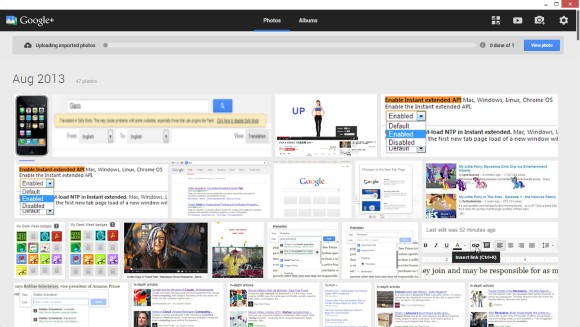
Here's the Google+ Photos app in Windows 8:


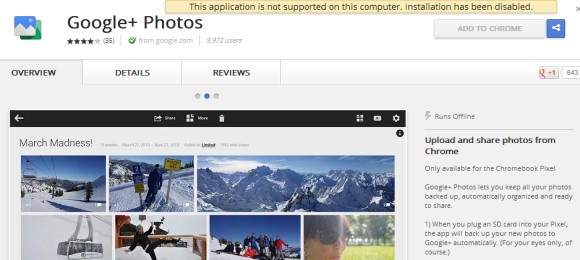
Unfortunately, the app's page from the Chrome Web Store only lets you install the app in Chrome OS, at least officially. For example, if you've installed the app on a Chromebook and you use Chrome Sync, then it should also be installed on your other computers that run Chrome.


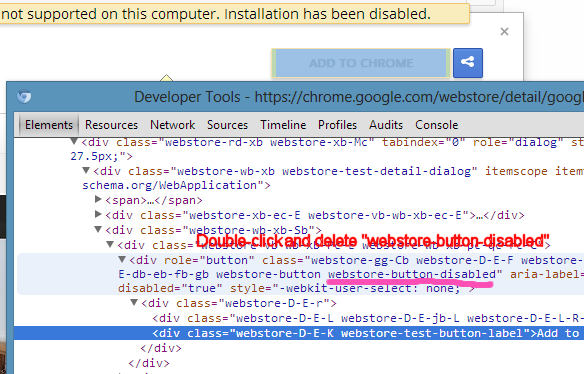
How to install the app in Chrome? First enable "Experimental Extension APIs" in the chrome://flags page and restart the browser. Go to this page, right-click the "Add the Chrome" button, select "Inspect element", remove the "webstore-button-disabled" class from the code (use Ctrl+F and search for webstore-button-disabled, double-click the value of the class attribute, delete "webstore-button-disabled" and press Enter), then click "Add to Chrome".


{ Thanks, Andrea Leardini, Tim Nguyen and Stef van der Woerdt. }
Read More
Posted in Google Chrome, Google Photos | No comments

Thursday, 25 July 2013

Find Auto Awesome Google+ Images

Posted on 07:53 by Unknown
Google+ has a feature called Auto Awesome, which automatically creates new photos that use the photos you've uploaded. For example, when you upload similar images at different exposures, Google+ will add an image that simulates HDR. When you upload a series of photos in succession, Google+ will create an animated image. "If you've taken a series of photos with overlapping landscape views, Auto Awesome will stitch these photos together into a panoramic image."

Unfortunately, it's not always easy to find these images. Here's a way to find the animated images created by Google: go to Google+ Photos and search for [motion.gif]. This works because all the animated GIFs created by Google+ include "motion" in the filename. You may also find other images that include "motion" in the filename or caption, but they weren't created by Google+. The nice thing is that Google's thumbnails are also animated GIFs, so it's easy to spot Auto Awesome images.

If you can't find Auto Awesome animated GIFs, click "From your circles" below the search box and you'll certainly find some GIFs if you follow the right people.

This post should have an included an animated screenshot, but I decided to add a YouTube video:


If you'd like to find panoramic images, search for pano.jpg. For HDR images, search for hdr.jpg, but you'll probably get a lot of false positives.


To find Auto Awesome images shared by other Google+ users, you can search for #autoawesome in Google+ and restrict the results to photos. There's also a community for Auto Awesome images.

You can also use Google Image Search and search for [site:plus.google.com inurl:motion.gif] for animated images and [site:plus.google.com inurl:pano.jpg inurl:googleusercontent.com] for panoramas.

{ via Jeremy Milo }
Read More
Posted in Google Photos, Google Plus, Tips | No comments

Google+ Photos App: Not Just For Chromebooks

Posted on 06:58 by Unknown
Remember the Google+ Photos app for Chromebooks? It was originally launched as a Chromebook Pixel exclusive, but it worked well on my Samsung Series 5 Chromebook.

The app is available in the Chrome Web Store. If you switch to French (or any language other than English), the app's description changes and it reveals something interesting:

Google+ Photos will currently instantly upload all .jpg files from the default pictures folder on your computer every time it is run. These directories include:

Windows XP: C:\Users\yourname\Pictures
Windows 7: C:\My Documents\yourname\My Pictures
Linux: /home/yourname/Pictures
Mac: /Users/yourname/Pictures


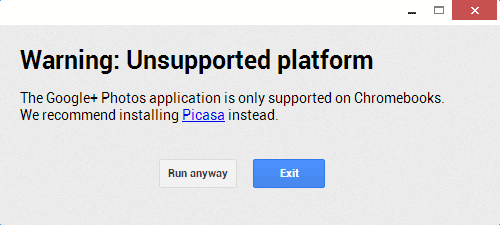
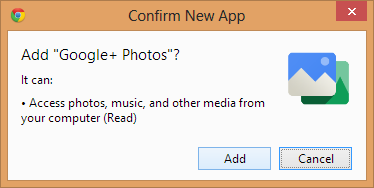
This means that the app will also work in Windows, Linux and Mac OS, not just in Chrome OS. Right now, when you install the app in Chrome for Windows, you get this error message:


{ Thanks, Jonathan. }
Read More
Posted in Google Chrome, Google Photos | No comments

Thursday, 27 June 2013

Google+ Photos Trash

Posted on 09:47 by Unknown
Did you know that Google+ Photos has a trash section? You can find it by clicking "More" and then "Trash" or you can use this link. Google says that the "items will be permanently deleted after 60 days" and shows a link for manually emptying the trash.


But there's more:

"Photos and videos you move to trash in Google+ are stored for a short period of time before they are permanently deleted. If you move an item to trash, and later want to retrieve it, you can do so by following these instructions: select Photos from the Google+ navigation menu, click More and select Trash from the dropdown, click one or many checkboxes to select photos and choose Restore to return these photos back to Google+. These photos will be restored to the same album(s) they were located prior to being moved to trash. To permanently delete photos, select the items you'd like to delete, and click Delete permanently."


Picasa Web Albums doesn't have a trash section. If you delete a photo from the Picasa Web interface, you can find it in the Google+ Photos trash. When you delete a photo from Google+ Photos, there's a message that says "your photo has been moved to trash" and links to the trash section.

For some reason, Google+ photos from the trash are automatically deleted after 60 days, Gmail's messages are deleted after 30 days, while Google Docs files are never deleted automatically. I wonder why.

{ Thanks, Fernando. }
Read More
Posted in Google Photos | No comments

Tuesday, 25 June 2013

Google+ Photos App for Chromebooks

Posted on 13:07 by Unknown
A few months ago, François Beaufort posted some screenshots of a Native Client Chrome app for Google+ Photos. The app is now available, but Google says it's only for the Chromebook Pixel, which is not exactly true.


"When you plug an SD card into your Pixel, the app will back up your new photos to Google+ automatically. (For your eyes only, of course.) And when you're offline, you can still view your most recent photos. The Pixel's high resolution display makes your photos look their best, and browsing via touchscreen is a lot of fun. You can share individual photos, set of photos, or an entire album in just a few seconds. Simply select the images you want, then click 'Share.'"


It's a pretty useful app for Chromebooks and it's not limited to the Pixel. In fact, I don't see why it couldn't work on any desktop computer that runs Chrome. It could even replace Picasa at some point.


You can download the app from the Chrome Web Store. Google engineers "are working to bring the app to other Chromebooks as well", even though the app works on other Chromebooks. The Office Viewer powered by the Google-acquired Quickoffice used to be limited to the Chromebook Pixel and it's now available as a Chrome extension.

Update: I've tried to install the app in Chrome for Windows and it worked:


... but then I got this message:


Then I switched to my Samsung Chromebook Series 5, installed the app and it worked well.


Even the SD card import worked:


So the app should work on any Chromebook. Maybe it's only optimized for the Pixel, maybe there are some bugs that need to be fixed. All I know is that the app worked well on my Chromebook and I don't have a Chromebook Pixel.
Read More
Posted in Google Chrome OS, Google Photos | No comments

Thursday, 13 June 2013

How Google's Image Recognition Works

Posted on 08:16 by Unknown
Just like Google Drive, Google+ Photos uses some amazing image recognition technology to make photos searchable, even if they don't have captions or useful filenames. "This is powered by computer vision and machine learning technology, which uses the visual content of an image to generate searchable tags for photos combined with other sources like text tags and EXIF metadata to enable search across thousands of concepts like a flower, food, car, jet ski, or turtle," explains Google.

Google acquired DNNresearch, a start-up created by Professor Geoffrey Hinton and two of his graduate students at the University of Toronto. They built "a system which used deep learning and convolutional neural networks and easily beat out more traditional approaches in the ImageNet computer vision competition designed to test image understanding." Google built and trained similar large-scale models and found that this approach doubles the average precision, compared to other object recognition methods. "We took cutting edge research straight out of an academic research lab and launched it, in just a little over six months," says Chuck Rosenberg, from the Google Image Search Team.

The paper, titled "ImageNet Classification with Deep Convolutional Neural Networks" [PDF], explains how this works. It uses supervised learning, 7 hidden weight layers and feature extractors learned from the data. "Our neural net has 60 million real-valued parameters and 650,000 neurons. It overfits a lot. Therefore we train on 224x224 patches extracted randomly from 256x256 images, and also their horizontal reflections."


Google says that the publicly available photo search feature recognizes 1100 tags. "We came up with a set of about 2000 visual classes based on the most popular labels on Google+ Photos and which also seemed to have a visual component, that a human could recognize visually. In contrast, the ImageNet competition has 1000 classes. As in ImageNet, the classes were not text strings, but are entities, in our case we use Freebase entities which form the basis of the Knowledge Graph used in Google search. An entity is a way to uniquely identify something in a language-independent way. (...) Since we wanted to provide only high precision labels, we also refined the classes from our initial set of 2000 to the most precise 1100 classes for our launch."

Some other examples of classes that are recognized: car, dance, kiss, meal, hibiscus, dahlia, sunsets, polar bear, grizzly bear. The system recognizes both generic visual concepts and specific objects. "Unlike other systems we experimented with, the errors which we observed often seemed quite reasonable to people. The mistakes were the type that a person might make - confusing things that look similar."
Read More
Posted in Google Photos | No comments

Tuesday, 4 June 2013

Find Your Photos Using Google Search

Posted on 03:17 by Unknown
Here's a cool Google Search feature that I missed: search for [my photos] and you'll see the latest images you've uploaded to Google+ Photos. Obviously, you need to log in to your Google account and join Google+ if you haven't done that already.

You can also search your photos directly from the Google Search box: enter [my photos], followed by one or more keywords and you'll see the results almost instantly. This works with the image recognition feature, so you'll get results for [my photos portrait] or [my photos flowers] even if the photos don't include "portrait" or "flowers" in the file name or captions. "To make computers do the hard work for you, we've also begun using computer vision and machine learning to help recognize more general concepts in your photos such as sunsets, food and flowers," informs Google.


Another way to use this feature is to search for [my photos], followed by the name of an album. Google will show some photos from that album. You can also search from [my photos from Paris last year], [Daniel's photos] (if you follow Daniel on Google+), [Daniel's photos from Germany 2011], [Matt Cutts photos cats], [Sergey Brin photos ocean].


It also works for people tagging, so you can search for [photos of Sergey Brin]. They're restricted to the photos uploaded by the people/pages you follow.


Unfortunately, if you click "Photos from you and your friends", Google will send you to the Google+ Photos homepage, instead of the list of search results.

To switch to the regular Google Image Search results, click the globe icon next to the gears button. This will hide personal results, but you can switch back by clicking the people icon.


{ via Inside Search }
Read More
Posted in Google Photos, Google Plus, Web Search | No comments

Wednesday, 22 May 2013

Google+ Photo Search With Image Recognition

Posted on 16:25 by Unknown
Last year, Google Drive added an advanced image search feature powered by Goggles that recognizes objects and uses OCR technology to extract text. The same feature is now available in Google+: search for [sunflower], click "More", restrict the results to "Photos" and select "Most recent". You'll find sunflower images from Google+ posts that don't even include "sunflower", not even in the image filename.


This also works for the images you've uploaded to Picasa Web Albums/Google+ Photos or the images uploaded by your circles.


{ via Android Police }
Read More
Posted in Google Goggles, Google Photos, Google Plus, Image Search | No comments

Monday, 13 May 2013

Shared Storage for Gmail, Google Drive and Google+ Photos

Posted on 12:49 by Unknown
Until now, Gmail offered 10GB of free storage and Google Drive/Google+ Photos only 5GB of free storage. Offering more storage for email than for storing files doesn't make a lot of sense. That's probably the reason why Google decided to share the storage for Gmail and Google Drive, so that you have a single free storage limit: 15 GB. Google Apps for Business/Education offers 30GB of free storage.

"With this new combined storage space, you won't have to worry about how much you're storing and where. For example, maybe you're a heavy Gmail user but light on photos, or perhaps you were bumping up against your Drive storage limit but were only using 2 GB in Gmail. Now it doesn't matter, because you can use your storage the way you want," explains Google.

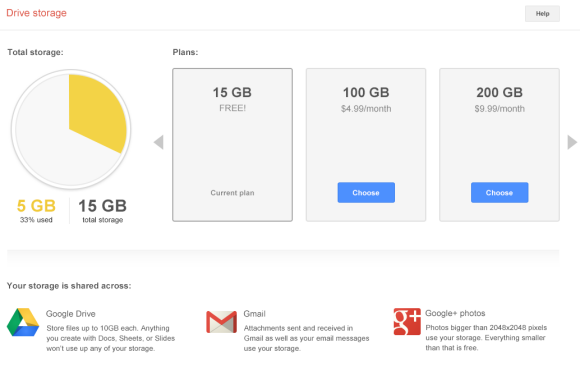
There's also a new interface for the Google Storage page:


But what if you've purchased additional Drive storage? That storage is now shared between Google Drive, Google+ Photos and Gmail, but it's not clear what happens to the bonus Gmail storage. Google says "you're no longer limited to a 25 GB upgrade in Gmail — any additional storage you purchase now applies there, too". Does this mean there's no longer extra Gmail storage when you buy Drive storage?

Apparently, Google dropped the 25GB upgrade option for $2.49/month and "plans start at $4.99/month for 100 GB". If you still see the old Google Storage page and you intend to use this option, upgrade now.

And here's an idea: why not store all Gmail attachments in Google Drive and offer free storage for Gmail messages (text-only)?

{ Thanks, Herin. }
Read More
Posted in gmail, google drive, Google Photos | No comments
Older Posts Home
Subscribe to: Posts (Atom)

Popular Posts

  • Merge cells vertically in Google spreadsheets
    There are many times when you want to format your spreadsheets in a certain way to make your data easier to read and understand. Starting to...
  • A completely new look for Drive on iOS
    One of the features you’ve told us you want on Drive for iOS is the ability to effortlessly browse and preview files, just like you can on A...
  • What's The Right Answer?
    Sometimes the same question can have multiple answers, even when you're looking for a simple fact. I've searched for [ny population]...
  • Google Quick View
    Google Search for mobile has a new feature called " Quick View ". Right now, it only shows up for Wikipedia results and it allows ...
  • Hosting a viewing party for the OSCARS®
    Last year, I planned an OSCARS® viewing party with my friends. To add some friendly competition and figure out who was coming, I collected p...
  • Upload and store your files in the cloud with Google Docs
    We're happy to announce that over the next few weeks we will be rolling out the ability to upload, store and organize any type of file i...
  • Summarize your data with pivot tables
    Starting today, we're rolling out pivot tables in Google spreadsheets. Pivot tables make it easy to process and summarize large data set...
  • In-cell dropdown and validation in spreadsheets
    Today, we added in-cell dropdown and validation to spreadsheets. This makes it easy to constrain the values of an individual cell to a spec...
  • More In-Depth Articles in Google Search
    For general queries like [ global warming ], [ love ], [ Mandela ], [ China ], Google shows some in-depth news articles at the bottom of th...
  • The Google Docs for students page
    We recently launched the Google Docs for students page which highlights how various student populations can use Google Docs in their daily ...

Categories

  • Acquisitions
  • Ads
  • Android
  • Annoyances
  • April Fools Day
  • attachments
  • back to school
  • Blogger
  • charts
  • chat
  • Chrome
  • Chrome extensions
  • chrome web apps
  • Cloud Connect
  • collaboration
  • comments
  • community
  • discussions
  • DMCA
  • docs
  • document list
  • documents
  • documents list
  • drawings
  • drivebacktoschool
  • Easter Egg
  • education
  • Faces of Docs
  • forms
  • gmail
  • gone google
  • Google Alerts
  • Google Analytics
  • Google Apps Blog
  • Google Apps Script
  • Google Calendar
  • Google Cast
  • Google Checkout
  • Google Chrome
  • Google Chrome OS
  • Google Cloud Connect
  • Google Contacts
  • Google Dictionary
  • Google Docs
  • Google Docs Viewer
  • google documents
  • google drive
  • Google Earth
  • Google Goggles
  • Google Hangouts
  • Google Instant
  • Google Keep
  • Google Latitude
  • Google Local
  • Google Maps
  • Google Music
  • Google News
  • Google Notebook
  • Google Now
  • Google Pack
  • Google Photos
  • Google Play
  • Google Plus
  • Google Reader
  • Google Sites
  • Google Suggest
  • Google Takeout
  • Google Talk
  • Google Toolbar
  • Google Translate
  • Google Trends
  • Google Voice
  • Google Wallet
  • Google+
  • googlenew
  • Greasemonkey
  • Guest Post
  • holiday
  • iGoogle
  • Image Search
  • images
  • InOut
  • iOS
  • Keep
  • Knowledge
  • mobile
  • OCR
  • offline
  • OneBox
  • paperless
  • pdfs
  • photo
  • photos
  • Picasa Web Albums
  • presentations
  • product ideas
  • profiles
  • quickoffice
  • Reddit
  • research
  • save to drive
  • scripts
  • Security
  • sharing
  • sheets
  • shortcut
  • slides
  • spell check
  • spreadsheets
  • stock photos
  • storage
  • students
  • tables
  • teachers
  • templates
  • Tips
  • User interface
  • videos
  • Viewer
  • Visualization
  • Voice Search
  • Web Search
  • Yahoo
  • YouTube

Blog Archive

  • ▼  2013 (519)
    • ▼  December (33)
      • Google Maps Easter Egg for Christmas
      • Google Music to Add Upload Feature
      • Sound Search Playlist in Google Music
      • Google Zeitgeist 2013
      • Google Zeitgeist Quiz
      • Google's Christmas Carols Easter Egg
      • More About Gmail's Proxy
      • Custom Maps in the New Google Maps
      • Auto Awesome Snow Shake in Google+ for Android
      • Updated Google Settings Page
      • Google Uses a Proxy to Load Gmail Images
      • Google's Animated Decorations for Christmas
      • The New Google Sheets
      • Google's Video Duration Experiment
      • New Google Sheets: faster, more powerful, and work...
      • 9 New Languages in Google Translate
      • 10 New Chromecast Apps
      • Google Settings Page for Phone Numbers
      • Connect Google Photo Spheres
      • Google Open Gallery
      • More In-Depth Articles in Google Search
      • Google's Mobile Image Search Adds Menu
      • Auto Awesome, Winter Special
      • Export Gmail and Google Calendar Data
      • The Old Google Contacts, No Longer Available
      • Location Autocomplete in Google Calendar
      • Short URLs in the New Google Maps
      • Chromecast Game
      • Personalized Embedded Google Maps
      • Google Santa Tracker
      • Chrome Download Tips
      • More Search Results in the New Google Maps
      • My Google?
    • ►  November (44)
    • ►  October (64)
    • ►  September (50)
    • ►  August (63)
    • ►  July (60)
    • ►  June (57)
    • ►  May (62)
    • ►  April (49)
    • ►  March (33)
    • ►  February (1)
    • ►  January (3)
  • ►  2012 (34)
    • ►  December (4)
    • ►  November (4)
    • ►  October (5)
    • ►  September (4)
    • ►  August (2)
    • ►  July (1)
    • ►  June (3)
    • ►  May (2)
    • ►  April (2)
    • ►  March (2)
    • ►  February (5)
  • ►  2011 (80)
    • ►  December (4)
    • ►  November (1)
    • ►  October (7)
    • ►  September (10)
    • ►  August (11)
    • ►  July (8)
    • ►  June (9)
    • ►  May (1)
    • ►  April (8)
    • ►  March (8)
    • ►  February (8)
    • ►  January (5)
  • ►  2010 (118)
    • ►  December (11)
    • ►  November (16)
    • ►  October (6)
    • ►  September (13)
    • ►  August (13)
    • ►  July (7)
    • ►  June (15)
    • ►  May (11)
    • ►  April (7)
    • ►  March (7)
    • ►  February (6)
    • ►  January (6)
  • ►  2009 (82)
    • ►  December (14)
    • ►  November (4)
    • ►  October (10)
    • ►  September (10)
    • ►  August (4)
    • ►  July (6)
    • ►  June (6)
    • ►  May (5)
    • ►  April (4)
    • ►  March (8)
    • ►  February (7)
    • ►  January (4)
  • ►  2008 (97)
    • ►  December (6)
    • ►  November (4)
    • ►  October (6)
    • ►  September (8)
    • ►  August (5)
    • ►  July (7)
    • ►  June (11)
    • ►  May (20)
    • ►  April (13)
    • ►  March (6)
    • ►  February (6)
    • ►  January (5)
  • ►  2007 (25)
    • ►  December (1)
    • ►  November (1)
    • ►  October (2)
    • ►  September (3)
    • ►  August (3)
    • ►  July (4)
    • ►  June (3)
    • ►  May (2)
    • ►  April (2)
    • ►  March (1)
    • ►  February (2)
    • ►  January (1)
  • ►  2006 (10)
    • ►  December (2)
    • ►  November (4)
    • ►  October (4)
Powered by Blogger.

About Me

Unknown
View my complete profile