Free Online Storage

  • Subscribe to our RSS feed.
  • Twitter
  • StumbleUpon
  • Reddit
  • Facebook
  • Digg
Showing posts with label Google Talk. Show all posts

Wednesday, 15 May 2013

New Google+ and Google Hangouts

Posted on 15:16 by Unknown
Google+ has received a major update. There's a new multi-column desktop interface, a new messaging platform and Google+ Photos is a lot smarter.


The desktop Google+ looks different. You can see more content thanks to the new interface that shows up to 3 columns, depending on the window size. "Photos and videos can fill the entire width of the stream, making it easier to scan, and nicer to look at. The sharebox bounces, the menus slide, and the cards flip and fade."

Google+ can now automatically generate hashtags for your posts, so other people can find related content. "Hashtags appearing at the top of a post are related to the post's content. Clicking on a hashtag will let you explore related posts. Hashtags with gray coloring are those used by the author of the post while hashtags with blue coloring are added by Google based on the content of the post. Related hashtags help posts get discovered and build conversations around the content of that post."

If you don't like this feature, you can disable it from the settings.


The unified chat service is not called Babel, the name is Google Hangouts. It replaces the Google Chat sidebar in Google+ and the Gmail Chat box and there are apps for Android, iOS and a Chrome extension. Google Hangouts combines Google+ Messenger, Google Talk/Chat and the old Hangouts feature, so you can use text chat, video chat, photo sharing and group conversations on the most popular platforms. You only see notifications once, no matter if you're using the desktop sites or the mobile apps. The built-in chat history lets you go back in time and read old conversations.


Google+ Photos is smarter. It can now find your best photos and use Auto Enhance to combine various effects that make your photos look better. "Auto Enhance makes instant adjustments to brightness, saturation and more. Auto Enhance is on by default so every photo you upload will look its best." There's also Auto Awesome, which creates new images from your photos: collages, motion images, HDR photos, panoramic images, improved group photos. Both Auto Enhance and Auto Awesome can be disabled in the settings.
Read More
Posted in Google Plus, Google Talk, User interface | No comments

Thursday, 9 May 2013

New Interface for Gmail Chat History

Posted on 07:48 by Unknown
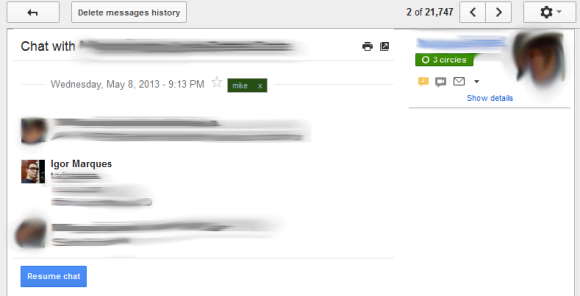
Google tests a new interface for the chat logs saved in Gmail. The new interface shows profile images and hides the regular buttons and menus that are displayed for almost all messages and conversations. For some reason, Google removed buttons like "move to inbox", "delete", "labels", the "more" drop-down, the "reply" button and the associated menu. Timestamps are only displayed when you mouse over a chat line.


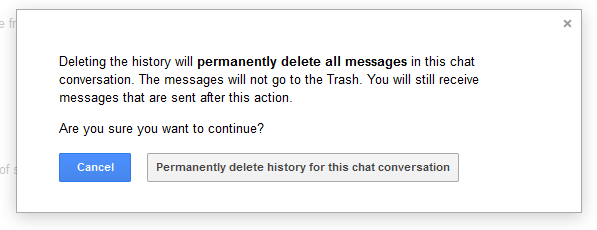
There's a new "resume chat" button and a "delete messages history" button that triggers this warning: "Deleting the history will permanently delete all messages in this chat conversation. The messages will not go to the Trash. You will still receive messages that are sent after this action."


I don't see this new interface in my Gmail account, but maybe you have more luck. You can find Gmail's chat history here: https://mail.google.com/mail/#chats. The interface should only look different for recent conversations, so you can still see the old UI for the other chat conversations.

{ Thanks, Igor Marques. }
Read More
Posted in gmail, Google Talk, User interface | No comments

Thursday, 25 April 2013

Google Chat in Google Docs

Posted on 12:02 by Unknown
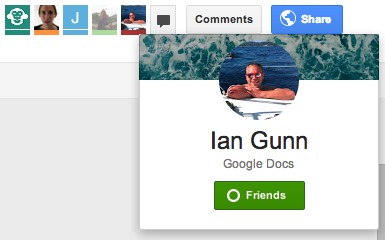
Do you remember the post about the animal icons from Google Drive? They're only displayed for anonymous users ("people who are not given explicit access"). For everyone else, Google will show the Google Profile photo and link to the Google+ page.


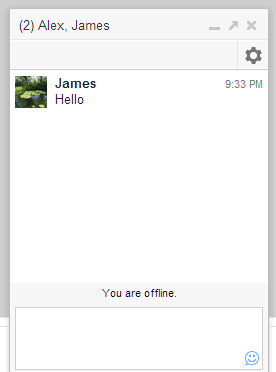
There's also a group chat feature powered by Google Talk/Chat. It's a simplified version of the chat feature from Gmail, Google+, iGoogle and orkut. There's only one chat box that lets you talk with the other signed-in users that edit or just view a document, presentation or any other file. For some reason, it doesn't work in Google Sheets/Spreadsheets.

"To begin a group chat with everyone viewing the document, click the Chat button, which you'll find in the top-right corner of your window. A chat box will appear at the bottom of your file, and everyone who's viewing the document and who's signed in with a Google account will be included in the group chat," explains Google.


The group chat feature from Google Drive doesn't support voice or video chat, conversations aren't saved in Gmail and they're not available in other services that use Google Chat. "If you've chatted in Gmail and Google+, you may have noticed that a chat started in Gmail will carry over into Google+, and vice versa. The same isn't true for chats in Google Drive. Chats you start in Google Drive won't carry over into other Google products, and chats you start in other products won't appear in Google Drive."

{ via Google Drive Blog }
Read More
Posted in google drive, Google Talk | No comments

Wednesday, 17 April 2013

Google Babel in Gmail

Posted on 16:02 by Unknown
As Droid Life previously reported, Google already tests Babel, an unified messaging service that combines Google Talk, Gmail Chat, Google+ Messenger. There's a Gmail page that mentions "dogfooding Babel in Gmail" and it's supposed to be available only to Google employees.


"Upgrade Chat to Babel! Babel is Google's new messenger with clients for Android, iOS, Chrome, Google+ and Gmail. Access the same conversation list from anywhere!" That's how Google describes the new service.

"Some of the new features:

* A new, conversation-based UI
* Advanced group conversations
* Send pictures
* Improved notifications across devices."

It looks like you can go back to the Gmail Chat interface: "You're about to revert the Babel chat client to the old Gmail chat client. You can always opt in back from the chat roster menu."

Here's a screenshot (it's this image):


{ Thanks, F. }
Read More
Posted in gmail, Google Talk | No comments

Thursday, 4 April 2013

Desktop Notifications for Google Voice

Posted on 16:56 by Unknown
Some readers of this blog spotted a new feature of the Google Voice extension for Chrome: desktop notifications. I didn't notice it, since Google Voice can't be used outside US.

"I've recently started getting notifications from the Chrome Google Voice extension every time I receive a SMS to my GV number. Of particular interest is the icon, which looks like an amalgamation of communications services' icons. Is it a harbinger of the new unified messaging service rumored to be on the way?" says Alec, a read of this blog.


Apparently, Google works on a new product called Babel that integrates Google Talk, Gmail Chat, Google+ Hangouts, Google+ Messenger. "You'll get a seamless messenger experience across Android, iOS, Chrome, Google+ and Gmail. From what we have seen, there is no mention of Google Voice or other services outside of the five we just mentioned, but that doesn't necessarily mean they won't be there at some point. As of now, this is being tested internally as a cross-platform service," reports Droid Life.

{ Thanks, Alec and Evan. }
Read More
Posted in Google Chrome, Google Talk, Google Voice | No comments
Older Posts Home
Subscribe to: Posts (Atom)

Popular Posts

  • Merge cells vertically in Google spreadsheets
    There are many times when you want to format your spreadsheets in a certain way to make your data easier to read and understand. Starting to...
  • A completely new look for Drive on iOS
    One of the features you’ve told us you want on Drive for iOS is the ability to effortlessly browse and preview files, just like you can on A...
  • What's The Right Answer?
    Sometimes the same question can have multiple answers, even when you're looking for a simple fact. I've searched for [ny population]...
  • Google Quick View
    Google Search for mobile has a new feature called " Quick View ". Right now, it only shows up for Wikipedia results and it allows ...
  • Hosting a viewing party for the OSCARS®
    Last year, I planned an OSCARS® viewing party with my friends. To add some friendly competition and figure out who was coming, I collected p...
  • Upload and store your files in the cloud with Google Docs
    We're happy to announce that over the next few weeks we will be rolling out the ability to upload, store and organize any type of file i...
  • Summarize your data with pivot tables
    Starting today, we're rolling out pivot tables in Google spreadsheets. Pivot tables make it easy to process and summarize large data set...
  • In-cell dropdown and validation in spreadsheets
    Today, we added in-cell dropdown and validation to spreadsheets. This makes it easy to constrain the values of an individual cell to a spec...
  • More In-Depth Articles in Google Search
    For general queries like [ global warming ], [ love ], [ Mandela ], [ China ], Google shows some in-depth news articles at the bottom of th...
  • The Google Docs for students page
    We recently launched the Google Docs for students page which highlights how various student populations can use Google Docs in their daily ...

Categories

  • Acquisitions
  • Ads
  • Android
  • Annoyances
  • April Fools Day
  • attachments
  • back to school
  • Blogger
  • charts
  • chat
  • Chrome
  • Chrome extensions
  • chrome web apps
  • Cloud Connect
  • collaboration
  • comments
  • community
  • discussions
  • DMCA
  • docs
  • document list
  • documents
  • documents list
  • drawings
  • drivebacktoschool
  • Easter Egg
  • education
  • Faces of Docs
  • forms
  • gmail
  • gone google
  • Google Alerts
  • Google Analytics
  • Google Apps Blog
  • Google Apps Script
  • Google Calendar
  • Google Cast
  • Google Checkout
  • Google Chrome
  • Google Chrome OS
  • Google Cloud Connect
  • Google Contacts
  • Google Dictionary
  • Google Docs
  • Google Docs Viewer
  • google documents
  • google drive
  • Google Earth
  • Google Goggles
  • Google Hangouts
  • Google Instant
  • Google Keep
  • Google Latitude
  • Google Local
  • Google Maps
  • Google Music
  • Google News
  • Google Notebook
  • Google Now
  • Google Pack
  • Google Photos
  • Google Play
  • Google Plus
  • Google Reader
  • Google Sites
  • Google Suggest
  • Google Takeout
  • Google Talk
  • Google Toolbar
  • Google Translate
  • Google Trends
  • Google Voice
  • Google Wallet
  • Google+
  • googlenew
  • Greasemonkey
  • Guest Post
  • holiday
  • iGoogle
  • Image Search
  • images
  • InOut
  • iOS
  • Keep
  • Knowledge
  • mobile
  • OCR
  • offline
  • OneBox
  • paperless
  • pdfs
  • photo
  • photos
  • Picasa Web Albums
  • presentations
  • product ideas
  • profiles
  • quickoffice
  • Reddit
  • research
  • save to drive
  • scripts
  • Security
  • sharing
  • sheets
  • shortcut
  • slides
  • spell check
  • spreadsheets
  • stock photos
  • storage
  • students
  • tables
  • teachers
  • templates
  • Tips
  • User interface
  • videos
  • Viewer
  • Visualization
  • Voice Search
  • Web Search
  • Yahoo
  • YouTube

Blog Archive

  • ▼  2013 (519)
    • ▼  December (33)
      • Google Maps Easter Egg for Christmas
      • Google Music to Add Upload Feature
      • Sound Search Playlist in Google Music
      • Google Zeitgeist 2013
      • Google Zeitgeist Quiz
      • Google's Christmas Carols Easter Egg
      • More About Gmail's Proxy
      • Custom Maps in the New Google Maps
      • Auto Awesome Snow Shake in Google+ for Android
      • Updated Google Settings Page
      • Google Uses a Proxy to Load Gmail Images
      • Google's Animated Decorations for Christmas
      • The New Google Sheets
      • Google's Video Duration Experiment
      • New Google Sheets: faster, more powerful, and work...
      • 9 New Languages in Google Translate
      • 10 New Chromecast Apps
      • Google Settings Page for Phone Numbers
      • Connect Google Photo Spheres
      • Google Open Gallery
      • More In-Depth Articles in Google Search
      • Google's Mobile Image Search Adds Menu
      • Auto Awesome, Winter Special
      • Export Gmail and Google Calendar Data
      • The Old Google Contacts, No Longer Available
      • Location Autocomplete in Google Calendar
      • Short URLs in the New Google Maps
      • Chromecast Game
      • Personalized Embedded Google Maps
      • Google Santa Tracker
      • Chrome Download Tips
      • More Search Results in the New Google Maps
      • My Google?
    • ►  November (44)
    • ►  October (64)
    • ►  September (50)
    • ►  August (63)
    • ►  July (60)
    • ►  June (57)
    • ►  May (62)
    • ►  April (49)
    • ►  March (33)
    • ►  February (1)
    • ►  January (3)
  • ►  2012 (34)
    • ►  December (4)
    • ►  November (4)
    • ►  October (5)
    • ►  September (4)
    • ►  August (2)
    • ►  July (1)
    • ►  June (3)
    • ►  May (2)
    • ►  April (2)
    • ►  March (2)
    • ►  February (5)
  • ►  2011 (80)
    • ►  December (4)
    • ►  November (1)
    • ►  October (7)
    • ►  September (10)
    • ►  August (11)
    • ►  July (8)
    • ►  June (9)
    • ►  May (1)
    • ►  April (8)
    • ►  March (8)
    • ►  February (8)
    • ►  January (5)
  • ►  2010 (118)
    • ►  December (11)
    • ►  November (16)
    • ►  October (6)
    • ►  September (13)
    • ►  August (13)
    • ►  July (7)
    • ►  June (15)
    • ►  May (11)
    • ►  April (7)
    • ►  March (7)
    • ►  February (6)
    • ►  January (6)
  • ►  2009 (82)
    • ►  December (14)
    • ►  November (4)
    • ►  October (10)
    • ►  September (10)
    • ►  August (4)
    • ►  July (6)
    • ►  June (6)
    • ►  May (5)
    • ►  April (4)
    • ►  March (8)
    • ►  February (7)
    • ►  January (4)
  • ►  2008 (97)
    • ►  December (6)
    • ►  November (4)
    • ►  October (6)
    • ►  September (8)
    • ►  August (5)
    • ►  July (7)
    • ►  June (11)
    • ►  May (20)
    • ►  April (13)
    • ►  March (6)
    • ►  February (6)
    • ►  January (5)
  • ►  2007 (25)
    • ►  December (1)
    • ►  November (1)
    • ►  October (2)
    • ►  September (3)
    • ►  August (3)
    • ►  July (4)
    • ►  June (3)
    • ►  May (2)
    • ►  April (2)
    • ►  March (1)
    • ►  February (2)
    • ►  January (1)
  • ►  2006 (10)
    • ►  December (2)
    • ►  November (4)
    • ►  October (4)
Powered by Blogger.

About Me

Unknown
View my complete profile