Free Online Storage

  • Subscribe to our RSS feed.
  • Twitter
  • StumbleUpon
  • Reddit
  • Facebook
  • Digg
Showing posts with label Google Takeout. Show all posts

Thursday, 5 December 2013

Export Gmail and Google Calendar Data

Posted on 11:47 by Unknown
Google Takeout now lets you export your calendars and it will soon add a similar feature for Gmail. The calendar exporting feature is not new - you could find it in the Google Calendar settings, but it's nice to see that Google Takeout gets more comprehensive and adds support for new services.

The Gmail exporting feature is completely new and it will be gradually released next month. It will let you download a big MBOX file you can import in mail clients like Outlook, Thunderbird or Apple Mail. You can also use this feature to backup your Gmail messages and read them offline.
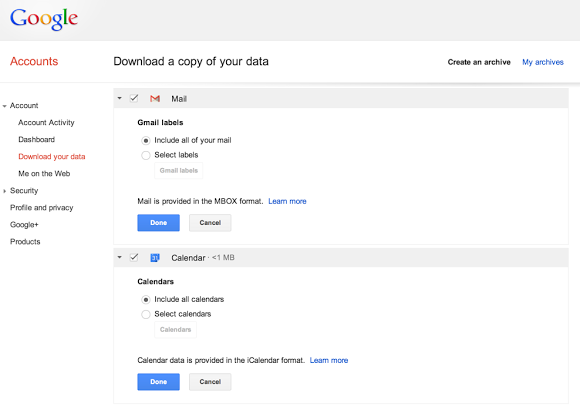

"You can download all of your mail and calendars or choose a subset of labels and calendars. You can also download a single archive file for multiple products with a copy of your Gmail, Calendar, Google+, YouTube, Drive, and other Google data," informs Google.
Read More
Posted in gmail, Google Calendar, Google Takeout, InOut | No comments

Sunday, 27 October 2013

Google Takeout's New Interface

Posted on 08:42 by Unknown
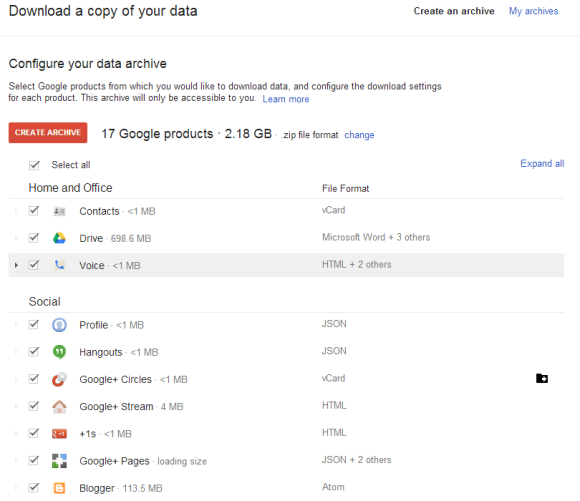
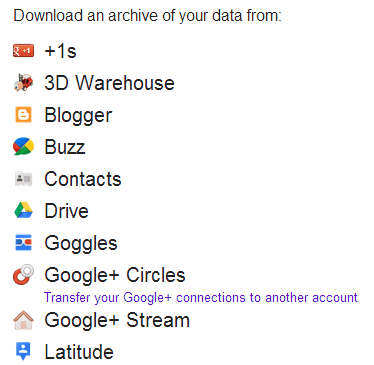
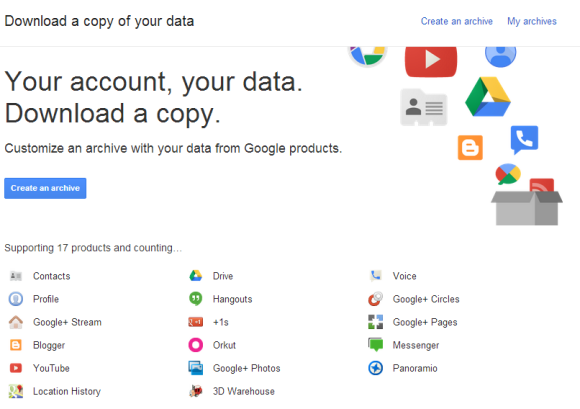
A few weeks ago, Google updated the Takeout interface and it's now much easier to download all your data. The service supports 17 products: Google Drive, YouTube, Blogger, Google+ Photos, Contacts, Hangouts, Location History and more.

When you click "create an archive", Google selects all the products that are available and shows the size of the ZIP archive you can download. Archives larger than 2GB will be split into multiple ZIP files. You can switch to .TGZ (.tar.gz) or .TBZ (.tar.bz2) tarball files, but you need a software like 7-zip to open them if you use Windows.


By default, all the products are selected. You can click "select all" and check the data you want to download. Click each product to find more about the data you download, change the format and sometimes even filter the data.


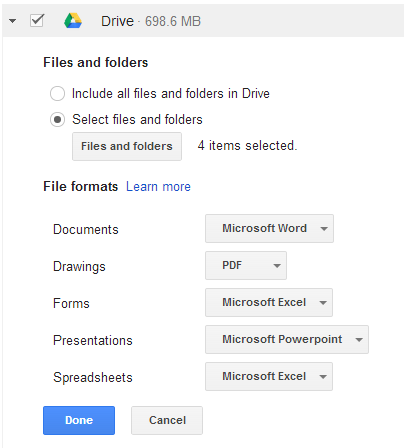
For example, you can download Drive files from certain folders and change the export formats. You can export contacts and Google+ circles as CSV, HTML or vCard and select the blogs and photo albums you want to download.


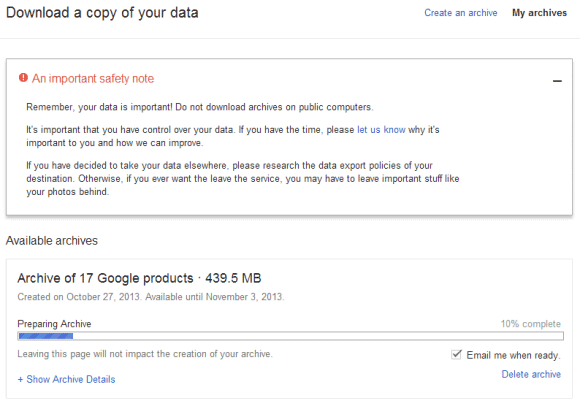
After creating an archive, you'll get an email when it's ready for download and the link will be available for a week. You can find all your archives in the "my archive" section.

"Remember, your data is important! Do not download archives on public computers. It's important that you have control over your data. If you have decided to take your data elsewhere, please research the data export policies of your destination. Otherwise, if you ever want the leave the service, you may have to leave important stuff like your photos behind," informs Google.


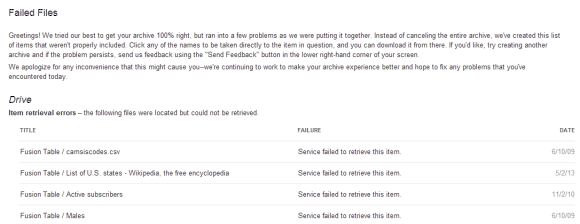
Update: Takeout doesn't work that well. I created 3 archives (zip, tar.gz, tar.bz2) for all the supported Google services and 2 of the archives failed at 100%. The only archive I could download included a 100 KB errors.html with a long list of files that couldn't be downloaded (most of them were Drive files Google+ posts).

"We tried our best to get your archive 100% right, but ran into a few problems as we were putting it together. Instead of canceling the entire archive, we've created this list of items that weren't properly included. Click any of the names to be taken directly to the item in question, and you can download it from there," informs the page.


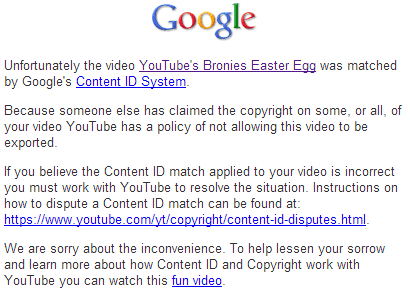
I also noticed that not all my YouTube videos were downloaded. For some of them, YouTube downloaded HTML pages which mention that they were matched by the Content ID system. "Because someone else has claimed the copyright on some, or all, of your video YouTube has a policy of not allowing this video to be exported." It's probably because I used YouTube's "add music" feature.


{ Thanks, Florian K. }
Read More
Posted in Google Takeout | No comments

Tuesday, 7 May 2013

When Did You Create Your Gmail Account?

Posted on 14:22 by Unknown
Here's a simple way to find when you've created your Gmail account. You can always find the oldest message from your account by visiting this page https://mail.google.com/mail/#all/p1000000: you'll get an error message and Gmail will redirect to a page that shows the oldest messages from your account. The problem is that this is not a reliable way to determine when the account was created: maybe you've deleted some messages, maybe you've imported messages from other accounts.

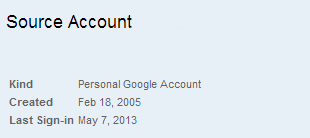
If you've joined Google+, you can quickly find the exact date. Go to Google Takeout, click "Transfer your Google+ connections to another account" (don't worry, you don't have to do that), enter your password and you can see the date when you've created your Gmail account in the blue box at the bottom of the page.


Why would you need this information? For example, Google's account recovery form includes a question about this. "If you find yourself locked out of your account and none of your other recovery options work, your last option is to visit our password-assistance page and fill out our Account Recovery form. (...) Since Google doesn't collect a lot of information about you when you sign up for an account, we'll ask you questions like when you created your account, what Google services you use, and who you email frequently (if you use Gmail)."

I haven't tested this, but I assume this trick also works for non-Gmail Google accounts.

{ via TechAirlines }
Read More
Posted in gmail, Google Takeout, Tips | No comments
Older Posts Home
Subscribe to: Posts (Atom)

Popular Posts

  • Merge cells vertically in Google spreadsheets
    There are many times when you want to format your spreadsheets in a certain way to make your data easier to read and understand. Starting to...
  • Hosting a viewing party for the OSCARS®
    Last year, I planned an OSCARS® viewing party with my friends. To add some friendly competition and figure out who was coming, I collected p...
  • Collaboration worldwide
    Posted by: Ken Norton, Product Manager, Google Docs & Spreadsheets Whether you're sitting in the same room, across campus, or in dif...
  • Summarize your data with pivot tables
    Starting today, we're rolling out pivot tables in Google spreadsheets. Pivot tables make it easy to process and summarize large data set...
  • The Google Docs for students page
    We recently launched the Google Docs for students page which highlights how various student populations can use Google Docs in their daily ...
  • Announcing your two most requested features: offline document editing and Drive for iOS
    In April, we introduced Google Drive, a place where you can create, share, and keep all your stuff. Today at the Google I/O conference we a...
  • Happy holidays from the Picasa team
    A lot of people who Google Docs also use Picasa Web Albums, so we wanted to let you know about a special offer. We made extra storage for Gm...
  • Dragging and dropping
    Posted by: Ken Norton, Product Manager, Google Docs & Spreadsheets Have you ever come across a link to a document on the web and wished ...
  • New Templates: Embedding spreadsheets in your website
    Did you know that you can publish a spreadsheet and embed it in your website or blog? An embedded spreadsheet is a perfect way to display a...
  • Upload and store your files in the cloud with Google Docs
    We're happy to announce that over the next few weeks we will be rolling out the ability to upload, store and organize any type of file i...

Categories

  • Acquisitions
  • Ads
  • Android
  • Annoyances
  • April Fools Day
  • attachments
  • back to school
  • Blogger
  • charts
  • chat
  • Chrome
  • Chrome extensions
  • chrome web apps
  • Cloud Connect
  • collaboration
  • comments
  • community
  • discussions
  • DMCA
  • docs
  • document list
  • documents
  • documents list
  • drawings
  • drivebacktoschool
  • Easter Egg
  • education
  • Faces of Docs
  • forms
  • gmail
  • gone google
  • Google Alerts
  • Google Analytics
  • Google Apps Blog
  • Google Apps Script
  • Google Calendar
  • Google Cast
  • Google Checkout
  • Google Chrome
  • Google Chrome OS
  • Google Cloud Connect
  • Google Contacts
  • Google Dictionary
  • Google Docs
  • Google Docs Viewer
  • google documents
  • google drive
  • Google Earth
  • Google Goggles
  • Google Hangouts
  • Google Instant
  • Google Keep
  • Google Latitude
  • Google Local
  • Google Maps
  • Google Music
  • Google News
  • Google Notebook
  • Google Now
  • Google Pack
  • Google Photos
  • Google Play
  • Google Plus
  • Google Reader
  • Google Sites
  • Google Suggest
  • Google Takeout
  • Google Talk
  • Google Toolbar
  • Google Translate
  • Google Trends
  • Google Voice
  • Google Wallet
  • Google+
  • googlenew
  • Greasemonkey
  • Guest Post
  • holiday
  • iGoogle
  • Image Search
  • images
  • InOut
  • iOS
  • Keep
  • Knowledge
  • mobile
  • OCR
  • offline
  • OneBox
  • paperless
  • pdfs
  • photo
  • photos
  • Picasa Web Albums
  • presentations
  • product ideas
  • profiles
  • quickoffice
  • Reddit
  • research
  • save to drive
  • scripts
  • Security
  • sharing
  • sheets
  • shortcut
  • slides
  • spell check
  • spreadsheets
  • stock photos
  • storage
  • students
  • tables
  • teachers
  • templates
  • Tips
  • User interface
  • videos
  • Viewer
  • Visualization
  • Voice Search
  • Web Search
  • Yahoo
  • YouTube

Blog Archive

  • ▼  2013 (519)
    • ▼  December (33)
      • Google Maps Easter Egg for Christmas
      • Google Music to Add Upload Feature
      • Sound Search Playlist in Google Music
      • Google Zeitgeist 2013
      • Google Zeitgeist Quiz
      • Google's Christmas Carols Easter Egg
      • More About Gmail's Proxy
      • Custom Maps in the New Google Maps
      • Auto Awesome Snow Shake in Google+ for Android
      • Updated Google Settings Page
      • Google Uses a Proxy to Load Gmail Images
      • Google's Animated Decorations for Christmas
      • The New Google Sheets
      • Google's Video Duration Experiment
      • New Google Sheets: faster, more powerful, and work...
      • 9 New Languages in Google Translate
      • 10 New Chromecast Apps
      • Google Settings Page for Phone Numbers
      • Connect Google Photo Spheres
      • Google Open Gallery
      • More In-Depth Articles in Google Search
      • Google's Mobile Image Search Adds Menu
      • Auto Awesome, Winter Special
      • Export Gmail and Google Calendar Data
      • The Old Google Contacts, No Longer Available
      • Location Autocomplete in Google Calendar
      • Short URLs in the New Google Maps
      • Chromecast Game
      • Personalized Embedded Google Maps
      • Google Santa Tracker
      • Chrome Download Tips
      • More Search Results in the New Google Maps
      • My Google?
    • ►  November (44)
    • ►  October (64)
    • ►  September (50)
    • ►  August (63)
    • ►  July (60)
    • ►  June (57)
    • ►  May (62)
    • ►  April (49)
    • ►  March (33)
    • ►  February (1)
    • ►  January (3)
  • ►  2012 (34)
    • ►  December (4)
    • ►  November (4)
    • ►  October (5)
    • ►  September (4)
    • ►  August (2)
    • ►  July (1)
    • ►  June (3)
    • ►  May (2)
    • ►  April (2)
    • ►  March (2)
    • ►  February (5)
  • ►  2011 (80)
    • ►  December (4)
    • ►  November (1)
    • ►  October (7)
    • ►  September (10)
    • ►  August (11)
    • ►  July (8)
    • ►  June (9)
    • ►  May (1)
    • ►  April (8)
    • ►  March (8)
    • ►  February (8)
    • ►  January (5)
  • ►  2010 (118)
    • ►  December (11)
    • ►  November (16)
    • ►  October (6)
    • ►  September (13)
    • ►  August (13)
    • ►  July (7)
    • ►  June (15)
    • ►  May (11)
    • ►  April (7)
    • ►  March (7)
    • ►  February (6)
    • ►  January (6)
  • ►  2009 (82)
    • ►  December (14)
    • ►  November (4)
    • ►  October (10)
    • ►  September (10)
    • ►  August (4)
    • ►  July (6)
    • ►  June (6)
    • ►  May (5)
    • ►  April (4)
    • ►  March (8)
    • ►  February (7)
    • ►  January (4)
  • ►  2008 (97)
    • ►  December (6)
    • ►  November (4)
    • ►  October (6)
    • ►  September (8)
    • ►  August (5)
    • ►  July (7)
    • ►  June (11)
    • ►  May (20)
    • ►  April (13)
    • ►  March (6)
    • ►  February (6)
    • ►  January (5)
  • ►  2007 (25)
    • ►  December (1)
    • ►  November (1)
    • ►  October (2)
    • ►  September (3)
    • ►  August (3)
    • ►  July (4)
    • ►  June (3)
    • ►  May (2)
    • ►  April (2)
    • ►  March (1)
    • ►  February (2)
    • ►  January (1)
  • ►  2006 (10)
    • ►  December (2)
    • ►  November (4)
    • ►  October (4)
Powered by Blogger.

About Me

Unknown
View my complete profile