Free Online Storage

  • Subscribe to our RSS feed.
  • Twitter
  • StumbleUpon
  • Reddit
  • Facebook
  • Digg
Showing posts with label Google Plus. Show all posts

Thursday, 12 December 2013

Auto Awesome Snow Shake in Google+ for Android

Posted on 11:49 by Unknown
This is another fun feature for the holidays, but it's limited to the Google+ app for Android: "Shake your device while viewing one of your photos, and watch the snow fall. Shake it again to save your new snowy photo and share it with family and friends."

It's a way to manually trigger the Auto Awesome Snow effect for any photo.


You need the latest version of the Google+ app (4.2.4), which was released today. Blame staged rollouts if you don't have the new version. You can also manually download the APK file.


This is not the only new feature: "when you +1 posts in the stream, you'll see something lovely" (hearts). There's also a unified search box, a new section for less important notifications and separate "What's Hot" streams for different categories.


Read More
Posted in Android, Google Photos, Google Plus | No comments

Thursday, 5 December 2013

Auto Awesome, Winter Special

Posted on 12:18 by Unknown
This is beautiful and clever. Google+ added 2 auto awesome effects just in time for Christmas.

1) Twinkle: upload a new photo of something that sparkles (like a Christmas tree or a chandelier), and we'll gift you a version with lights that actually twinkle.

2) Snow: upload a new photo with snow to Google+, and we'll gift you a version with snow that’s actually falling.

Here are 2 examples:


Please note that this only works for new photos. Check the animations generated for other Google+ users: #AutoAwesomeTwinkle and #AutoAwesomeSnowGlobe.
Read More
Posted in Google Plus | No comments

Thursday, 28 November 2013

Keyboard Shortcuts for Google+ Notifications

Posted on 08:35 by Unknown

The Google+ notifications box has a few keyboard shortcuts you might find helpful. Here are some of them:

* up/down arrow keys help you select a notification from the list. Notice the blue line, which shows the currently selected notification. After opening a notification, use the same arrow keys to scroll.

* Enter (Return for Mac) opens the notification you've selected. You can also use o

* press the down arrow key after the last notification and then press Enter to open the list of previously read notifications

* right/left arrow keys let you go to the next/previous notification. You can also use j/k

* u - go back to the list of notifications or to the main screen

* d - mark as read the notification you've selected

* Esc closes the notifications box.

Unfortunately, there's no shortcut that opens the Google+ Notifications box, so you still need to click the bell icon. How to quickly read your notifications? Press the down arrow key, then press Enter and go to the next notification using the right arrow key.

Sometimes Page Up/Page Down and Space/Shift+Space work, but only after you use the arrow keys. If you find other keyboard shortcuts, please let me know in the comments.

Google+ also has a list of keyboard shortcuts.
Read More
Posted in Google Plus, Tips | No comments

Tuesday, 26 November 2013

Gmail's Google+ Interstitial

Posted on 16:15 by Unknown
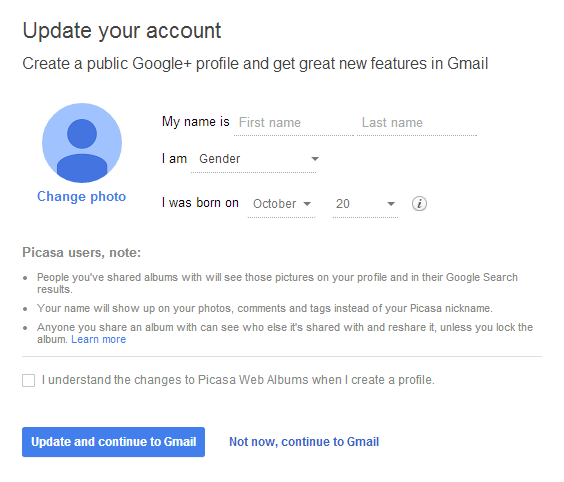
Google works hard to convince people to join Google+. I went to Gmail, signed in using an account that hasn't switched to Google+ and got this interstitial page (the URL starts with "https://plus.google.com/up/accounts/inter"):

"Update your account. Create a public Google+ profile and get great new features in Gmail."


You only have to check "I understand the changes to Picasa Web Albums when I create a profile" and click "Update and continue to Gmail". For now, you can ignore this page and click "not now, continue to Gmail".
Read More
Posted in gmail, Google Plus | No comments

Wednesday, 20 November 2013

YouTube's Follow Back in Google+

Posted on 14:26 by Unknown
Emanuele Bartolomucci spotted a new YouTube feature: when you're watching a video from a channel associated with a page that follows you in Google+, you get this message: "X added you on Google+. Follow back for exclusive updates!"


I wasn't able to trigger this feature, so it's probably an experiment. It's also a sign that YouTube will integrate more with Google+.

{ Thanks, Emanuele. }
Read More
Posted in Google Plus, YouTube | No comments

New Interface for Google+ Notifications

Posted on 13:25 by Unknown
Google+ notifications have a new interface: there's a "previously read" section, just like in the Google+ app for Android, and there are some new transitions that mimic scrolling down.

The previously read notifications are no longer displayed below the Jingles icon, so you need to click "previously read" to see them. The notifications box is less cluttered and you can still read all your notifications.


Here's a GIF that shows some of the new animations:


{ Thanks, Mukil. }
Read More
Posted in Google Plus, User interface | No comments

Tuesday, 19 November 2013

Google+ Shows Line Counter for Long Posts

Posted on 03:53 by Unknown
Google+ now shows the number of lines that are collapsed next to "read more", so you can see if the post is long. If the post has less than 10 lines, Google doesn't display the number of lines.


Here's an example of a long Google+ post: "read more (50 lines)".


Google+ shows a similar line counter for long comments:


These are only displayed in the stream and profile pages, not for the post pages.
Read More
Posted in Google Plus | No comments

Friday, 1 November 2013

Google+ Easter Egg for Halloween

Posted on 08:20 by Unknown
Google+ notifications have a special interface for Halloween. Mr. Jingles looks scary and there's a funny animation that's displayed when you click the Google+ mascot. To see Jingles, you first need to mark as read all the notifications.


Here's the GIF animation, now with infinite loop:

Read More
Posted in Easter Egg, Google Plus | No comments

Wednesday, 30 October 2013

New Features in Google+ for Android

Posted on 12:06 by Unknown
Mobile apps for social services are strange. Until now, the Google+ mobile app didn't allow you to copy the text of a post. You had to get the URL of the post, open the browser and copy the text there. I thought this must be a bug until I checked the Facebook app and noticed that you can't copy text.

The latest version of the Google+ app for Android lets you copy the text of a post, copy comments, quickly reply to comments, translate posts and comments.


While the new features are useful, I don't see why you can't select some of the text and copy it. The Google+ app still doesn't support sharing intents. I assume that apps like Google+ and Facebook want to force users to stick to their own sharing features.

The Google+ app actually supports sharing intents, but only for your photos. The sharing interface looks different and it includes Google+ options. Google+ Photos has a new icon, it's now called "Photos", it includes photos and videos stored on your device, an Auto-Awesome section and is poised to replace the standard Android Gallery.


There's also an updated notification sidebar that shows the notifications you've read in a new section: "previously read". The interface is cleaner, but it's more difficult to hide the sidebar.

If you can't update to the new Google+ version, blame staged rollouts and download the APK file from here.
Read More
Posted in Android, Google Plus | No comments

Tuesday, 29 October 2013

Custom Google+ URLs

Posted on 15:08 by Unknown
Until now, vanity Google+ URLs were only for popular business, famous people, Google employees and some other special users. Now anyone can get a custom URL and replace the long Google+ URL with something more memorable. Unfortunately, you don't get to choose the URL: you can only pick from Google's preapproved URLs.

"If you meet the eligibility requirements, you can get a custom URL for your Google+ account or page. This means you can choose one of the custom URLs Google preassigns to your Google+ profile or page. Depending on the preassigned custom URL, you may also need to add a few letters or numbers to make it unique to you," explains Google.

For profiles, you need 10 or more followers, an account that is 30 days old or more and a profile photo. For pages, you need to link your page with your site or use Google+ Local and verify your local business.

Pages get Google+ URLs that are based on the site's URL. I got google.com/+GooglesystemBlogspot, but I haven't enabled it. Maybe Google will provide more options in the future.


"Once you meet the eligibility criteria, just visit your profile or page to begin the claiming process. If you don't see the option yet, don't worry: we're expanding availability throughout the week, and you'll see the in-product notice as soon as your custom URL is ready," informs Google's Otavio Silva.

{ Thanks, Tolis Nubis. }
Read More
Posted in Google Plus | No comments

540 Million Google+ Users, 300 Million Core Users

Posted on 14:09 by Unknown

Google+ continues to grow and the growth rate is impressive, according to Google's stats. Back in December, Google announced that "235 million [people] are active across Google (+1'ing apps in Google Play, hanging out in Gmail, connecting with friends in Search), and 135 million are active in just the stream." Now Google says that 540 million people are active across Google each month and 300 million people are active in the Google+ stream.

The number of Google+ users doubled in less than a year. Even if you use the conservative stream data and conclude that Google+ only has 300 million active users, that's still a lot. No other social network had so many users in 2 years and a half. Sure, Facebook has more than one billion active users, but the service got to 100 million users in 4 years.

Google has more than 1 billion users, so that's the upper boundary for Google+. It's unlikely that all the Google users will join Google+ and actively use it, but most of them will. Google+ is integrated with so many Google services and the YouTube integration will bring a lot more Google+ users. Google+ is now at the heart of Google's photo service, messaging service, local search and it will soon power core features of the most popular video sharing service.
Read More
Posted in Google Plus | No comments

Auto Awesome Action, Eraser and Movie

Posted on 13:26 by Unknown
Auto Awesome is a collection of features that create new images which use the photos you upload: panoramas, animations, HDR, better group photos. They're created automatically and Google now even sends notifications when they're ready.

There are 3 new Auto Awesome features: 2 of them are only for photos (action, eraser) and the third one is for both photos and videos.

Action is great for action photos. "Take a series of photos of someone moving (dancing, running, jumping) and Auto Awesome will merge them together into one action shot where you can see the full range of movements in a single image, capturing the movement in one captivating still."

Google combines these 6 photos:


and creates this awesome visual effect:


Eraser is useful when you want to remove people from photos. "If you take a sequence of 3 or more photos in front of a structure or landmark with movement in the background, Eraser will give you a photo with all the moving objects removed. It's helpful for those situations when you're trying to get a great shot of a landmark or other crowded place, but want to avoid including all of the people in the background of your photo."

These photos aren't great:


but they can be combined to get this:


Auto Awesome Movie is a bit like HTC Zoe, but it's a lot more advanced. In fact, it's the only Auto Awesome feature that lets you customize the result and the only feature you can trigger manually. Google creates a video that combines some of the videos and photos you uploaded, processes the videos, adds image stabilization and picks some appropriate music. "You can create Auto Awesome movies from the Google Photos app for Android, which are short films created automatically by editing together the videos and photos you capture around an experience. Choose the photos and videos you wish to make into an Auto Awesome movie, and let Google do the rest. You can change the theme, style, background music, or even remove, shorten, or re-order scenes. After your movie is created, you can choose to share or save it. Auto Awesome movies are currently only available for some devices running Android 4.3 and up, including the Nexus 4, Nexus 7, Nexus 10, and HTC One."


Auto Awesome shows that advanced features don't need complicated interfaces. It also shows the power of the cloud: Google+ Photos finds your best photos, enhances your photos, it lets you search your photos and it even creates new ones. All of this without buying expensive photo editors and learning how to use them.
Read More
Posted in Google Photos, Google Plus | No comments

Google+ Photo Search Detects More Than 1,000 Objects

Posted on 12:42 by Unknown
Back in May, Google announced an impressive search feature that allows to find photos even if they don't include any useful metadata. "To make computers do the hard work for you, we've also begun using computer vision and machine learning to help recognize more general concepts in your photos such as sunsets, food and flowers." Here are more details: "This is powered by computer vision and machine learning technology, which uses the visual content of an image to generate searchable tags for photos combined with other sources like text tags and EXIF metadata to enable search across thousands of concepts like a flower, food, car, jet ski, or turtle."

Now Google announced that it detects more than 1,000 objects. It may not seem like a lot, but it's extremely difficult to detect objects algorithmically and do this with enough precision. Distinguishing between so many objects makes this task even more difficult. Google can now detect labradors and snowmen, tulips and umbrellas, laptops and shoes.


Google's announcement is strange because a Google post from June mentioned that the classifier already detected 1,100 classes of objects:

We came up with a set of about 2000 visual classes based on the most popular labels on Google+ Photos and which also seemed to have a visual component, that a human could recognize visually. In contrast, the ImageNet competition has 1000 classes. As in ImageNet, the classes were not text strings, but are entities, in our case we use Freebase entities which form the basis of the Knowledge Graph used in Google search. An entity is a way to uniquely identify something in a language-independent way. In English when we encounter the word 'jaguar', it is hard to determine if it represents the animal or the car manufacturer. Entities assign a unique ID to each, removing that ambiguity, in this case '/m/0449p' for the former and '/m/012x34' for the latter. In order to train better classifiers we used more training images per class than ImageNet, 5000 versus 1000. Since we wanted to provide only high precision labels, we also refined the classes from our initial set of 2000 to the most precise 1100 classes for our launch.

I'm not sure if there's some improvement I'm missing. It's likely that the search results are better, but the number of objects has not increased.

Read More
Posted in Google Photos, Google Plus | No comments

Tuesday, 22 October 2013

No More Saved Searches in Google+

Posted on 14:03 by Unknown
Google+ had a cool feature that allowed you to save searches. It's no longer available and all your saved searches will be removed in a few weeks.

Google shows this message when you click one of the saved searches: "Saved searches are going away. Bookmark this page on your browser to save your Google+ search for later."


There's even an article that explains how to bookmark a search results page. "Browser bookmarks replace the earlier 'Save this search' option in Google+. You can access any existing saved searches from the Home > More menu until November 15, 2013."

I used this feature to save searches like #autoawesome, #googleplusupdate.

{ Thanks, Francis and Lee. }
Read More
Posted in Google Plus | No comments

Monday, 21 October 2013

The Untranslated Google+ Share Button

Posted on 14:15 by Unknown
Google's new navigation interface includes a redesigned "share" button that's more compact. For some reason, Google uses "share" in the English interface and "+" in the non-English interfaces.


The old share button, which is still available in Blogger, Google Wallet and a few other Google services, used this button text: "+ Share", which was translated in other languages.


{ Thanks, Florian K. }
Read More
Posted in Google Plus | No comments

Picasa Web Search Goes Missing, Redirects to Google+

Posted on 06:47 by Unknown
Ever since Google+ was launched, I wondered what will happen with Picasa Web Albums. Google now redirects all Picasa Web links to Google+ Photos, but it still lets you switch back to the Picasa Web interface. There are still Google users who haven't switched to Google+, so they need a way to manage their photos.

Picasa Web's search was a great feature that allowed you to restrict the results to your photos, the photos from your favorite users or all the public photos. Google included a lot of advanced search features, so you could sort the results by date or relevance, change thumbnail size, find Creative Commons photos, restrict the results to panoramas or portrait photos and start a slideshow from the results.


"Picasa Web Albums searches across tags, captions, album titles, album descriptions, and album locations to deliver you relevant photos and videos. Choose one of the advanced search options on the left to refine your results. Among your options are faces (with faces or without), aspect ratio (Landscape vs. Portrait vs. Panoroma), size, format (photos vs. video), camera type (Nikon, Canon, etc.), Creative Commons license type (copyright status), and the order (by date or by relevance)," informed Google.

Unfortunately, Picasa Web search no longer exists and it now redirects to Google+ Photos, which lacks all the advanced features I mentioned.


If you've joined Google+, you can see results from your photo albums and from the albums created by your circles:


If you're not a Google+ user, Google shows a list of Google+ posts that include photos:


{ Thanks, Florian K. }
Read More
Posted in Google Plus, Picasa Web Albums | No comments

Friday, 11 October 2013

Google+ Notification for the New Terms of Service

Posted on 15:46 by Unknown
This is interesting: Google uses Google+ notifications to informs users about the new terms of use. "The update includes information about mobile safety, login security, and the use of your information in ads and other contexts."


I wonder if the Google+ notifications panel will be used for other Google services. What about Google Now notifications?
Read More
Posted in Google Plus | No comments

Google Ad Endorsements

Posted on 11:53 by Unknown
Google updated the terms of service to make it clear that it can show your name and Google+ profile picture next to ads.


"Feedback from people you know can save you time and improve results for you and your friends across all Google services, including Search, Maps, Play and in advertising. For example, your friends might see that you rated an album 4 stars on the band’s Google Play page. And the +1 you gave your favorite local bakery could be included in an ad that the bakery runs through Google. We call these recommendations shared endorsements."

Here's an excerpt from the updated terms of service:

"If you have a Google Account, we may display your Profile name, Profile photo, and actions you take on Google or on third-party applications connected to your Google Account (such as +1’s, reviews you write and comments you post) in our Services, including displaying in ads and other commercial contexts. We will respect the choices you make to limit sharing or visibility settings in your Google Account. For example, you can choose your settings so your name and photo do not appear in an ad."

Google already shows a list of people from your circles next to some Google search results and it showcases their reviews in Google Maps and Google Play. Now Google wants to expand this feature for ads and some people may not like to be associated with ads.

It's easy to disable ad endorsements: just go this page, scroll down, uncheck "Based upon my activity, Google may show my name and profile photo in shared endorsements that appear in ads" and click "Save". If you've created Google+ pages, they have separate ad endorsement options and you need to check the settings pages. It's important to mention that you can only disable ad endorsements, so all the other Google services and features can still show your name and profile next to search results, recommended apps, reviews and more.

"For users under 18, their actions won't appear in Shared Endorsements in ads and certain other contexts," informs Google. The new ad policy goes live next month (November 11).

"Facebook, the world’s largest social network with 1.2 billion users worldwide, has been aggressively marketing such social endorsements. For example, if you post that you love McDonald’s new Mighty Wings on the chain’s Facebook page, McDonald’s could pay Facebook to broadcast your kind words to all your friends, effectively using you as a product endorser. Facebook does not allow its users to opt out of such ads, which it calls sponsored stories, although users can limit how their actions on the social network are used in some other types of advertising," reports the New York Times.

{ Thanks, +Sushubh Mittal. }
Read More
Posted in Google Plus | No comments

Thursday, 26 September 2013

Google+ Celebrates 15 Years of Google

Posted on 04:20 by Unknown
Mr. Jingles, the Google+ notification mascot, celebrates Google's 15th birthday with a pixelated animation. Just click the bell icon, read all your notifications or click "mark all as read" to see it.


"Friends of mine here at work found this old photo of me from back in 1998, the same year Google started up. Yes, I know I was a bit awkward back then – but so was Google (check out this link for proof). Anyways, enjoy this retro version of me in your Notifications tray for the next day or so. Oh, and Happy Birthday, Google!"

Mr. Jingles also changed its profile photo: "A little change of pace in my profile photo for #throwbackthursday.". The file name is self-explanatory: "1998-jangles-avatar.png".

Read More
Posted in Google Plus | No comments

Tuesday, 24 September 2013

YouTube Comments Powered by Google+

Posted on 14:12 by Unknown
Just like Blogger, YouTube will switch to Google+ comments, but it won't be optional. YouTube already asks users to connect their channels with Google+.

"When it comes to the conversations happening on YouTube, recent does not necessarily mean relevant. So, comments will soon become conversations that matter to you. In the coming months, comments from people you care about will rise up where you can see them, while new tools will help video creators moderate conversations for welcome and unwelcome voices. Starting this week, you'll see the new YouTube comments powered by Google+ on your channel discussion tab. This update will come to comments on all videos later this year, as we bring you more ways to connect with familiar faces on YouTube," informs the YouTube blog.

Here's a screenshot that shows the new commenting interface:


YouTube's comments are rarely insightful or useful. There's a lot of spam, trolling and hate speech. Switching from anonymous aliases to Google+ profiles might improve the quality of comments.

"You'll see posts at the top of the list from the video's creator, popular personalities, engaged discussions about the video, and people in your Google+ Circles. You can choose to start a conversation so that it is seen by everyone on YouTube and Google+, only people in your Circles or just your bestie. Like Gmail, replies are threaded so you can easily follow conversations. You have new tools to review comments before they're posted, block certain words or save time by auto-approving comments from certain fans. These can help you spend less time moderating, and more time sharing videos and connecting with your fans."

Blogger's commenting system powered by Google+ has been disappointing so far. Google doesn't offer comment moderation tools in the Blogger interface and Google doesn't do a good job at detecting spam or at ranking comments. There's a lot of noise and Google even shows a list of people who +1'd the post.

{ Thanks, Adrià. }
Read More
Posted in Google Plus, YouTube | No comments
Older Posts Home
Subscribe to: Posts (Atom)

Popular Posts

  • Merge cells vertically in Google spreadsheets
    There are many times when you want to format your spreadsheets in a certain way to make your data easier to read and understand. Starting to...
  • Hosting a viewing party for the OSCARS®
    Last year, I planned an OSCARS® viewing party with my friends. To add some friendly competition and figure out who was coming, I collected p...
  • Collaboration worldwide
    Posted by: Ken Norton, Product Manager, Google Docs & Spreadsheets Whether you're sitting in the same room, across campus, or in dif...
  • Summarize your data with pivot tables
    Starting today, we're rolling out pivot tables in Google spreadsheets. Pivot tables make it easy to process and summarize large data set...
  • The Google Docs for students page
    We recently launched the Google Docs for students page which highlights how various student populations can use Google Docs in their daily ...
  • Announcing your two most requested features: offline document editing and Drive for iOS
    In April, we introduced Google Drive, a place where you can create, share, and keep all your stuff. Today at the Google I/O conference we a...
  • Happy holidays from the Picasa team
    A lot of people who Google Docs also use Picasa Web Albums, so we wanted to let you know about a special offer. We made extra storage for Gm...
  • Dragging and dropping
    Posted by: Ken Norton, Product Manager, Google Docs & Spreadsheets Have you ever come across a link to a document on the web and wished ...
  • New Templates: Embedding spreadsheets in your website
    Did you know that you can publish a spreadsheet and embed it in your website or blog? An embedded spreadsheet is a perfect way to display a...
  • Upload and store your files in the cloud with Google Docs
    We're happy to announce that over the next few weeks we will be rolling out the ability to upload, store and organize any type of file i...

Categories

  • Acquisitions
  • Ads
  • Android
  • Annoyances
  • April Fools Day
  • attachments
  • back to school
  • Blogger
  • charts
  • chat
  • Chrome
  • Chrome extensions
  • chrome web apps
  • Cloud Connect
  • collaboration
  • comments
  • community
  • discussions
  • DMCA
  • docs
  • document list
  • documents
  • documents list
  • drawings
  • drivebacktoschool
  • Easter Egg
  • education
  • Faces of Docs
  • forms
  • gmail
  • gone google
  • Google Alerts
  • Google Analytics
  • Google Apps Blog
  • Google Apps Script
  • Google Calendar
  • Google Cast
  • Google Checkout
  • Google Chrome
  • Google Chrome OS
  • Google Cloud Connect
  • Google Contacts
  • Google Dictionary
  • Google Docs
  • Google Docs Viewer
  • google documents
  • google drive
  • Google Earth
  • Google Goggles
  • Google Hangouts
  • Google Instant
  • Google Keep
  • Google Latitude
  • Google Local
  • Google Maps
  • Google Music
  • Google News
  • Google Notebook
  • Google Now
  • Google Pack
  • Google Photos
  • Google Play
  • Google Plus
  • Google Reader
  • Google Sites
  • Google Suggest
  • Google Takeout
  • Google Talk
  • Google Toolbar
  • Google Translate
  • Google Trends
  • Google Voice
  • Google Wallet
  • Google+
  • googlenew
  • Greasemonkey
  • Guest Post
  • holiday
  • iGoogle
  • Image Search
  • images
  • InOut
  • iOS
  • Keep
  • Knowledge
  • mobile
  • OCR
  • offline
  • OneBox
  • paperless
  • pdfs
  • photo
  • photos
  • Picasa Web Albums
  • presentations
  • product ideas
  • profiles
  • quickoffice
  • Reddit
  • research
  • save to drive
  • scripts
  • Security
  • sharing
  • sheets
  • shortcut
  • slides
  • spell check
  • spreadsheets
  • stock photos
  • storage
  • students
  • tables
  • teachers
  • templates
  • Tips
  • User interface
  • videos
  • Viewer
  • Visualization
  • Voice Search
  • Web Search
  • Yahoo
  • YouTube

Blog Archive

  • ▼  2013 (519)
    • ▼  December (33)
      • Google Maps Easter Egg for Christmas
      • Google Music to Add Upload Feature
      • Sound Search Playlist in Google Music
      • Google Zeitgeist 2013
      • Google Zeitgeist Quiz
      • Google's Christmas Carols Easter Egg
      • More About Gmail's Proxy
      • Custom Maps in the New Google Maps
      • Auto Awesome Snow Shake in Google+ for Android
      • Updated Google Settings Page
      • Google Uses a Proxy to Load Gmail Images
      • Google's Animated Decorations for Christmas
      • The New Google Sheets
      • Google's Video Duration Experiment
      • New Google Sheets: faster, more powerful, and work...
      • 9 New Languages in Google Translate
      • 10 New Chromecast Apps
      • Google Settings Page for Phone Numbers
      • Connect Google Photo Spheres
      • Google Open Gallery
      • More In-Depth Articles in Google Search
      • Google's Mobile Image Search Adds Menu
      • Auto Awesome, Winter Special
      • Export Gmail and Google Calendar Data
      • The Old Google Contacts, No Longer Available
      • Location Autocomplete in Google Calendar
      • Short URLs in the New Google Maps
      • Chromecast Game
      • Personalized Embedded Google Maps
      • Google Santa Tracker
      • Chrome Download Tips
      • More Search Results in the New Google Maps
      • My Google?
    • ►  November (44)
    • ►  October (64)
    • ►  September (50)
    • ►  August (63)
    • ►  July (60)
    • ►  June (57)
    • ►  May (62)
    • ►  April (49)
    • ►  March (33)
    • ►  February (1)
    • ►  January (3)
  • ►  2012 (34)
    • ►  December (4)
    • ►  November (4)
    • ►  October (5)
    • ►  September (4)
    • ►  August (2)
    • ►  July (1)
    • ►  June (3)
    • ►  May (2)
    • ►  April (2)
    • ►  March (2)
    • ►  February (5)
  • ►  2011 (80)
    • ►  December (4)
    • ►  November (1)
    • ►  October (7)
    • ►  September (10)
    • ►  August (11)
    • ►  July (8)
    • ►  June (9)
    • ►  May (1)
    • ►  April (8)
    • ►  March (8)
    • ►  February (8)
    • ►  January (5)
  • ►  2010 (118)
    • ►  December (11)
    • ►  November (16)
    • ►  October (6)
    • ►  September (13)
    • ►  August (13)
    • ►  July (7)
    • ►  June (15)
    • ►  May (11)
    • ►  April (7)
    • ►  March (7)
    • ►  February (6)
    • ►  January (6)
  • ►  2009 (82)
    • ►  December (14)
    • ►  November (4)
    • ►  October (10)
    • ►  September (10)
    • ►  August (4)
    • ►  July (6)
    • ►  June (6)
    • ►  May (5)
    • ►  April (4)
    • ►  March (8)
    • ►  February (7)
    • ►  January (4)
  • ►  2008 (97)
    • ►  December (6)
    • ►  November (4)
    • ►  October (6)
    • ►  September (8)
    • ►  August (5)
    • ►  July (7)
    • ►  June (11)
    • ►  May (20)
    • ►  April (13)
    • ►  March (6)
    • ►  February (6)
    • ►  January (5)
  • ►  2007 (25)
    • ►  December (1)
    • ►  November (1)
    • ►  October (2)
    • ►  September (3)
    • ►  August (3)
    • ►  July (4)
    • ►  June (3)
    • ►  May (2)
    • ►  April (2)
    • ►  March (1)
    • ►  February (2)
    • ►  January (1)
  • ►  2006 (10)
    • ►  December (2)
    • ►  November (4)
    • ►  October (4)
Powered by Blogger.

About Me

Unknown
View my complete profile