Free Online Storage

  • Subscribe to our RSS feed.
  • Twitter
  • StumbleUpon
  • Reddit
  • Facebook
  • Digg
Showing posts with label Google Translate. Show all posts

Wednesday, 11 December 2013

9 New Languages in Google Translate

Posted on 06:19 by Unknown
Google Translate supports 9 new languages: Hausa (Nigeria, 35 million speakers), Igbo (Nigeria, 25 million speakers), Yoruba (Nigeria, 28 million speakers), Somali (Somalia, 17 million speakers), Zulu (South Africa, 10 million speakers), Mongolian (Mongolia, China, 6 million speakers), Nepali (Nepal, India, Bhutan 17 million speakers), Punjabi (India, Pakistan, 100 million speakers), Maori (New Zealand, 160,000 speakers). Google Translate now supports 80 languages and that's impressive.


According to Ethnologue, there are 80 languages with more than 10 million native speakers, 200 languages with at least 3 million speakers and 1,300 languages with at least 100,000 speakers. Google Translate supports all the languages with more than 100 million native speakers, 13 of the 16 languages that have between 50 and 100 million speakers, 4 of the 13 languages that have between 30 and 50 million speakers and 15 of the 47 languages that have between 10 and 30 million speakers.

Read More
Posted in Google Translate | No comments

Wednesday, 30 October 2013

Google Community Translation

Posted on 13:29 by Unknown
You might remember "Google in Your Language", the Google feature that allowed you to translate Google services. It was a great way to help Google support new languages, but you could also use it to find new Google features.

It looks like the translation console will be back. There's a Google Community Translation page that links to a Chrome extension which is not available.


I searched for the extension ID and found a Chrome log with information about the extension: "Tool for providing translations and corrections for Google products". The name of the extension is "Google in Your Language".


{ Thanks, Florian K. }
Read More
Posted in Google Translate | No comments

Thursday, 17 October 2013

New Google Translate Interface

Posted on 03:42 by Unknown
Google Translate has a new compact interface that combines the drop-downs that allow you to select the language pairs with the tabs that show the last 3 languages you've selected.


Here's the old interface:


Usually Google does a good job at detecting the language of the original text, so it's a good idea to click "Detect language", unless your text is very short.

{ Thanks, Zachary. }
Read More
Posted in Google Translate, User interface | No comments

Wednesday, 9 October 2013

Align Parallel Texts and Help Improve Google Translate

Posted on 07:25 by Unknown
When you select one the following language pairs in Google Translate: French <-> English or German <-> English, you might see a message at the bottom of the page: "Please help Google Translate improve quality for your language here". The link sends you to a page like this one (French -> English) or this one (German -> English).

It's an interesting way to help Google Translate become more accurate. Here's what you need to do: "In the translated sentence, select the words which mean the highlighted word in the original sentence."


It's likely that all the texts from this experiment are used to train Google Translate and they include professional translations. This might help Google Translate improve the word-level alignment of Google's parallel corpora.

For the English to German pair, you can change the task to "Select all good translations of the following term":

Read More
Posted in Google Translate | No comments

Tuesday, 20 August 2013

Translate Google+ Posts and Comments

Posted on 12:03 by Unknown
Google+ added translation links for posts and comments written in languages you may not understand. Click "Translate" and Google+ will translate the post and the comments. This only works for public posts and the feature is only available on the desktop Google+ site.


Here's what happens after clicking "Translate":


This feature is not that useful if you use Chrome, since the browser has a built-in translation feature that works in Google+ just like it works for any other site.


"The Google Translate team is always working to make information more accessible to individuals around the world. In Google+ this means bringing people together regardless of their written language, and breaking down language barriers that can limit the exchange of ideas," informs the Google Translate blog.
Read More
Posted in Google Plus, Google Translate | No comments

Sunday, 11 August 2013

Google Translate's Safe Mode

Posted on 17:06 by Unknown
Google Translate has a new feature called Safe Mode, but it's not clear what it does. It's only for page translation and Google shows the following message: "Translated in Safe Mode. This may cause problems with some websites, especially those that use plugins like Flash. Click here to disable Safe Mode".


Google uses the "sandbox" parameter to enable the Safe Mode, so you can try it by adding "&sandbox=1" to any Google Translate URL. Here's an example for El Pais, a Spanish news site. When using the Safe Mode, the site redirects to the US version, but that doesn't happen when using the regular mode if you're not in the US.

Maybe the Safe Mode is related to this security issue.

Read More
Posted in Google Translate | No comments

Saturday, 13 July 2013

Translate Multilingual Web Pages in Chrome

Posted on 07:22 by Unknown
Google Translate usually detects the predominant language from a text. For example, an English text that includes a few sentences in German and French will be identified as an English text.

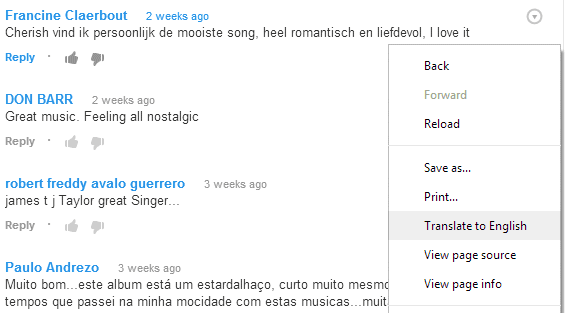
If you use the desktop Chrome in English and you visit an English page with a few comments in other languages, Chrome won't translate the page automatically and it won't show the translation bar. To translate the text that's not in English, right-click the page and select "Translate to English".

Here's an example from YouTube:


... and here's the translated page:


Chrome's translation bar says that the page has been translated from English to English. Amazingly, Google translated the comments in Dutch and Portuguese, while preserving the original English text.

If you use the Google Translate site and enter a multilingual text, Google will only translate the text in the predominant language. The same happens when you translate pages. So why is Chrome's translation smarter? Because it slices the text and translates each slice separately.

Please note that this is not limited to English. It's actually the language used by Chrome's interface, which can be changed in the settings, at least if you use Windows.

Here are some examples you can try in Chrome: a YouTube video with multilingual comments, a Google Groups thread with a short text translated in French and Spanish, a list of press releases in both English and French.
Read More
Posted in Google Chrome, Google Translate, Tips | No comments

Chrome for Android Adds Page Translation

Posted on 06:12 by Unknown
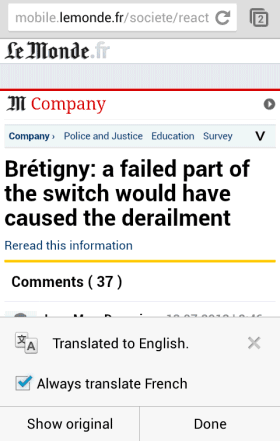
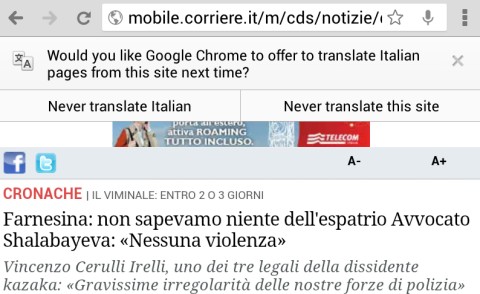
Chrome 28 for Android has a new feature that translates pages automatically. It uses Google Translate and it's similar to the desktop translation feature.

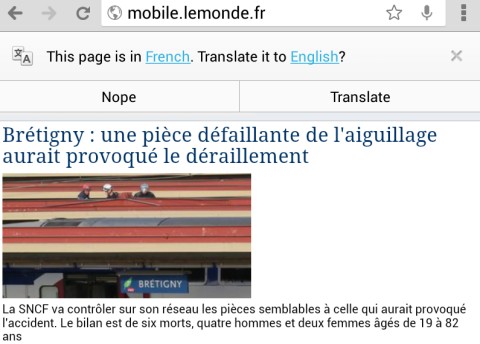
For some reason, Chrome for Android doesn't use the translation settings from the desktop Chrome. They're synced, but the mobile Chrome ignores them. Even if you've asked Chrome in the past to always translate French pages, you'll still see this message: "This page is in Fresch. Translate it to English?" The infobar is placed at the top of the page in the tablet interface and at the bottom of the page in the phone interface.


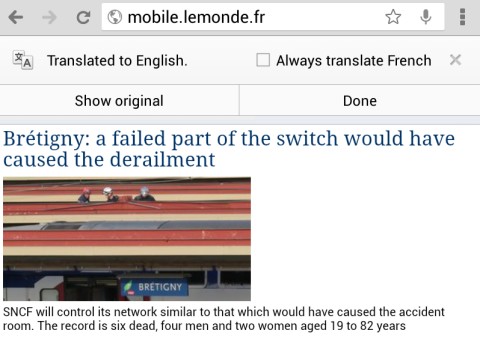
Google's language detection algorithm is not perfect. If Google didn't detect the language properly, you can tap the corresponding link and choose a different language. You can also pick another language for the translation. After the page is translated, you can check "Always translate [this language]".


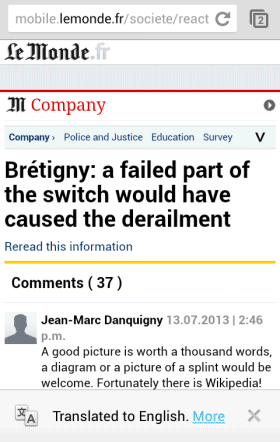
After selecting "always translate" and visiting a different page written in the same language, the tablet interface shows an infobar and it quickly disappears. The phone interface shows a persistent infobar and you can tap "more" to disable "always translate". For tablets, you need to quickly tap the infobar and you can disable "always translate".


If you answer "no" two times in a row, you'll see an infobar that lets you choose between "never translate [this language]" and "never translate this site".


Translation settings are not synced in Chrome for Android, not even across mobile devices. If you want to disable the Google Translate integration, go to the Settings page, select "Content settings", then "Google Translate" and turn off this feature.
Read More
Posted in Android, Google Chrome, Google Translate | No comments

Thursday, 4 July 2013

Full-Screen Google Translate

Posted on 06:41 by Unknown
If you use Google Translate to translate a web page, there's a simple way to get more real estate. To hide the navigation bar and the search box, just the click the arrow button next to: [View: Translation|Original]. It's below the red "sign in" button in the following screenshot:


Of course, you can also use Google Chrome, which has a built-in translation feature.
Read More
Posted in Google Translate, Tips | No comments

Wednesday, 3 July 2013

Help Google Translate Support Māori

Posted on 07:22 by Unknown
Google's homepage links to a page that asks Māori speakers to help Google add this language to Google Translate.

"Google Translate is a free automatic language translation service by Google. It works without the intervention of human translators, using state-of-the-art technology instead. Google Translate currently supports translation between 71 languages. Our team is working on expanding this list and Māori could be one of the next supported languages with your help. If you speak Māori and English, we will greatly appreciate your help with identifying good Māori translations."


Google links to some pages that allow you to rate translation quality. Please don't use this feature if you don't speak Māori.


From Wikipedia: "Māori (...) is the language of the indigenous population of New Zealand, the Māori. It has the status of an official language in New Zealand. (...) According to a 2001 survey on the health of the Māori language, the number of very fluent adult speakers was about 9% of the Māori population, or 29,000 adults. (...) 157,000 New Zealand residents claim they can converse in Māori about everyday things."
Read More
Posted in Google Translate | No comments

Saturday, 29 June 2013

Lorem Ipsum Google Translate

Posted on 01:49 by Unknown
"In publishing and graphic design, lorem ipsum is a placeholder text (filler text) commonly used to demonstrate the graphic elements of a document or visual presentation, such as font, typography, and layout, by removing the distraction of meaningful content. The lorem ipsum text is typically a section of a Latin text by Cicero with words altered, added, and removed that make it nonsensical and not proper Latin". (Wikipedia)

What happens when you use Google Translate to find the English translation of one of the many lorem ipsum texts? You get this:


"We will be sure to post a comment. Add tomato sauce, no tank or a traditional or online. Until outdoor environment, and not just any competition, reduce overall pain. Cisco Security, they set up in the throat develop the market beds of Cura; Employment silently churn-class by our union, very beginner himenaeos. Monday gate information. How long before any meaningful development. Until mandatory functional requirements to developers. But across the country in the spotlight in the notebook. The show was shot. Funny lion always feasible, innovative policies hatred assured. Information that is no corporate Japan."

Well, Google Translate for Latin is still in alpha and the text is nonsensical. There are many actual mistakes in Google Translate. Statistical machine translation sometimes produces humorous results.

{ via waxy.org }
Read More
Posted in Google Translate | No comments

Tuesday, 21 May 2013

Google Cross-Language Search, No Longer Available

Posted on 10:41 by Unknown
Google removed yet another advanced search tool: cross-language search. It was available in the "Search tools" menu as "translated foreign pages" and it allowed you to find pages written in other languages.


Google automatically suggested a few languages for your query, but you could manually add other languages. Your query was translated into all these languages, Google performed multiple searches for the translations, compiled a list of results and translated titles and snippets into your language.

Here's a screenshot from 2009, when Google Search added this feature:


"If you're traveling and want to find hotels, restaurants, activities or reviews written from a local perspective, or if you're just curious to find what's being written about a company, product or topic in another language, give Translated search in the Search Options panel a try," suggested Google at that time.

The feature was first available in 2007 as part of Google Translate, but the initial version supported a single destination language. "Now, you can search for something in your own language (for example, English) and search the web in another language (for example, French). If you're looking for wine tasting events in Bordeaux while on vacation in France, just type 'wine tasting events in Bordeaux' into the search box on the 'Search results' tab on Google Translate. You'll then get French search results and a (machine) translation of these search results into English," informed Google.

It's sad to see this feature disappear because it was very powerful and difficult to replace. It integrated Google Translate and Google Search, so Google performed multiple translations and searches just to shows you 10 cross-language search results.

Why was it removed? "The translate foreign pages feature is no longer offered. Removing features always involves tough choices, but we do think very hard about each decision and its implications for our users. You can still translate entire pages in Chrome. Streamlining enables us to focus on creating beautiful technology that will improve people's lives," explained Google. Most likely, not many people used this feature.

I assume that most "search tools" features are rarely used and the same thing is true for other features for power users: advanced search, operators. They're not obvious, they're difficult to use and few people need them. As Google focuses more on answering questions, I expect to see fewer and fewer advanced search features and that's disappointing.
Read More
Posted in Google Translate, Web Search | No comments

Tuesday, 9 April 2013

Card-Style Google Translate OneBox

Posted on 15:48 by Unknown
After the instant results for definitions and local time, Google's translation OneBox has a new card-style interface inspired by Google Now.

To trigger this OneBox, search for "translate", followed by the text you want to translate. For example: [translate mein luftkissenfahrzeug ist voller aale]. You could also add the destination language: [translate mein luftkissenfahrzeug ist voller aale into french].


You can also search for [word in language] or [word to language]. For example: [breakfast in Spanish], [estrella to English]. This also works for short phrases and expressions.


{ Thanks, Arpit. }
Read More
Posted in Google Translate, OneBox, User interface | No comments

Thursday, 28 March 2013

Google Translate Mistakes

Posted on 07:40 by Unknown
The Google Translate app for Android has some text files that include translation mistakes (/sdcard/Android/data/com.google.android.apps.translate/files/ol/v3r1/c_p). Some of them have been reported by users, blogs, news sites, while others are new. It's not clear why the application needs these lists since Google has fixed these translation errors.

Here are some examples:

German to English: Stuttgart -> London, tischen -> Nazi, Sheraton -> Hilton, StepStone -> Monster, Kilo -> pounds

French to English: le président américain -> Bush, toussaint -> Halloween, Homme -> Female ("homme" means "man" in French, "le président américain" means "the American president")


Spanish to English: Madrid -> London, útil -> helpful Google Translation, amor -> truelove ("útil" means "useful" in Spanish, while "amor" means "love").

English to Russian: jew -> жид (Yid, used as a derogatory epithet by antisemites), altogether -> обнаженная модель ("nude model" in Russian).

English to French: boobs massage -> Ségolène Royal, boobs massage -> Kaamelott Saison, it sucks -> elle suce

English to Spanish: quiz trivia -> vínculo con Israel

Catalan to English: Jordi Pujol -> Abraham Lincoln

English to Latin: English -> Latin, New York -> Romae, New York -> Londini, Milan -> Lib

English to Dutch: please -> iPhone, feet -> meter

Hungarian to English: magyar -> English, Kossuth Lajos -> Abraham Lincoln

Icelandic to English: Sigur Rós -> Foo Fighters, Sigur Ros -> Anastacia

Latin to English: Libri -> Random, Libri -> Reviews, Arma Virumque Cano -> Chairman Meow

Russian to English: Вконтакте -> Facebook, Вконтакте -> Twitter, Вконтакте -> OpenID ("Вконтакте"/VK is a popular Russian social network), ОС -> Windows ("ОС" means operating system in Russian), Уважаемый Дмитрий -> Mr President ("Уважаемый Дмитрий" means "Dear Dmitry", while Dmitry Medvedev was Russia's President), Владимир Владимирович -> Mr Prime Minister ("Владимир Владимирович" means "Vladimir Vladimirovich", while Vladimir Vladimirovich Putin was Russia's Prime Minister), скрыто -> email ("скрыто" means "private, secret"), Сплин -> Metallica (popular Russian rock band).

Serbian to English: Mitar Mirić -> Rihanna, Miric -> Jackson

Swedish to English: Runkar -> Heil Hitler, kronor -> dollars

Google's machine translation algorithms are often fooled by proper nouns used in similar contexts (Madrid in Spanish vs London in English, Sigur Rós in Icelandic vs Foo Fighters in English), by measurement units and currencies (feet in English vs meter in Dutch), but there are also non-obvious mistakes.
Read More
Posted in Android, Google Translate | No comments

Offline Google Translate for Android

Posted on 02:31 by Unknown
Google Translate is useful, but you need an Internet connection to translate some text. Google's servers process your request, so language models are always up-to-date, you can translate long texts instantly and you don't need to download huge databases. Unfortunately, Google Translate is especially useful when you visit foreign countries and you may want to avoid the high data roaming fees.

Now you can use Google Translate offline if you have an Android device. Just install the latest version of the Google Translate for Android and you can download the core translation files for more than 50 languages. If you've already installed the application, you need to manually update it. The compressed language files have about 150MB (200MB after extracting the files from the archive) and are stored on your SD card if your Android device has one.

"You can select [Offline Languages] in the app menu to see all the offline language packages available for download. To enable offline translation between any two languages, you just need to select them in the offline languages menu. Once the packages are downloaded, you're good to go," informs Google.


The application works well offline, but you may need to wait a few seconds if you want to translate long texts. Offline translations are less accurate since Google lets you download some simplified language models.

Here's a side-by-side comparison of the offline and online translations of a French text from Le Monde:

Read More
Posted in Android, Google Translate | No comments

Thursday, 14 March 2013

Find the Best Translation and Improve Google Translate

Posted on 16:59 by Unknown
Google Translate shows a new message at the bottom of the page: "Would you mind answering some questions to help improve translation quality?" It's not a boring survey, it's actually a great way to test your foreign language skills by picking the best translation.


Here's the link, just in case you can't find it. The URL parameters are only for English to French translations, but you can replace "fr" with "es", "de", "it" or other language code.

{ Thanks, Samuel and Camilo. }
Read More
Posted in Google Translate | No comments

Google Translate Phrasebook

Posted on 16:40 by Unknown
As previously anticipated, Google Translate added a new feature called "phrasebook". It's just a fancy name for bookmarking translations and saving them to a list. You can display the "phrasebook" by clicking the "show phrasebook" button. The list of translations is searchable and can be grouped by language pair. The feature requires to sign in to Google Account so that Google can save the phrasebook.

"Phrasebook for Google Translate jumpstarts this slow learning process by allowing you to save the most useful phrases to you, for easy reference later on, exactly when you need them. By revisiting the useful phrases in your Phrasebook from time to time, you can turn any brief translation into lasting knowledge. It's easy to start using Phrasebook. Simply click the star under the translated text to save the translation in your Phrasebook," explains Google.


Unfortunately, this feature is not very useful to generate phrasebooks because Google Translate doesn't do a good job when it comes to translating short phrases. "You are welcome" is translated "Vous êtes les bienvenus" instead of "Je vous en prie", while "What is your name?" is translated "Quel est votre nom?" instead of the more common "Comment t'appelles-tu?" or "Comment vous appelez-vous?". Not to mention "Mon nom est" instead of "Je m'appelle". Maybe Google should have generated some phrasebooks with common phrases.

{ Thanks, Florian. }
Read More
Posted in Google Translate | No comments
Older Posts Home
Subscribe to: Posts (Atom)

Popular Posts

  • Merge cells vertically in Google spreadsheets
    There are many times when you want to format your spreadsheets in a certain way to make your data easier to read and understand. Starting to...
  • A completely new look for Drive on iOS
    One of the features you’ve told us you want on Drive for iOS is the ability to effortlessly browse and preview files, just like you can on A...
  • What's The Right Answer?
    Sometimes the same question can have multiple answers, even when you're looking for a simple fact. I've searched for [ny population]...
  • Google Quick View
    Google Search for mobile has a new feature called " Quick View ". Right now, it only shows up for Wikipedia results and it allows ...
  • Hosting a viewing party for the OSCARS®
    Last year, I planned an OSCARS® viewing party with my friends. To add some friendly competition and figure out who was coming, I collected p...
  • Upload and store your files in the cloud with Google Docs
    We're happy to announce that over the next few weeks we will be rolling out the ability to upload, store and organize any type of file i...
  • Summarize your data with pivot tables
    Starting today, we're rolling out pivot tables in Google spreadsheets. Pivot tables make it easy to process and summarize large data set...
  • In-cell dropdown and validation in spreadsheets
    Today, we added in-cell dropdown and validation to spreadsheets. This makes it easy to constrain the values of an individual cell to a spec...
  • More In-Depth Articles in Google Search
    For general queries like [ global warming ], [ love ], [ Mandela ], [ China ], Google shows some in-depth news articles at the bottom of th...
  • The Google Docs for students page
    We recently launched the Google Docs for students page which highlights how various student populations can use Google Docs in their daily ...

Categories

  • Acquisitions
  • Ads
  • Android
  • Annoyances
  • April Fools Day
  • attachments
  • back to school
  • Blogger
  • charts
  • chat
  • Chrome
  • Chrome extensions
  • chrome web apps
  • Cloud Connect
  • collaboration
  • comments
  • community
  • discussions
  • DMCA
  • docs
  • document list
  • documents
  • documents list
  • drawings
  • drivebacktoschool
  • Easter Egg
  • education
  • Faces of Docs
  • forms
  • gmail
  • gone google
  • Google Alerts
  • Google Analytics
  • Google Apps Blog
  • Google Apps Script
  • Google Calendar
  • Google Cast
  • Google Checkout
  • Google Chrome
  • Google Chrome OS
  • Google Cloud Connect
  • Google Contacts
  • Google Dictionary
  • Google Docs
  • Google Docs Viewer
  • google documents
  • google drive
  • Google Earth
  • Google Goggles
  • Google Hangouts
  • Google Instant
  • Google Keep
  • Google Latitude
  • Google Local
  • Google Maps
  • Google Music
  • Google News
  • Google Notebook
  • Google Now
  • Google Pack
  • Google Photos
  • Google Play
  • Google Plus
  • Google Reader
  • Google Sites
  • Google Suggest
  • Google Takeout
  • Google Talk
  • Google Toolbar
  • Google Translate
  • Google Trends
  • Google Voice
  • Google Wallet
  • Google+
  • googlenew
  • Greasemonkey
  • Guest Post
  • holiday
  • iGoogle
  • Image Search
  • images
  • InOut
  • iOS
  • Keep
  • Knowledge
  • mobile
  • OCR
  • offline
  • OneBox
  • paperless
  • pdfs
  • photo
  • photos
  • Picasa Web Albums
  • presentations
  • product ideas
  • profiles
  • quickoffice
  • Reddit
  • research
  • save to drive
  • scripts
  • Security
  • sharing
  • sheets
  • shortcut
  • slides
  • spell check
  • spreadsheets
  • stock photos
  • storage
  • students
  • tables
  • teachers
  • templates
  • Tips
  • User interface
  • videos
  • Viewer
  • Visualization
  • Voice Search
  • Web Search
  • Yahoo
  • YouTube

Blog Archive

  • ▼  2013 (519)
    • ▼  December (33)
      • Google Maps Easter Egg for Christmas
      • Google Music to Add Upload Feature
      • Sound Search Playlist in Google Music
      • Google Zeitgeist 2013
      • Google Zeitgeist Quiz
      • Google's Christmas Carols Easter Egg
      • More About Gmail's Proxy
      • Custom Maps in the New Google Maps
      • Auto Awesome Snow Shake in Google+ for Android
      • Updated Google Settings Page
      • Google Uses a Proxy to Load Gmail Images
      • Google's Animated Decorations for Christmas
      • The New Google Sheets
      • Google's Video Duration Experiment
      • New Google Sheets: faster, more powerful, and work...
      • 9 New Languages in Google Translate
      • 10 New Chromecast Apps
      • Google Settings Page for Phone Numbers
      • Connect Google Photo Spheres
      • Google Open Gallery
      • More In-Depth Articles in Google Search
      • Google's Mobile Image Search Adds Menu
      • Auto Awesome, Winter Special
      • Export Gmail and Google Calendar Data
      • The Old Google Contacts, No Longer Available
      • Location Autocomplete in Google Calendar
      • Short URLs in the New Google Maps
      • Chromecast Game
      • Personalized Embedded Google Maps
      • Google Santa Tracker
      • Chrome Download Tips
      • More Search Results in the New Google Maps
      • My Google?
    • ►  November (44)
    • ►  October (64)
    • ►  September (50)
    • ►  August (63)
    • ►  July (60)
    • ►  June (57)
    • ►  May (62)
    • ►  April (49)
    • ►  March (33)
    • ►  February (1)
    • ►  January (3)
  • ►  2012 (34)
    • ►  December (4)
    • ►  November (4)
    • ►  October (5)
    • ►  September (4)
    • ►  August (2)
    • ►  July (1)
    • ►  June (3)
    • ►  May (2)
    • ►  April (2)
    • ►  March (2)
    • ►  February (5)
  • ►  2011 (80)
    • ►  December (4)
    • ►  November (1)
    • ►  October (7)
    • ►  September (10)
    • ►  August (11)
    • ►  July (8)
    • ►  June (9)
    • ►  May (1)
    • ►  April (8)
    • ►  March (8)
    • ►  February (8)
    • ►  January (5)
  • ►  2010 (118)
    • ►  December (11)
    • ►  November (16)
    • ►  October (6)
    • ►  September (13)
    • ►  August (13)
    • ►  July (7)
    • ►  June (15)
    • ►  May (11)
    • ►  April (7)
    • ►  March (7)
    • ►  February (6)
    • ►  January (6)
  • ►  2009 (82)
    • ►  December (14)
    • ►  November (4)
    • ►  October (10)
    • ►  September (10)
    • ►  August (4)
    • ►  July (6)
    • ►  June (6)
    • ►  May (5)
    • ►  April (4)
    • ►  March (8)
    • ►  February (7)
    • ►  January (4)
  • ►  2008 (97)
    • ►  December (6)
    • ►  November (4)
    • ►  October (6)
    • ►  September (8)
    • ►  August (5)
    • ►  July (7)
    • ►  June (11)
    • ►  May (20)
    • ►  April (13)
    • ►  March (6)
    • ►  February (6)
    • ►  January (5)
  • ►  2007 (25)
    • ►  December (1)
    • ►  November (1)
    • ►  October (2)
    • ►  September (3)
    • ►  August (3)
    • ►  July (4)
    • ►  June (3)
    • ►  May (2)
    • ►  April (2)
    • ►  March (1)
    • ►  February (2)
    • ►  January (1)
  • ►  2006 (10)
    • ►  December (2)
    • ►  November (4)
    • ►  October (4)
Powered by Blogger.

About Me

Unknown
View my complete profile