Free Online Storage

  • Subscribe to our RSS feed.
  • Twitter
  • StumbleUpon
  • Reddit
  • Facebook
  • Digg
Showing posts with label Security. Show all posts

Tuesday, 10 December 2013

Google Settings Page for Phone Numbers

Posted on 10:17 by Unknown
Google's account settings page has an updated section for phone numbers that groups some features that were already available elsewhere. If you click "edit" next to "phone numbers", Google will show the phone numbers associated with your account.

You'll probably see a phone number associated with Hangouts. You can enable or disable this setting: "Help people who have your phone number find and connect with you on Google services, like Hangouts and caller ID by Google." You can edit the phone number, change the way it's verified or remove the number.

There's also a phone number that's used for account recovery. Google encourages users to enable this feature, but it's optional. For now, the account recovery page is not integrated with the account settings page, so it looks different and has a long URL. "We'll use your phone to do things like challenge hijackers or send you a text message to help you access your account if you forget your password," informs Google.


The phone number management page was added back in May, but now it's more functional.

{ Thanks, Herin. }
Read More
Posted in Security | No comments

Wednesday, 27 November 2013

New Interface for Google's Account Permissions Page

Posted on 08:46 by Unknown
Google's account permissions page has a new interface which does a better job at listing the permissions, shows bigger thumbnails and the date when you authorized a service.

"On the Account Permissions tab of your Google Account, you can see a list of third-party sites and applications. These are sites and applications to which you've granted permission to access your Google Account, and you can see on this list to what parts of your account they have access. For example, you might have downloaded an app that helps you schedule workouts with friends. This application might have requested access to your Google Calendar and Contacts to suggest times and friends for you to meet up with," informs Google's help center.

Google shows your Android and iOS devices at the top of the page. My Nexus 7 tablet was listed 3 times, so I clicked "Revoke access" next to the entries that include: "Inactive - We haven't seen activity from this device for at least 60 days."


If you see some services you no longer use, click "Revoke access". You'll be asked for permission the next time you use them.

{ Thanks, Florian K. }
Read More
Posted in Security, User interface | No comments

Wednesday, 6 November 2013

Google Operating System, Again a Phishing Site?

Posted on 05:54 by Unknown
Back in September, I wrote about Netcraft, who incorrectly flagged this blog as phishing. Many applications use the Netcraft backlist, so Opera, Kaspersky and probably other apps prevent users from visiting this site. I reported this issue to Netcraft, who solved it, but the site was added again to the blacklist a few days later. A Netcraft employee promised to flag the site as safe.

The issue is that Netcraft only flagged googlesystem.blogspot.com. Blogger redirects to domains like blogspot.co.uk, blogspot.ro, depending on your country. Now Netcraft flags as phishing all googlesystem.blogspot.* URLs, except for googlesystem.blogspot.com. According to VirusTotal, security tools from ESET, Fortinet and Kaspersky show phishing warnings for this blog.


Google Safe Browsing also shows a phishing warning for googlesystem.blogspot.ca, googlesystem.blogspot.se, googlesystem.blogspot.ro, googlesystem.blogspot.com.br and probably other similar URLs. Google Safe Browsing is used by Chrome, Firefox, and Safari for desktop. "Reported Phishing Website Ahead! Google Chrome has blocked access to googlesystem.blogspot.com.br. This website has been reported as a phishing website. Phishing websites are designed to trick you into disclosing your login, password or other sensitive information by disguising themselves as other websites you may trust."


I reported this issue to Netcraft and Google, so hopefully it will be solved. I just don't understand what triggered these phishing warnings and why they're no longer limited to Netcraft.

Update: After a few hours, the issue was fixed.

{ Thanks, Manuel Janeiro. }
Read More
Posted in Security | No comments

Wednesday, 11 September 2013

Google Operating System, Phishing Site?

Posted on 04:40 by Unknown
If you use Opera to visit the site, you'll probably see this warning: "This site has been reported as fraudulent. Exchanging sensitive or confidential information with this site could put you at risk for identity theft and/or financial fraud. Opera Software strongly discourages visiting this page."


Opera uses Netcraft's phishing blacklist. You'll get a similar warning if you install Netcraft's toolbar:


Netcraft's site report page doesn't provide too many useful information. I could only find that the Google OS blog has a 5/10 risk rating, but the rating varies depending on the URL. The recent post about the Google logo has a 7/10 risk rating.


Many factors contribute to the risk rating of each site. The dominant factor for most sites is the age of the domain name in which the site appears. Domain names that have never been seen in the Netcraft Web Server Survey are given a high risk rating, since many phishing sites and relatively few legitimate sites fall into this category. Other factors which can influence the risk rating include:

* Any other known phishing sites in the same domain.
* Whether a hostname or a numeric IP address is used in the URL.
* Whether or not a port number appears in the URL.
* The hosting ISP's history with respect to phishing sites.
* The hosting country's history with respect to phishing sites.
* The top level domain's history with respect to phishing sites.
* The site's popularity with Netcraft Extension users.

So just because other Blogger blogs are used for phishing, Netcraft decided that this is a phishing site? It's hard to say. Google's official blog has a 0/10 risk rating, while a random blog like googlelatlong.blogspot.com (it's not Google's Maps blog) has a 7/10 risk rating, but there's no warning.

A site that lets you check multiple anti-phishing blacklists is the Google-owned VirusTotal. "VirusTotal is a free service that analyzes suspicious files and URLs and facilitates the quick detection of viruses, worms, trojans, and all kinds of malware." VirusTotal reported that there are 3 services that flag the Google OS blog: Opera, Netcraft and Kaspersky. They probably have the same source.


Here's Kaspersky's "access denied" message:


Ironically, a recent blog post from Kaspersky's site informs that: "Kaspersky's product blocked 99 percent of the 187 phishing websites while producing zero false alarms among the 400 legitimate URLs, earning first place among its competitors with an Advanced + award from AV-Comparatives."

I used Netcraft's browser extension to report that the URL was flagged by mistake and received this message after a few minutes: "Thank you for your enquiry. Following a review of the URL in question, I have unblocked the URL from the toolbar. Please allow a short period of time for the changes to propagate."


{ Thanks, Josh Rich. He reported this issue. }
Read More
Posted in Security | No comments

Wednesday, 10 July 2013

The Android Bug 8219321

Posted on 12:55 by Unknown
There's a lot of talk about an Android security bug that affects almost all the Android devices. Jeff Forristal from Bluebox Security reported that "the vulnerability involves discrepancies in how Android applications are cryptographically verified & installed, allowing for APK code modification without breaking the cryptographic signature. Details of Android security bug 8219321 were responsibly disclosed through Bluebox Security's close relationship with Google in February 2013."

So the bug could allow someone to create a modified version of an system app and trick other people to install it. The modified version could include malicious code.

Actually, the bug is simple: APK files are ZIP archives and Android allows APK files to include files with the same name. "It's a problem in the way Android handles APKs that have duplicate file names inside," says Pau Oliva Fora, security engineer at security firm ViaForensics. "The entry which is verified for signature is the second one inside the APK, and the entry which ends up being installed is the first one inside the APK - the injected one that can contain the malicious payload and is not checked for signature at all."

The problem is that Android supported duplicate file names in APKs and the patch removed this support. The patch is extremely simple: return an error if the APK file has duplicate file names.


Apparently, Geremy Condra from Google wrote a patch in February. "Google made changes to Google Play in order to detect apps modified in this way and a patch has already been shared with device manufacturers," informs ComputerWorld. CyanogenMod included the bug fix in the latest release, faster than OEMs and even Google, which didn't update Nexus devices to address this issue.

The bug #8219321 is now a test that will show us how fast Google, OEMs and carriers can deploy security patches. For now, CyanogenMod is the place to go to get the latest features and security patches.
Read More
Posted in Android, Security | No comments

Thursday, 13 June 2013

Google Shows Your Recent Sign-ins

Posted on 01:39 by Unknown
There's a new section in the Google Account settings page: recent activity. Google shows a list of recent sign-ins and other security-related actions, with information about the browser, device, IP address and approximate location.


The feature seems similar to Gmail's account activity feature, but it's not. Gmail's feature shows information about about recent activity, whether it's from a browser or an email client, and it's only limited to Gmail. Google's new recent activity feature shows "security-related actions you've taken, like signing in to your Google Account, changing your password, or adding a recovery email address or phone number. This information is for your entire Google Account, so sign-ins from any Google product (such as Blogger, Gmail, or YouTube) will be listed in this section."

There's a subtle difference: "A sign-in is only listed when you've actually typed your username and password to sign in. For example, if you've been signed in to your account for several weeks on your phone, checking your email from time to time, we'll only list the time and location of your initial sign-in." That's not the case for Gmail's account activity feature, which is not limited to the initial sign-ins.

In other related news, Google has a new security dashboard that shows information about your password, recovery options, notifications for unusual activity, 2-step verification and connected applications/sites.


{ Thanks, Florian K. and Herin. }
Read More
Posted in Security | No comments

Wednesday, 3 April 2013

Google Blocks Gmail's Mail Fetcher

Posted on 07:02 by Unknown
Google has always added great security features that protect user accounts: from SSL access to most services, Google Safe Browsing, Gmail's spam and phishing filters to 2-step authentication, phone number verification and Gmail's account activity monitoring.

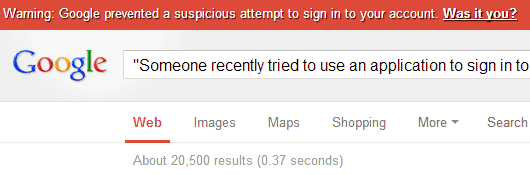
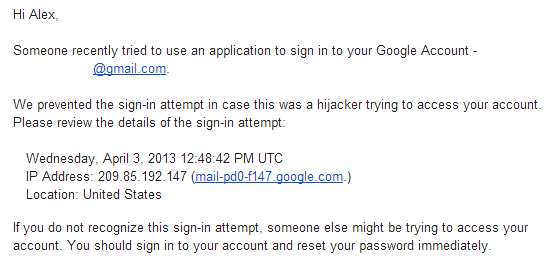
Sometimes Google's security features are extra paranoid and block Google's own services. I tried to use the mail fetcher feature from a secondary Gmail account and Google mentioned that the authentication failed (it's been enabled before). I entered the right password and Google still couldn't authenticate. Then Google started to show warnings in my main Gmail account, at the top of Google search pages and even sent an email and an SMS message: "Someone recently tried to use an application to sign in to your Google Account. We prevented the sign-in attempt in case this was a hijacker trying to access your account."

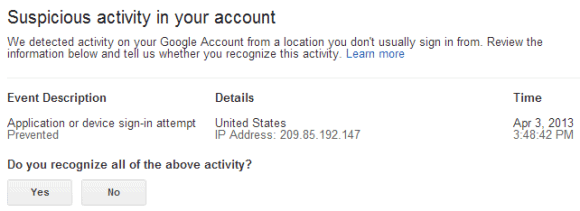
Google sent me to this page which says: "We detected activity on your Google Account from a location you don't usually sign in from." The IP address is 209.85.192.147 (mail-pd0-f147.google.com) and it's from United States. Obviously, it's Google's own IP address.


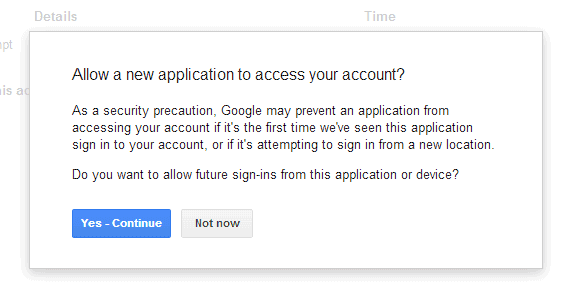
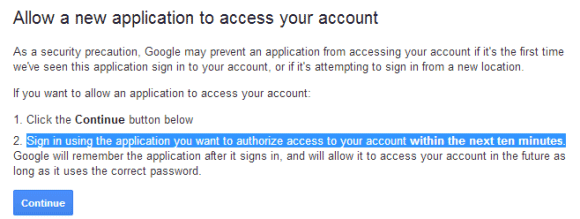
How to fix this issue? Go to this page, click "Yes" and "Yes - Continue". From the Google confirmation message: "As a security precaution, Google may prevent an application from accessing your account if it's the first time we've seen this application sign in to your account, or if it's attempting to sign in from a new location."


Then Google sends you to this page and you need to click "Continue" and "sign in using the application you want to authorize access to your account within the next ten minutes."


Unfortunately for Google, it wasn't even the first time when Gmail's mail fetcher was enabled. Google should find a way to make Gmail's mail fetcher work without having to jump through hoops.
Read More
Posted in gmail, Security | No comments
Older Posts Home
Subscribe to: Posts (Atom)

Popular Posts

  • Merge cells vertically in Google spreadsheets
    There are many times when you want to format your spreadsheets in a certain way to make your data easier to read and understand. Starting to...
  • Hosting a viewing party for the OSCARS®
    Last year, I planned an OSCARS® viewing party with my friends. To add some friendly competition and figure out who was coming, I collected p...
  • Collaboration worldwide
    Posted by: Ken Norton, Product Manager, Google Docs & Spreadsheets Whether you're sitting in the same room, across campus, or in dif...
  • Summarize your data with pivot tables
    Starting today, we're rolling out pivot tables in Google spreadsheets. Pivot tables make it easy to process and summarize large data set...
  • The Google Docs for students page
    We recently launched the Google Docs for students page which highlights how various student populations can use Google Docs in their daily ...
  • Announcing your two most requested features: offline document editing and Drive for iOS
    In April, we introduced Google Drive, a place where you can create, share, and keep all your stuff. Today at the Google I/O conference we a...
  • Happy holidays from the Picasa team
    A lot of people who Google Docs also use Picasa Web Albums, so we wanted to let you know about a special offer. We made extra storage for Gm...
  • Dragging and dropping
    Posted by: Ken Norton, Product Manager, Google Docs & Spreadsheets Have you ever come across a link to a document on the web and wished ...
  • New Templates: Embedding spreadsheets in your website
    Did you know that you can publish a spreadsheet and embed it in your website or blog? An embedded spreadsheet is a perfect way to display a...
  • Upload and store your files in the cloud with Google Docs
    We're happy to announce that over the next few weeks we will be rolling out the ability to upload, store and organize any type of file i...

Categories

  • Acquisitions
  • Ads
  • Android
  • Annoyances
  • April Fools Day
  • attachments
  • back to school
  • Blogger
  • charts
  • chat
  • Chrome
  • Chrome extensions
  • chrome web apps
  • Cloud Connect
  • collaboration
  • comments
  • community
  • discussions
  • DMCA
  • docs
  • document list
  • documents
  • documents list
  • drawings
  • drivebacktoschool
  • Easter Egg
  • education
  • Faces of Docs
  • forms
  • gmail
  • gone google
  • Google Alerts
  • Google Analytics
  • Google Apps Blog
  • Google Apps Script
  • Google Calendar
  • Google Cast
  • Google Checkout
  • Google Chrome
  • Google Chrome OS
  • Google Cloud Connect
  • Google Contacts
  • Google Dictionary
  • Google Docs
  • Google Docs Viewer
  • google documents
  • google drive
  • Google Earth
  • Google Goggles
  • Google Hangouts
  • Google Instant
  • Google Keep
  • Google Latitude
  • Google Local
  • Google Maps
  • Google Music
  • Google News
  • Google Notebook
  • Google Now
  • Google Pack
  • Google Photos
  • Google Play
  • Google Plus
  • Google Reader
  • Google Sites
  • Google Suggest
  • Google Takeout
  • Google Talk
  • Google Toolbar
  • Google Translate
  • Google Trends
  • Google Voice
  • Google Wallet
  • Google+
  • googlenew
  • Greasemonkey
  • Guest Post
  • holiday
  • iGoogle
  • Image Search
  • images
  • InOut
  • iOS
  • Keep
  • Knowledge
  • mobile
  • OCR
  • offline
  • OneBox
  • paperless
  • pdfs
  • photo
  • photos
  • Picasa Web Albums
  • presentations
  • product ideas
  • profiles
  • quickoffice
  • Reddit
  • research
  • save to drive
  • scripts
  • Security
  • sharing
  • sheets
  • shortcut
  • slides
  • spell check
  • spreadsheets
  • stock photos
  • storage
  • students
  • tables
  • teachers
  • templates
  • Tips
  • User interface
  • videos
  • Viewer
  • Visualization
  • Voice Search
  • Web Search
  • Yahoo
  • YouTube

Blog Archive

  • ▼  2013 (519)
    • ▼  December (33)
      • Google Maps Easter Egg for Christmas
      • Google Music to Add Upload Feature
      • Sound Search Playlist in Google Music
      • Google Zeitgeist 2013
      • Google Zeitgeist Quiz
      • Google's Christmas Carols Easter Egg
      • More About Gmail's Proxy
      • Custom Maps in the New Google Maps
      • Auto Awesome Snow Shake in Google+ for Android
      • Updated Google Settings Page
      • Google Uses a Proxy to Load Gmail Images
      • Google's Animated Decorations for Christmas
      • The New Google Sheets
      • Google's Video Duration Experiment
      • New Google Sheets: faster, more powerful, and work...
      • 9 New Languages in Google Translate
      • 10 New Chromecast Apps
      • Google Settings Page for Phone Numbers
      • Connect Google Photo Spheres
      • Google Open Gallery
      • More In-Depth Articles in Google Search
      • Google's Mobile Image Search Adds Menu
      • Auto Awesome, Winter Special
      • Export Gmail and Google Calendar Data
      • The Old Google Contacts, No Longer Available
      • Location Autocomplete in Google Calendar
      • Short URLs in the New Google Maps
      • Chromecast Game
      • Personalized Embedded Google Maps
      • Google Santa Tracker
      • Chrome Download Tips
      • More Search Results in the New Google Maps
      • My Google?
    • ►  November (44)
    • ►  October (64)
    • ►  September (50)
    • ►  August (63)
    • ►  July (60)
    • ►  June (57)
    • ►  May (62)
    • ►  April (49)
    • ►  March (33)
    • ►  February (1)
    • ►  January (3)
  • ►  2012 (34)
    • ►  December (4)
    • ►  November (4)
    • ►  October (5)
    • ►  September (4)
    • ►  August (2)
    • ►  July (1)
    • ►  June (3)
    • ►  May (2)
    • ►  April (2)
    • ►  March (2)
    • ►  February (5)
  • ►  2011 (80)
    • ►  December (4)
    • ►  November (1)
    • ►  October (7)
    • ►  September (10)
    • ►  August (11)
    • ►  July (8)
    • ►  June (9)
    • ►  May (1)
    • ►  April (8)
    • ►  March (8)
    • ►  February (8)
    • ►  January (5)
  • ►  2010 (118)
    • ►  December (11)
    • ►  November (16)
    • ►  October (6)
    • ►  September (13)
    • ►  August (13)
    • ►  July (7)
    • ►  June (15)
    • ►  May (11)
    • ►  April (7)
    • ►  March (7)
    • ►  February (6)
    • ►  January (6)
  • ►  2009 (82)
    • ►  December (14)
    • ►  November (4)
    • ►  October (10)
    • ►  September (10)
    • ►  August (4)
    • ►  July (6)
    • ►  June (6)
    • ►  May (5)
    • ►  April (4)
    • ►  March (8)
    • ►  February (7)
    • ►  January (4)
  • ►  2008 (97)
    • ►  December (6)
    • ►  November (4)
    • ►  October (6)
    • ►  September (8)
    • ►  August (5)
    • ►  July (7)
    • ►  June (11)
    • ►  May (20)
    • ►  April (13)
    • ►  March (6)
    • ►  February (6)
    • ►  January (5)
  • ►  2007 (25)
    • ►  December (1)
    • ►  November (1)
    • ►  October (2)
    • ►  September (3)
    • ►  August (3)
    • ►  July (4)
    • ►  June (3)
    • ►  May (2)
    • ►  April (2)
    • ►  March (1)
    • ►  February (2)
    • ►  January (1)
  • ►  2006 (10)
    • ►  December (2)
    • ►  November (4)
    • ►  October (4)
Powered by Blogger.

About Me

Unknown
View my complete profile