Free Online Storage

  • Subscribe to our RSS feed.
  • Twitter
  • StumbleUpon
  • Reddit
  • Facebook
  • Digg
Showing posts with label InOut. Show all posts

Thursday, 5 December 2013

Export Gmail and Google Calendar Data

Posted on 11:47 by Unknown
Google Takeout now lets you export your calendars and it will soon add a similar feature for Gmail. The calendar exporting feature is not new - you could find it in the Google Calendar settings, but it's nice to see that Google Takeout gets more comprehensive and adds support for new services.

The Gmail exporting feature is completely new and it will be gradually released next month. It will let you download a big MBOX file you can import in mail clients like Outlook, Thunderbird or Apple Mail. You can also use this feature to backup your Gmail messages and read them offline.
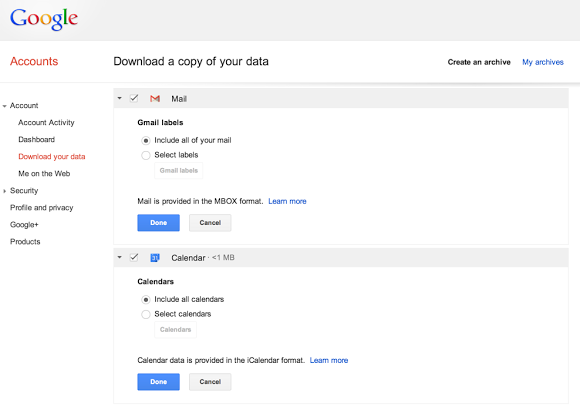

"You can download all of your mail and calendars or choose a subset of labels and calendars. You can also download a single archive file for multiple products with a copy of your Gmail, Calendar, Google+, YouTube, Drive, and other Google data," informs Google.
Read More
Posted in gmail, Google Calendar, Google Takeout, InOut | No comments

Wednesday, 10 July 2013

Export Google Latitude Friends

Posted on 04:55 by Unknown
Google Latitude has been discontinued and a help center article offers more information about this. Unfortunately, there's something inaccurate: "you can't export your friend information out of Latitude".

Well, you can export your Latitude friends because they're added to a hidden Gmail group. Here's how to do that:

1. go to this Google Contacts page

2. select all contacts

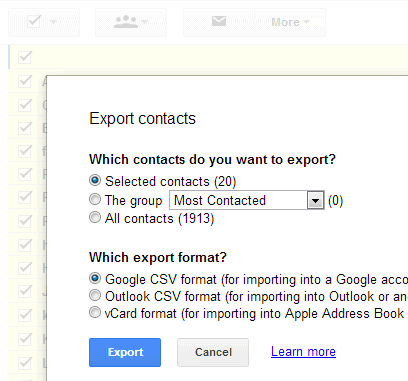
3. click "More", then "Export" and click the "Export" button. You'll get a CSV file with all your Latitude friends.


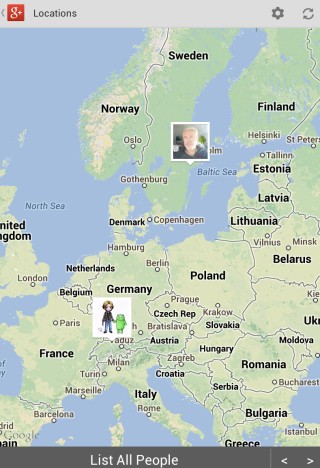
4. (optional) import the contacts to Google+ and use location sharing - Google's Latitude replacement. Go to the People section in Google+, click "connect services" in the left sidebar, select "open address book" and pick the CSV file you've exported. You'll get a list of people you can add to a new Google+ circle (let's call it Latitude). Enable location sharing at the bottom of this page and restrict it to the circle you've created: pick "Custom" and select the Latitude circle. Unfortunately, Google only shows location data on profile pages and in the Locations section of the Google+ app for Android, but that may change in the future.


"Google Latitude will be retired on August 9th, 2013. Products being retired include Google Latitude in Google Maps for Android, Latitude for iPhone, the Latitude API, the public badge, the iGoogle Gadget, and the Latitude website at maps.google.com/latitude. We'll delete your list of friends on Latitude. You won't be able to see or manage friends. Any existing friends will no longer see your location in Google Maps for mobile on Android, Latitude for iPhone, the public badge, the iGoogle Gadget, and the Latitude website at maps.google.com/latitude, if you continue to use these products," says Google.

Location History will continue to be available, since it's used by Google Maps, Google Earth and Google Now. "Google Location History is an opt-in feature that allows you to store your past Google location history and see it on a Google Map or in Google Earth. Your Location History is visible only to you." Location Reporting will also be available, since it "allows Google to periodically store and use your device's most recent location data in connection with your Google Account".
Read More
Posted in gmail, Google Latitude, InOut | No comments

Sunday, 14 April 2013

Google's Inactive Account Manager

Posted on 05:07 by Unknown
Google has recently added a feature that lets you decide what happens when you no longer use your account. It's called Inactive Account Manager and the goal was to offer a feature that tells Google "what you want done with your digital assets when you die or can no longer use your account".

You need to set a timeout period (3/6/9/12 months), add your phone number and contact details for up to 10 trusted friends or family members (email addresses and phone numbers), then decide if you want to share Google Takeout for services like Blogger, Picasa Web Albums, YouTube with those people and delete your account once it's inactive. Google will alert you one month before the timeout period expires.


It's a feature that seems to be useful if you want Google to automatically delete your account when you're no longer alive and share some data with the people you trust. Unfortunately, not all the Google Takeout data is easy to use. YouTube videos, Picasa photos, Drive files and Gmail's contact files are easy to open, but the data from Google+, Blogger, Reader is more difficult to read. When you set up this feature, you can pick the services you want.

You can also use the Inactive Account Manager just to notify friends and family members that you no longer use that account or to send an automated response to all incoming Gmail messages once your account becomes inactive.
Read More
Posted in InOut | No comments
Older Posts Home
Subscribe to: Posts (Atom)

Popular Posts

  • Merge cells vertically in Google spreadsheets
    There are many times when you want to format your spreadsheets in a certain way to make your data easier to read and understand. Starting to...
  • Hosting a viewing party for the OSCARS®
    Last year, I planned an OSCARS® viewing party with my friends. To add some friendly competition and figure out who was coming, I collected p...
  • Collaboration worldwide
    Posted by: Ken Norton, Product Manager, Google Docs & Spreadsheets Whether you're sitting in the same room, across campus, or in dif...
  • Summarize your data with pivot tables
    Starting today, we're rolling out pivot tables in Google spreadsheets. Pivot tables make it easy to process and summarize large data set...
  • The Google Docs for students page
    We recently launched the Google Docs for students page which highlights how various student populations can use Google Docs in their daily ...
  • Announcing your two most requested features: offline document editing and Drive for iOS
    In April, we introduced Google Drive, a place where you can create, share, and keep all your stuff. Today at the Google I/O conference we a...
  • Happy holidays from the Picasa team
    A lot of people who Google Docs also use Picasa Web Albums, so we wanted to let you know about a special offer. We made extra storage for Gm...
  • Dragging and dropping
    Posted by: Ken Norton, Product Manager, Google Docs & Spreadsheets Have you ever come across a link to a document on the web and wished ...
  • New Templates: Embedding spreadsheets in your website
    Did you know that you can publish a spreadsheet and embed it in your website or blog? An embedded spreadsheet is a perfect way to display a...
  • Upload and store your files in the cloud with Google Docs
    We're happy to announce that over the next few weeks we will be rolling out the ability to upload, store and organize any type of file i...

Categories

  • Acquisitions
  • Ads
  • Android
  • Annoyances
  • April Fools Day
  • attachments
  • back to school
  • Blogger
  • charts
  • chat
  • Chrome
  • Chrome extensions
  • chrome web apps
  • Cloud Connect
  • collaboration
  • comments
  • community
  • discussions
  • DMCA
  • docs
  • document list
  • documents
  • documents list
  • drawings
  • drivebacktoschool
  • Easter Egg
  • education
  • Faces of Docs
  • forms
  • gmail
  • gone google
  • Google Alerts
  • Google Analytics
  • Google Apps Blog
  • Google Apps Script
  • Google Calendar
  • Google Cast
  • Google Checkout
  • Google Chrome
  • Google Chrome OS
  • Google Cloud Connect
  • Google Contacts
  • Google Dictionary
  • Google Docs
  • Google Docs Viewer
  • google documents
  • google drive
  • Google Earth
  • Google Goggles
  • Google Hangouts
  • Google Instant
  • Google Keep
  • Google Latitude
  • Google Local
  • Google Maps
  • Google Music
  • Google News
  • Google Notebook
  • Google Now
  • Google Pack
  • Google Photos
  • Google Play
  • Google Plus
  • Google Reader
  • Google Sites
  • Google Suggest
  • Google Takeout
  • Google Talk
  • Google Toolbar
  • Google Translate
  • Google Trends
  • Google Voice
  • Google Wallet
  • Google+
  • googlenew
  • Greasemonkey
  • Guest Post
  • holiday
  • iGoogle
  • Image Search
  • images
  • InOut
  • iOS
  • Keep
  • Knowledge
  • mobile
  • OCR
  • offline
  • OneBox
  • paperless
  • pdfs
  • photo
  • photos
  • Picasa Web Albums
  • presentations
  • product ideas
  • profiles
  • quickoffice
  • Reddit
  • research
  • save to drive
  • scripts
  • Security
  • sharing
  • sheets
  • shortcut
  • slides
  • spell check
  • spreadsheets
  • stock photos
  • storage
  • students
  • tables
  • teachers
  • templates
  • Tips
  • User interface
  • videos
  • Viewer
  • Visualization
  • Voice Search
  • Web Search
  • Yahoo
  • YouTube

Blog Archive

  • ▼  2013 (519)
    • ▼  December (33)
      • Google Maps Easter Egg for Christmas
      • Google Music to Add Upload Feature
      • Sound Search Playlist in Google Music
      • Google Zeitgeist 2013
      • Google Zeitgeist Quiz
      • Google's Christmas Carols Easter Egg
      • More About Gmail's Proxy
      • Custom Maps in the New Google Maps
      • Auto Awesome Snow Shake in Google+ for Android
      • Updated Google Settings Page
      • Google Uses a Proxy to Load Gmail Images
      • Google's Animated Decorations for Christmas
      • The New Google Sheets
      • Google's Video Duration Experiment
      • New Google Sheets: faster, more powerful, and work...
      • 9 New Languages in Google Translate
      • 10 New Chromecast Apps
      • Google Settings Page for Phone Numbers
      • Connect Google Photo Spheres
      • Google Open Gallery
      • More In-Depth Articles in Google Search
      • Google's Mobile Image Search Adds Menu
      • Auto Awesome, Winter Special
      • Export Gmail and Google Calendar Data
      • The Old Google Contacts, No Longer Available
      • Location Autocomplete in Google Calendar
      • Short URLs in the New Google Maps
      • Chromecast Game
      • Personalized Embedded Google Maps
      • Google Santa Tracker
      • Chrome Download Tips
      • More Search Results in the New Google Maps
      • My Google?
    • ►  November (44)
    • ►  October (64)
    • ►  September (50)
    • ►  August (63)
    • ►  July (60)
    • ►  June (57)
    • ►  May (62)
    • ►  April (49)
    • ►  March (33)
    • ►  February (1)
    • ►  January (3)
  • ►  2012 (34)
    • ►  December (4)
    • ►  November (4)
    • ►  October (5)
    • ►  September (4)
    • ►  August (2)
    • ►  July (1)
    • ►  June (3)
    • ►  May (2)
    • ►  April (2)
    • ►  March (2)
    • ►  February (5)
  • ►  2011 (80)
    • ►  December (4)
    • ►  November (1)
    • ►  October (7)
    • ►  September (10)
    • ►  August (11)
    • ►  July (8)
    • ►  June (9)
    • ►  May (1)
    • ►  April (8)
    • ►  March (8)
    • ►  February (8)
    • ►  January (5)
  • ►  2010 (118)
    • ►  December (11)
    • ►  November (16)
    • ►  October (6)
    • ►  September (13)
    • ►  August (13)
    • ►  July (7)
    • ►  June (15)
    • ►  May (11)
    • ►  April (7)
    • ►  March (7)
    • ►  February (6)
    • ►  January (6)
  • ►  2009 (82)
    • ►  December (14)
    • ►  November (4)
    • ►  October (10)
    • ►  September (10)
    • ►  August (4)
    • ►  July (6)
    • ►  June (6)
    • ►  May (5)
    • ►  April (4)
    • ►  March (8)
    • ►  February (7)
    • ►  January (4)
  • ►  2008 (97)
    • ►  December (6)
    • ►  November (4)
    • ►  October (6)
    • ►  September (8)
    • ►  August (5)
    • ►  July (7)
    • ►  June (11)
    • ►  May (20)
    • ►  April (13)
    • ►  March (6)
    • ►  February (6)
    • ►  January (5)
  • ►  2007 (25)
    • ►  December (1)
    • ►  November (1)
    • ►  October (2)
    • ►  September (3)
    • ►  August (3)
    • ►  July (4)
    • ►  June (3)
    • ►  May (2)
    • ►  April (2)
    • ►  March (1)
    • ►  February (2)
    • ►  January (1)
  • ►  2006 (10)
    • ►  December (2)
    • ►  November (4)
    • ►  October (4)
Powered by Blogger.

About Me

Unknown
View my complete profile