Free Online Storage

  • Subscribe to our RSS feed.
  • Twitter
  • StumbleUpon
  • Reddit
  • Facebook
  • Digg
Showing posts with label Google Keep. Show all posts

Saturday, 14 September 2013

Google Keep to Integrate With Google Drive

Posted on 12:14 by Unknown
Google Keep was supposed to integrate with Google Drive, but it's still a distinct app. Google Keep is a pretty basic app and doesn't have a lot of features, so you can't expect that it will improve.

Right now, you can only insert images and save audio files when using the dictation feature from the mobile app. Google Keep's code includes multiple references to an upcoming feature that lets you upload any file to Google Drive and add it to a note, preview the file using the Google Drive Viewer or open it using various apps. You'll also be able to add videos (YouTube URLs or videos uploaded to Google Drive) and play them inside Google Keep.


While this isn't the Drive integration I expected, it's still a cool feature. Hopefully, Keep will become a Google Drive app and you'll be able to open and edit your notes from Google Drive.

Update: The screenshots are from the Chrome app for Google Keep, but there are similar references in the desktop Google Keep web app.
Read More
Posted in google drive, Google Keep | No comments

Wednesday, 21 August 2013

Google Keep Reminders

Posted on 12:27 by Unknown
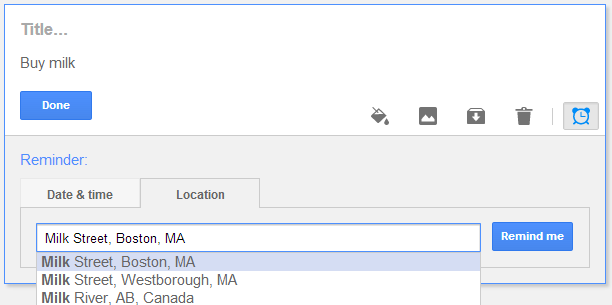
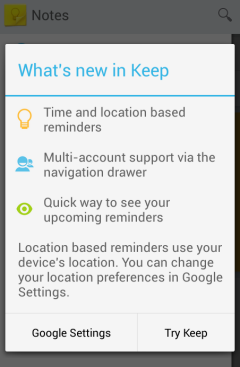
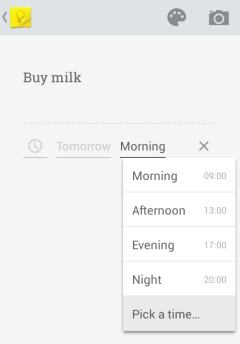
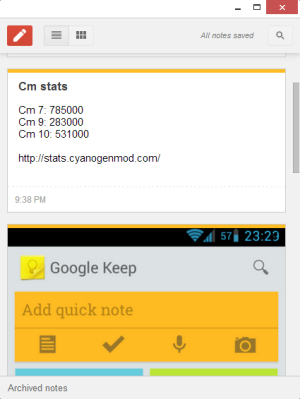
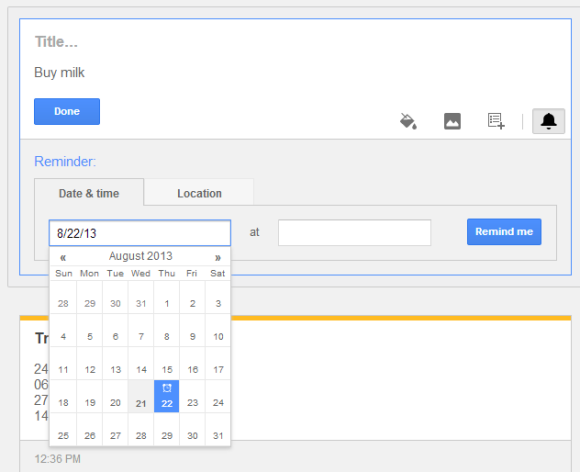
Google Keep now allows you to add reminders to your notes. Just like in Google Now, you can add time-based reminders and location-based reminders. "Time reminders work on all devices, but location reminders will only be triggered on mobile devices," mentions the help center.

"To get started, select the 'Remind me' button from the bottom of any note and choose the type of reminder you want to add. You can add time-based reminders for a specific date and time, or a more general time of day, like tomorrow morning. Adding a location reminder is incredibly easy too — as soon as you start typing Google Keep suggests places nearby," explains Google.

Here's the desktop Google Keep site:


The Android app has been updated and now supports reminders. There's a new navigation drawer with separate sections for archived notes and reminders and you can now add photos from the Gallery without using the "share" feature.


Google Keep integrates with Google Now, so all the Keep reminders are added to Google Now. You'll find them in Settings > My Stuff > Reminders. For some reason, the reminders added from Google Now aren't available in Google Keep.

You'll get notifications in Google Now, the Google Keep app for Android, the Google Keep app for Chrome (desktop notification) and the Google Keep desktop site (alert box), but you won't see redundant notifications. If you have both the Google Search app and Google Keep, you'll only get notifications from Google Keep.

When Google Tasks is discontinued (it will happen eventually), Google Keep will be the replacement. It's optimized for mobile and it doesn't integrate with Gmail or Google Calendar, but at least it's constantly improving and it has a cool mobile app.
Read More
Posted in Google Keep | No comments

Sunday, 7 July 2013

Google Keep Tips

Posted on 13:06 by Unknown
Here are some tips for Google Keep. Since it's a service designed for mobile devices, most of the tips are for the Android app.

Mobile

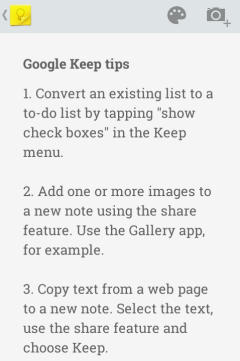
1. Convert an existing list to a to-do list by tapping "show checkboxes" in the Keep menu.

2. A simple way to add images to a new note: select one or more images in the gallery app or a file manager, use the share feature and select Keep.

3. Copy text from a web page to a new note. Select the text, use the share feature and choose Keep.

4. Save the title of a web page and the URL to a new note. Use the share option from your favorite browser.

5. Add a Keep widget with the latest notes. Resize the widget to show more notes.

6. Reorder notes: long press a note and drag it to a different position.

7. Use colors to organize notes. For example, blue notes are related to work.

8. Take multiple photos from a note. You can then upload the album to Google+ using the share feature.

9. Write short notes quickly: tap "add quick note", type the note and tap "Done".

10. Duplicate a note: open it, tap the share button and select Keep.

11. Tap the microphone to dictate your note and to save your voice recording. You can use Keep as a voice recording app.

12. Find notes with voice recordings: they have a small play icon next to the date.

13. Remove a recording by tapping "x" next to the audio player. You can also remove photos in the same way.

14. Dictate notes without saving audio files by tapping the microphone button from the keyboard.

15. Use Google Voice Search to dictate notes. Start with "note to self" and select Keep from the list of applications after dictating the note.

16. Change the default background color: tap "add quick note", type something, then tap the color palette icon and pick a color.

17. Use the minus operator to exclude keywords when you use the search feature. Use quotes for exact matches. Examples: [milk -buy], ["buy milk"].

Desktop

18. Read your notes online from any device at drive.google.com/keep.

19. Install the Chrome app to read your notes offline when you use your computer.

20. Get permalinks for your notes: open the Google Keep site in a desktop browser, switch to the grid view and click a note.

21. Download voice recordings: open Keep in a desktop browser, click a note, mouse over the voice recording and click "Download".

22. Keyboard shortcuts:

j/k - navigate to the next/previous note
n/p - same as j/k, but also useful for navigating between list items
c - compose a new note
/ - use the search feature
e - archive selected note
# - delete selected note
o - open selected note
Enter - edit selected note
Ctrl+g - toggle between list and grid view
Esc - finish editing a note.
Read More
Posted in Google Keep, Tips | No comments

Thursday, 2 May 2013

Google Keep App for Chrome

Posted on 11:57 by Unknown
Speaking of new-style packaged apps for Chrome, here's a new app: Google Keep. It's another way to access the recently launched service for taking notes.


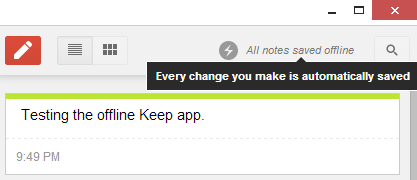
The app looks just like the Google Keep site, but it works offline. This means that you can access your notes or create new notes even if you don't have an Internet connection. Unfortunately, you can't insert images when you're offline. Another limitation is that new notes aren't uploaded in the background when you're back online, so you need to open the app.


{ via Chrome Blog }
Read More
Posted in Google Chrome, google drive, Google Keep | No comments

Wednesday, 20 March 2013

Google Keep, Now Available

Posted on 15:16 by Unknown
Google Keep has been launched: it's Google's latest attempt to create a service for taking notes. Unlike Google Notebook, Keep is a Google Drive app (the Drive integration is not yet ready for public release), it doesn't have a rich-text editor and it's optimized for mobile.

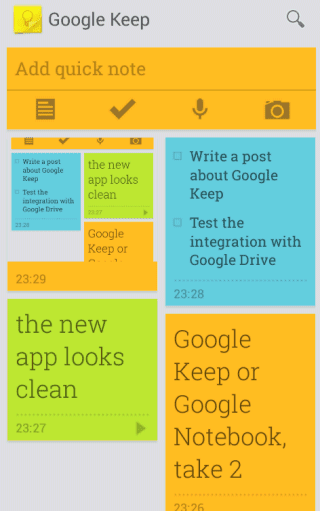
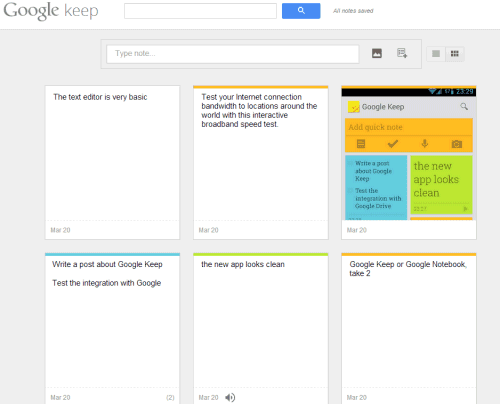
There's an Android app and a desktop site. Both use the sticky notes metaphor and you can choose the color for each note, add text, images, lists and voice recordings that are automatically converted to text in the mobile app. Both interfaces let you choose between the grid view and the list view.


Google Keep lacks many of the features that were available in Google Notebook: labels, sorting, comments, multiple notebooks, rich-text editor, sharing. It looks like a lightweight Google Notebook for mobile devices.

"With Keep you can quickly jot ideas down when you think of them and even include checklists and photos to keep track of what's important to you. Your notes are safely stored in Google Drive and synced to all your devices so you can always have them at hand," informs Google.

It's likely that each Google Keep note will be a file in Google Drive, so you'll be able to share it with other people, add it to a folder, download it etc.

For now, Google Keep is the only Google Drive service that has more features in the Android app than in the desktop interface.


{ Thanks, Sterling. }
Read More
Posted in google drive, Google Keep, Google Notebook | No comments

Sunday, 17 March 2013

Google Keep, a New Service for Taking Notes

Posted on 10:18 by Unknown
Carlos Jeurissen found some interesting hints about a new Google Drive app called Keep. There are multiple references to Google Keep in the GDrive code, including some URLs like: https://drive.google.com/keep/?note. In fact, the codename for Google Keep is "memento" and the MIME type for Google Keep files is "application/vnd.google-apps.note". Obviously, Google Keep is a replacement for Google Notebook, a service that has been discontinued back in 2009.


Carlos also found the service's icon and a short URL that redirects to the Play Store page for a non-existent Google Keep app.


Google has a cool Chrome extension called Scratchpad. It's great for taking notes and it syncs with Google Docs. Let's hope that Keep is better than both Scratchpad and Google Notebook.

Update: Android Police has some screenshots of the new service.

{ Thanks, Carlos. }
Read More
Posted in google drive, Google Keep, Google Notebook | No comments
Older Posts Home
Subscribe to: Posts (Atom)

Popular Posts

  • Merge cells vertically in Google spreadsheets
    There are many times when you want to format your spreadsheets in a certain way to make your data easier to read and understand. Starting to...
  • A completely new look for Drive on iOS
    One of the features you’ve told us you want on Drive for iOS is the ability to effortlessly browse and preview files, just like you can on A...
  • What's The Right Answer?
    Sometimes the same question can have multiple answers, even when you're looking for a simple fact. I've searched for [ny population]...
  • Google Quick View
    Google Search for mobile has a new feature called " Quick View ". Right now, it only shows up for Wikipedia results and it allows ...
  • Hosting a viewing party for the OSCARS®
    Last year, I planned an OSCARS® viewing party with my friends. To add some friendly competition and figure out who was coming, I collected p...
  • Upload and store your files in the cloud with Google Docs
    We're happy to announce that over the next few weeks we will be rolling out the ability to upload, store and organize any type of file i...
  • Summarize your data with pivot tables
    Starting today, we're rolling out pivot tables in Google spreadsheets. Pivot tables make it easy to process and summarize large data set...
  • In-cell dropdown and validation in spreadsheets
    Today, we added in-cell dropdown and validation to spreadsheets. This makes it easy to constrain the values of an individual cell to a spec...
  • More In-Depth Articles in Google Search
    For general queries like [ global warming ], [ love ], [ Mandela ], [ China ], Google shows some in-depth news articles at the bottom of th...
  • The Google Docs for students page
    We recently launched the Google Docs for students page which highlights how various student populations can use Google Docs in their daily ...

Categories

  • Acquisitions
  • Ads
  • Android
  • Annoyances
  • April Fools Day
  • attachments
  • back to school
  • Blogger
  • charts
  • chat
  • Chrome
  • Chrome extensions
  • chrome web apps
  • Cloud Connect
  • collaboration
  • comments
  • community
  • discussions
  • DMCA
  • docs
  • document list
  • documents
  • documents list
  • drawings
  • drivebacktoschool
  • Easter Egg
  • education
  • Faces of Docs
  • forms
  • gmail
  • gone google
  • Google Alerts
  • Google Analytics
  • Google Apps Blog
  • Google Apps Script
  • Google Calendar
  • Google Cast
  • Google Checkout
  • Google Chrome
  • Google Chrome OS
  • Google Cloud Connect
  • Google Contacts
  • Google Dictionary
  • Google Docs
  • Google Docs Viewer
  • google documents
  • google drive
  • Google Earth
  • Google Goggles
  • Google Hangouts
  • Google Instant
  • Google Keep
  • Google Latitude
  • Google Local
  • Google Maps
  • Google Music
  • Google News
  • Google Notebook
  • Google Now
  • Google Pack
  • Google Photos
  • Google Play
  • Google Plus
  • Google Reader
  • Google Sites
  • Google Suggest
  • Google Takeout
  • Google Talk
  • Google Toolbar
  • Google Translate
  • Google Trends
  • Google Voice
  • Google Wallet
  • Google+
  • googlenew
  • Greasemonkey
  • Guest Post
  • holiday
  • iGoogle
  • Image Search
  • images
  • InOut
  • iOS
  • Keep
  • Knowledge
  • mobile
  • OCR
  • offline
  • OneBox
  • paperless
  • pdfs
  • photo
  • photos
  • Picasa Web Albums
  • presentations
  • product ideas
  • profiles
  • quickoffice
  • Reddit
  • research
  • save to drive
  • scripts
  • Security
  • sharing
  • sheets
  • shortcut
  • slides
  • spell check
  • spreadsheets
  • stock photos
  • storage
  • students
  • tables
  • teachers
  • templates
  • Tips
  • User interface
  • videos
  • Viewer
  • Visualization
  • Voice Search
  • Web Search
  • Yahoo
  • YouTube

Blog Archive

  • ▼  2013 (519)
    • ▼  December (33)
      • Google Maps Easter Egg for Christmas
      • Google Music to Add Upload Feature
      • Sound Search Playlist in Google Music
      • Google Zeitgeist 2013
      • Google Zeitgeist Quiz
      • Google's Christmas Carols Easter Egg
      • More About Gmail's Proxy
      • Custom Maps in the New Google Maps
      • Auto Awesome Snow Shake in Google+ for Android
      • Updated Google Settings Page
      • Google Uses a Proxy to Load Gmail Images
      • Google's Animated Decorations for Christmas
      • The New Google Sheets
      • Google's Video Duration Experiment
      • New Google Sheets: faster, more powerful, and work...
      • 9 New Languages in Google Translate
      • 10 New Chromecast Apps
      • Google Settings Page for Phone Numbers
      • Connect Google Photo Spheres
      • Google Open Gallery
      • More In-Depth Articles in Google Search
      • Google's Mobile Image Search Adds Menu
      • Auto Awesome, Winter Special
      • Export Gmail and Google Calendar Data
      • The Old Google Contacts, No Longer Available
      • Location Autocomplete in Google Calendar
      • Short URLs in the New Google Maps
      • Chromecast Game
      • Personalized Embedded Google Maps
      • Google Santa Tracker
      • Chrome Download Tips
      • More Search Results in the New Google Maps
      • My Google?
    • ►  November (44)
    • ►  October (64)
    • ►  September (50)
    • ►  August (63)
    • ►  July (60)
    • ►  June (57)
    • ►  May (62)
    • ►  April (49)
    • ►  March (33)
    • ►  February (1)
    • ►  January (3)
  • ►  2012 (34)
    • ►  December (4)
    • ►  November (4)
    • ►  October (5)
    • ►  September (4)
    • ►  August (2)
    • ►  July (1)
    • ►  June (3)
    • ►  May (2)
    • ►  April (2)
    • ►  March (2)
    • ►  February (5)
  • ►  2011 (80)
    • ►  December (4)
    • ►  November (1)
    • ►  October (7)
    • ►  September (10)
    • ►  August (11)
    • ►  July (8)
    • ►  June (9)
    • ►  May (1)
    • ►  April (8)
    • ►  March (8)
    • ►  February (8)
    • ►  January (5)
  • ►  2010 (118)
    • ►  December (11)
    • ►  November (16)
    • ►  October (6)
    • ►  September (13)
    • ►  August (13)
    • ►  July (7)
    • ►  June (15)
    • ►  May (11)
    • ►  April (7)
    • ►  March (7)
    • ►  February (6)
    • ►  January (6)
  • ►  2009 (82)
    • ►  December (14)
    • ►  November (4)
    • ►  October (10)
    • ►  September (10)
    • ►  August (4)
    • ►  July (6)
    • ►  June (6)
    • ►  May (5)
    • ►  April (4)
    • ►  March (8)
    • ►  February (7)
    • ►  January (4)
  • ►  2008 (97)
    • ►  December (6)
    • ►  November (4)
    • ►  October (6)
    • ►  September (8)
    • ►  August (5)
    • ►  July (7)
    • ►  June (11)
    • ►  May (20)
    • ►  April (13)
    • ►  March (6)
    • ►  February (6)
    • ►  January (5)
  • ►  2007 (25)
    • ►  December (1)
    • ►  November (1)
    • ►  October (2)
    • ►  September (3)
    • ►  August (3)
    • ►  July (4)
    • ►  June (3)
    • ►  May (2)
    • ►  April (2)
    • ►  March (1)
    • ►  February (2)
    • ►  January (1)
  • ►  2006 (10)
    • ►  December (2)
    • ►  November (4)
    • ►  October (4)
Powered by Blogger.

About Me

Unknown
View my complete profile