Free Online Storage

  • Subscribe to our RSS feed.
  • Twitter
  • StumbleUpon
  • Reddit
  • Facebook
  • Digg

Thursday, 25 April 2013

Google Chat in Google Docs

Posted on 12:02 by Unknown
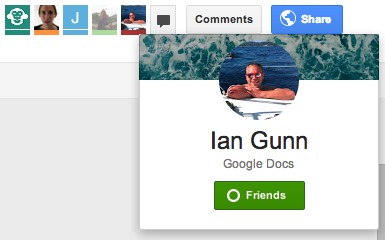
Do you remember the post about the animal icons from Google Drive? They're only displayed for anonymous users ("people who are not given explicit access"). For everyone else, Google will show the Google Profile photo and link to the Google+ page.


There's also a group chat feature powered by Google Talk/Chat. It's a simplified version of the chat feature from Gmail, Google+, iGoogle and orkut. There's only one chat box that lets you talk with the other signed-in users that edit or just view a document, presentation or any other file. For some reason, it doesn't work in Google Sheets/Spreadsheets.

"To begin a group chat with everyone viewing the document, click the Chat button, which you'll find in the top-right corner of your window. A chat box will appear at the bottom of your file, and everyone who's viewing the document and who's signed in with a Google account will be included in the group chat," explains Google.
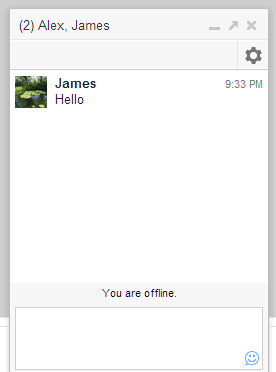

The group chat feature from Google Drive doesn't support voice or video chat, conversations aren't saved in Gmail and they're not available in other services that use Google Chat. "If you've chatted in Gmail and Google+, you may have noticed that a chat started in Gmail will carry over into Google+, and vice versa. The same isn't true for chats in Google Drive. Chats you start in Google Drive won't carry over into other Google products, and chats you start in other products won't appear in Google Drive."

{ via Google Drive Blog }
Email ThisBlogThis!Share to XShare to Facebook
Posted in google drive, Google Talk | No comments
Newer Post Older Post Home

0 comments:

Post a Comment

Subscribe to: Post Comments (Atom)

Popular Posts

  • Merge cells vertically in Google spreadsheets
    There are many times when you want to format your spreadsheets in a certain way to make your data easier to read and understand. Starting to...
  • Writing a campaign speech with Google Docs
    A few months ago, my colleague Julia and I were at a technology conference for educators. Teachers were very enthusiastic when we demonstrat...
  • Announcing your two most requested features: offline document editing and Drive for iOS
    In April, we introduced Google Drive, a place where you can create, share, and keep all your stuff. Today at the Google I/O conference we a...
  • How Accurate Is Browser Market Share Data?
    It's really hard to get accurate browser stats . Some companies report the number of active users, others report the total number of use...
  • Tips & Tricks: Using the new Subtotal function in Google spreadsheets
    This week, we added the Subtotal function to our list of functions in Google spreadsheets. One of the benefits of the Subtotal function is...
  • Table improvements and easier formatting in documents
    Starting today, it’s easier to work with tables and to make formatting changes in Google documents. You can now select any grid of cells in...
  • In-cell dropdown and validation in spreadsheets
    Today, we added in-cell dropdown and validation to spreadsheets. This makes it easy to constrain the values of an individual cell to a spec...
  • Array Formulas without Ctrl-Shift-Enter
    Posted by: John Danaher, Engineer - Google spreadsheets If you're an expert spreadsheet user, you might be familiar with the powerful an...
  • Summarize your data with pivot tables
    Starting today, we're rolling out pivot tables in Google spreadsheets. Pivot tables make it easy to process and summarize large data set...
  • Chrome's Predictors Page
    Chrome has a lot of fascinating features you'll probably never use. Tony Hirst spotted one: open a new tab, type chrome://predictors i...

Categories

  • Acquisitions
  • Ads
  • Android
  • Annoyances
  • April Fools Day
  • attachments
  • back to school
  • Blogger
  • charts
  • chat
  • Chrome
  • Chrome extensions
  • chrome web apps
  • Cloud Connect
  • collaboration
  • comments
  • community
  • discussions
  • DMCA
  • docs
  • document list
  • documents
  • documents list
  • drawings
  • drivebacktoschool
  • Easter Egg
  • education
  • Faces of Docs
  • forms
  • gmail
  • gone google
  • Google Alerts
  • Google Analytics
  • Google Apps Blog
  • Google Apps Script
  • Google Calendar
  • Google Cast
  • Google Checkout
  • Google Chrome
  • Google Chrome OS
  • Google Cloud Connect
  • Google Contacts
  • Google Dictionary
  • Google Docs
  • Google Docs Viewer
  • google documents
  • google drive
  • Google Earth
  • Google Goggles
  • Google Hangouts
  • Google Instant
  • Google Keep
  • Google Latitude
  • Google Local
  • Google Maps
  • Google Music
  • Google News
  • Google Notebook
  • Google Now
  • Google Pack
  • Google Photos
  • Google Play
  • Google Plus
  • Google Reader
  • Google Sites
  • Google Suggest
  • Google Takeout
  • Google Talk
  • Google Toolbar
  • Google Translate
  • Google Trends
  • Google Voice
  • Google Wallet
  • Google+
  • googlenew
  • Greasemonkey
  • Guest Post
  • holiday
  • iGoogle
  • Image Search
  • images
  • InOut
  • iOS
  • Keep
  • Knowledge
  • mobile
  • OCR
  • offline
  • OneBox
  • paperless
  • pdfs
  • photo
  • photos
  • Picasa Web Albums
  • presentations
  • product ideas
  • profiles
  • quickoffice
  • Reddit
  • research
  • save to drive
  • scripts
  • Security
  • sharing
  • sheets
  • shortcut
  • slides
  • spell check
  • spreadsheets
  • stock photos
  • storage
  • students
  • tables
  • teachers
  • templates
  • Tips
  • User interface
  • videos
  • Viewer
  • Visualization
  • Voice Search
  • Web Search
  • Yahoo
  • YouTube

Blog Archive

  • ▼  2013 (519)
    • ►  December (33)
    • ►  November (44)
    • ►  October (64)
    • ►  September (50)
    • ►  August (63)
    • ►  July (60)
    • ►  June (57)
    • ►  May (62)
    • ▼  April (49)
      • PayPal, Payment Method in Google Play?
      • Google Now for iOS
      • No More Quick View in Google Search
      • Chrome Viewer for Microsoft Office Documents
      • Google Chat in Google Docs
      • Bringing people together in Drive
      • New Drop-Down Menu for Google Search Results
      • Google Removes Related Searches Option
      • YouTube's Homepage Carousel UI
      • A Bogus DMCA Takedown Request (Part 4)
      • How Accurate Is Browser Market Share Data?
      • Google Tests New Interface for Related Image Searches
      • Swipe Navigation in the Mobile Gmail Site
      • Outsourcing Blogger Comments to Google+
      • Google Now for Google's Homepage in Testing
      • Add Google+ Comments to Any Web Page
      • Gapless Internet and Google Fiber
      • Google Now Is Not Google Voice Search
      • Anonymous Animals in Google Drive
      • Blogger Comments Powered by Google+
      • Google Babel in Gmail
      • How Google Quick View Works
      • Google Quick View
      • A Bogus DMCA Takedown Request (Part 3)
      • A Bogus DMCA Takedown Request (Part 2)
      • Try Google's Experimental App Launcher Button
      • YouTube's Tape Mode Easter Egg
      • Google's Inactive Account Manager
      • Google Mobile Search Tests Sub-sitelinks
      • Reduce Data Usage in Chrome for Android
      • New Gmail Keyboard Shortcuts
      • Google Tests a New Homepage Footer
      • A Bogus DMCA Takedown Request
      • Gmail Shortcuts That Are Enabled by Default
      • Card-Style Google Translate OneBox
      • Google's Broken Search Provider for Internet Explorer
      • Change Your Homepage When Creating a Google Account
      • Create a Google Account Without a Gmail Address
      • Why Gmail Redesigned the Compose Interface
      • Desktop Notifications for Google Voice
      • Improved Gmail Search Suggestions
      • Updated Google Search Interface for Tablets
      • Google Blocks Gmail's Mail Fetcher
      • New Gmail Smart Labels
      • Gmail's Sponsored Promotions
      • New Interface for Google Drive Shared Folders
      • Chrome's Context-Sensitive Spell Checker Works Off...
      • Chrome Omnibox Replaces the Google Search Box in iOS
      • Google April Fools' Day 2013
    • ►  March (33)
    • ►  February (1)
    • ►  January (3)
  • ►  2012 (34)
    • ►  December (4)
    • ►  November (4)
    • ►  October (5)
    • ►  September (4)
    • ►  August (2)
    • ►  July (1)
    • ►  June (3)
    • ►  May (2)
    • ►  April (2)
    • ►  March (2)
    • ►  February (5)
  • ►  2011 (80)
    • ►  December (4)
    • ►  November (1)
    • ►  October (7)
    • ►  September (10)
    • ►  August (11)
    • ►  July (8)
    • ►  June (9)
    • ►  May (1)
    • ►  April (8)
    • ►  March (8)
    • ►  February (8)
    • ►  January (5)
  • ►  2010 (118)
    • ►  December (11)
    • ►  November (16)
    • ►  October (6)
    • ►  September (13)
    • ►  August (13)
    • ►  July (7)
    • ►  June (15)
    • ►  May (11)
    • ►  April (7)
    • ►  March (7)
    • ►  February (6)
    • ►  January (6)
  • ►  2009 (82)
    • ►  December (14)
    • ►  November (4)
    • ►  October (10)
    • ►  September (10)
    • ►  August (4)
    • ►  July (6)
    • ►  June (6)
    • ►  May (5)
    • ►  April (4)
    • ►  March (8)
    • ►  February (7)
    • ►  January (4)
  • ►  2008 (97)
    • ►  December (6)
    • ►  November (4)
    • ►  October (6)
    • ►  September (8)
    • ►  August (5)
    • ►  July (7)
    • ►  June (11)
    • ►  May (20)
    • ►  April (13)
    • ►  March (6)
    • ►  February (6)
    • ►  January (5)
  • ►  2007 (25)
    • ►  December (1)
    • ►  November (1)
    • ►  October (2)
    • ►  September (3)
    • ►  August (3)
    • ►  July (4)
    • ►  June (3)
    • ►  May (2)
    • ►  April (2)
    • ►  March (1)
    • ►  February (2)
    • ►  January (1)
  • ►  2006 (10)
    • ►  December (2)
    • ►  November (4)
    • ►  October (4)
Powered by Blogger.

About Me

Unknown
View my complete profile