Free Online Storage

  • Subscribe to our RSS feed.
  • Twitter
  • StumbleUpon
  • Reddit
  • Facebook
  • Digg

Friday, 22 November 2013

Google Knowledge Graph Gets Confused

Posted on 03:16 by Unknown
Google has a lot of clever algorithms that detect so many things automatically. Some of these algorithms extract facts from webpages and add them to the Knowledge Graph.

Here's a baffling example which shows that Google's algorithms aren't always so smart. When you search for [Robert Greene], Google shows some information about an American author who was born in 1959 and died in... 1592. Google confused Robert Greene, the American author, with Robert Greene, a 16th-century English writer. The American author is alive and still writes books.


The good news is that you can tell Google when you found an error like this by clicking "Feedback/More info" and then "Wrong?" next to the information that's incorrect. Still, you'd expect Google to check if the date of death is more recent than the date of birth.


Update (November 28): It took a few days, but Google fixed this issue.

Related:
Google and Brandy: a sober mistake
What's the right answer?

{ Thanks, Roie Ambulo. }
Read More
Posted in Knowledge | No comments

Thursday, 21 November 2013

Chrome's Predictors Page

Posted on 16:01 by Unknown
Chrome has a lot of fascinating features you'll probably never use. Tony Hirst spotted one: open a new tab, type chrome://predictors in the omnibox and press Enter. This page shows some cool stats about the characters you've typed in the omnibox and the URLs you've selected.

For example, if you usually type "y", Chrome autocompletes the URL to youtube.com and you press Enter, you'll find this association in the table. There are also 3 values: hit count (how often you type those characters), miss count (how often you pick a different suggestion) and confidence score = hit_count/(hit_count+miss_count). Check "Filter zero confidences" to remove entries with a 0 confidence score. Green entries have a 1 confidence score, which means that the text is always associated with the URL.


You can find all the internal Chrome pages by going to chrome://chrome-urls/. For example, chrome://view-http-cache/ shows a list of all the URLs requested by the browser, chrome://plugins/ lets you see the plug-ins that are available in Chrome, chrome://components/ shows a list of components like Pepper Flash and Portable Native Client, which can be independently updated, chrome://flags/ shows a list of experimental features you can enable, while chrome://net-internals/ is a very advanced network logging and diagnostic tool.

{ Screenshot licensed as Creative Commons Attribution by Tony Hirst. }
Read More
Posted in Google Chrome | No comments

More About Gmail's New Attachment UI

Posted on 14:41 by Unknown
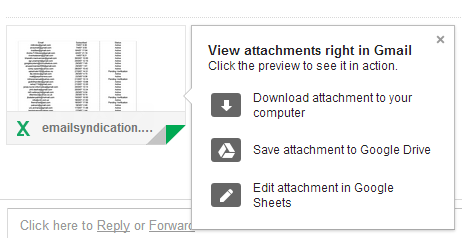
After more than a week of waiting, I got the new interface for Gmail attachments and it's much better than I expected. Most of the features from the old interface are still available, but there are some new Google Drive features that improve the user experience.

Here are some of my favorite features:

1. Thumbnails - they're displayed for many files, not just for photos. They help you distinguish between attachments and they're especially useful for PDF files, presentations and photos.


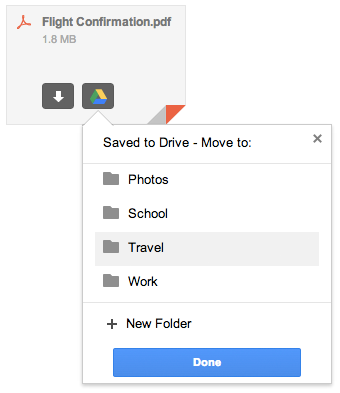
2. Save to Drive - mouse over an attachments, click "save to drive" and you can select the Drive folder where to save the file. You no longer have to visit Google Drive to move the file. Please note that the file is automatically saved to Google Drive and selecting a folder is optional.


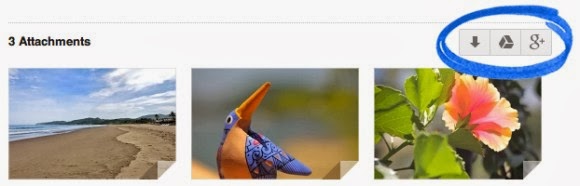
3. Save all to Drive - if a message has more than one attachment, you can save all the files to Google Drive with one click. You only need to find the Drive button placed next to the attachments. You can also click "download all" to download a ZIP file with all the attachments.


4. Show in Drive - Gmail is smart to remember when you save a file to Google Drive and replaces "save to Drive" with "show in Drive", which opens the file in Google Drive. "Save all to drive" is disabled after clicking the button once.

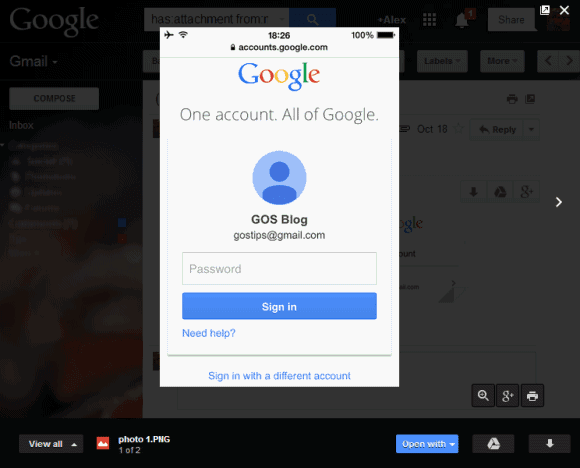
5. Quick preview - just click an attachment and you can preview the file inside Gmail. This works for photos, PDF files, documents, spreadsheets, presentations and more. To scroll down, use the mouse wheel, the down arrow key or Page Down. You can click the "pop out" icon next to "x" to open the preview in a new tab. To close the preview box, press Esc or click the "x" icon.


6. Slideshow - you can quickly go to the next attachment by clicking the arrow icon or by using keyboard shortcuts (right arrow key). Use the left arrow key to go back to the previous attachment. This is only a manual slideshow, there's no support for automatic slideshows.

7. Share photos on Google+ - click the attachment, then click the Google+ button at the bottom of the page. For multiple image attachments, click the Google+ button next to the list of attachments and you can share all the images on Google+.

8. Print files - click the attachment, then click the "print" button at the bottom of the page.

9. Zoom in/zoom out/zoom to fit - use the zoom buttons for a more in-depth look.

10. Edit files - for files you can import in Google's Drive apps, you'll also see a button like this when you mouse over the attachment: "Edit in Google Sheets", "Edit in Google Docs" or "Edit in Google Slides". Click the button to save the attachment as an editable file.

When you preview the file, you can click "Open with" and select an app that handles your file. This is not limited to Google's apps, so you can select apps like Zoho, DocuSign and more.

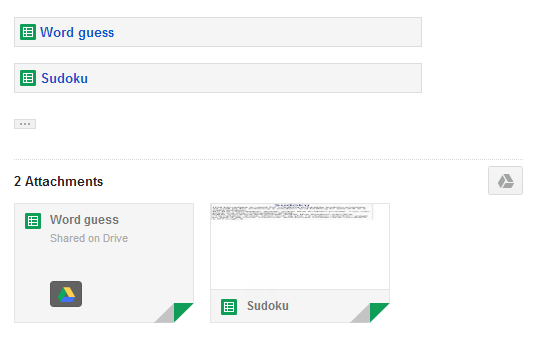
Oh, and one more thing: links to Google Drive files are treated as attachments.


While the new interface is great, I found a some annoyances. There's a cool feature that is no longer available in the new interface: it allowed to see all the image attachments on a single page. Another downside is that you need to mouse over an attachment to see the entire filename and its size.

{ Thanks, Stefan. }
Read More
Posted in gmail, google drive | No comments

Pegman's Return and the Full-Screen Google Maps

Posted on 13:20 by Unknown
I posted about Pegman's return to Google Maps two weeks ago, but I only got the update today. Sometimes it takes a few weeks until Google rolls out new features, sometimes it takes months (Gmail's pay button is an example).

While Pegman's return is a good news, the most striking thing about the latest Google Maps update is that the black bar has disappeared and the new navigation is placed on top of the map. The settings and help buttons have been moved to the bottom of the page.

Here are some screenshots from the "Welcome back, Pegman!" tour:


{ Thanks, Emanuele Bartolomucci. }
Read More
Posted in Google Maps | No comments

Wednesday, 20 November 2013

YouTube Easter Egg for Doge Meme

Posted on 17:04 by Unknown
"Doge is a slang term for 'dog' that is primarily associated with pictures of Shiba Inus (nicknamed 'Shibe') and internal monologue captions on Tumblr. These photos may be photoshopped to change the dog's face or captioned with interior monologues in Comic Sans font," informs KnowYourMeme.

YouTube has an Easter Egg that changes the search results page for [doge meme]: colorful text, Comic Sans, much wow, so hip, help plz.


{ via Phandroid, thanks Sushubh }
Read More
Posted in Easter Egg, YouTube | No comments

YouTube's Follow Back in Google+

Posted on 14:26 by Unknown
Emanuele Bartolomucci spotted a new YouTube feature: when you're watching a video from a channel associated with a page that follows you in Google+, you get this message: "X added you on Google+. Follow back for exclusive updates!"


I wasn't able to trigger this feature, so it's probably an experiment. It's also a sign that YouTube will integrate more with Google+.

{ Thanks, Emanuele. }
Read More
Posted in Google Plus, YouTube | No comments

New Interface for Google+ Notifications

Posted on 13:25 by Unknown
Google+ notifications have a new interface: there's a "previously read" section, just like in the Google+ app for Android, and there are some new transitions that mimic scrolling down.

The previously read notifications are no longer displayed below the Jingles icon, so you need to click "previously read" to see them. The notifications box is less cluttered and you can still read all your notifications.


Here's a GIF that shows some of the new animations:


{ Thanks, Mukil. }
Read More
Posted in Google Plus, User interface | No comments
Newer Posts Older Posts Home
Subscribe to: Posts (Atom)

Popular Posts

  • Merge cells vertically in Google spreadsheets
    There are many times when you want to format your spreadsheets in a certain way to make your data easier to read and understand. Starting to...
  • What's The Right Answer?
    Sometimes the same question can have multiple answers, even when you're looking for a simple fact. I've searched for [ny population]...
  • A completely new look for Drive on iOS
    One of the features you’ve told us you want on Drive for iOS is the ability to effortlessly browse and preview files, just like you can on A...
  • Google Quick View
    Google Search for mobile has a new feature called " Quick View ". Right now, it only shows up for Wikipedia results and it allows ...
  • Upload and store your files in the cloud with Google Docs
    We're happy to announce that over the next few weeks we will be rolling out the ability to upload, store and organize any type of file i...
  • Summarize your data with pivot tables
    Starting today, we're rolling out pivot tables in Google spreadsheets. Pivot tables make it easy to process and summarize large data set...
  • Hosting a viewing party for the OSCARS®
    Last year, I planned an OSCARS® viewing party with my friends. To add some friendly competition and figure out who was coming, I collected p...
  • In-cell dropdown and validation in spreadsheets
    Today, we added in-cell dropdown and validation to spreadsheets. This makes it easy to constrain the values of an individual cell to a spec...
  • More In-Depth Articles in Google Search
    For general queries like [ global warming ], [ love ], [ Mandela ], [ China ], Google shows some in-depth news articles at the bottom of th...
  • The Google Docs for students page
    We recently launched the Google Docs for students page which highlights how various student populations can use Google Docs in their daily ...

Categories

  • Acquisitions
  • Ads
  • Android
  • Annoyances
  • April Fools Day
  • attachments
  • back to school
  • Blogger
  • charts
  • chat
  • Chrome
  • Chrome extensions
  • chrome web apps
  • Cloud Connect
  • collaboration
  • comments
  • community
  • discussions
  • DMCA
  • docs
  • document list
  • documents
  • documents list
  • drawings
  • drivebacktoschool
  • Easter Egg
  • education
  • Faces of Docs
  • forms
  • gmail
  • gone google
  • Google Alerts
  • Google Analytics
  • Google Apps Blog
  • Google Apps Script
  • Google Calendar
  • Google Cast
  • Google Checkout
  • Google Chrome
  • Google Chrome OS
  • Google Cloud Connect
  • Google Contacts
  • Google Dictionary
  • Google Docs
  • Google Docs Viewer
  • google documents
  • google drive
  • Google Earth
  • Google Goggles
  • Google Hangouts
  • Google Instant
  • Google Keep
  • Google Latitude
  • Google Local
  • Google Maps
  • Google Music
  • Google News
  • Google Notebook
  • Google Now
  • Google Pack
  • Google Photos
  • Google Play
  • Google Plus
  • Google Reader
  • Google Sites
  • Google Suggest
  • Google Takeout
  • Google Talk
  • Google Toolbar
  • Google Translate
  • Google Trends
  • Google Voice
  • Google Wallet
  • Google+
  • googlenew
  • Greasemonkey
  • Guest Post
  • holiday
  • iGoogle
  • Image Search
  • images
  • InOut
  • iOS
  • Keep
  • Knowledge
  • mobile
  • OCR
  • offline
  • OneBox
  • paperless
  • pdfs
  • photo
  • photos
  • Picasa Web Albums
  • presentations
  • product ideas
  • profiles
  • quickoffice
  • Reddit
  • research
  • save to drive
  • scripts
  • Security
  • sharing
  • sheets
  • shortcut
  • slides
  • spell check
  • spreadsheets
  • stock photos
  • storage
  • students
  • tables
  • teachers
  • templates
  • Tips
  • User interface
  • videos
  • Viewer
  • Visualization
  • Voice Search
  • Web Search
  • Yahoo
  • YouTube

Blog Archive

  • ▼  2013 (519)
    • ▼  December (33)
      • Google Maps Easter Egg for Christmas
      • Google Music to Add Upload Feature
      • Sound Search Playlist in Google Music
      • Google Zeitgeist 2013
      • Google Zeitgeist Quiz
      • Google's Christmas Carols Easter Egg
      • More About Gmail's Proxy
      • Custom Maps in the New Google Maps
      • Auto Awesome Snow Shake in Google+ for Android
      • Updated Google Settings Page
      • Google Uses a Proxy to Load Gmail Images
      • Google's Animated Decorations for Christmas
      • The New Google Sheets
      • Google's Video Duration Experiment
      • New Google Sheets: faster, more powerful, and work...
      • 9 New Languages in Google Translate
      • 10 New Chromecast Apps
      • Google Settings Page for Phone Numbers
      • Connect Google Photo Spheres
      • Google Open Gallery
      • More In-Depth Articles in Google Search
      • Google's Mobile Image Search Adds Menu
      • Auto Awesome, Winter Special
      • Export Gmail and Google Calendar Data
      • The Old Google Contacts, No Longer Available
      • Location Autocomplete in Google Calendar
      • Short URLs in the New Google Maps
      • Chromecast Game
      • Personalized Embedded Google Maps
      • Google Santa Tracker
      • Chrome Download Tips
      • More Search Results in the New Google Maps
      • My Google?
    • ►  November (44)
    • ►  October (64)
    • ►  September (50)
    • ►  August (63)
    • ►  July (60)
    • ►  June (57)
    • ►  May (62)
    • ►  April (49)
    • ►  March (33)
    • ►  February (1)
    • ►  January (3)
  • ►  2012 (34)
    • ►  December (4)
    • ►  November (4)
    • ►  October (5)
    • ►  September (4)
    • ►  August (2)
    • ►  July (1)
    • ►  June (3)
    • ►  May (2)
    • ►  April (2)
    • ►  March (2)
    • ►  February (5)
  • ►  2011 (80)
    • ►  December (4)
    • ►  November (1)
    • ►  October (7)
    • ►  September (10)
    • ►  August (11)
    • ►  July (8)
    • ►  June (9)
    • ►  May (1)
    • ►  April (8)
    • ►  March (8)
    • ►  February (8)
    • ►  January (5)
  • ►  2010 (118)
    • ►  December (11)
    • ►  November (16)
    • ►  October (6)
    • ►  September (13)
    • ►  August (13)
    • ►  July (7)
    • ►  June (15)
    • ►  May (11)
    • ►  April (7)
    • ►  March (7)
    • ►  February (6)
    • ►  January (6)
  • ►  2009 (82)
    • ►  December (14)
    • ►  November (4)
    • ►  October (10)
    • ►  September (10)
    • ►  August (4)
    • ►  July (6)
    • ►  June (6)
    • ►  May (5)
    • ►  April (4)
    • ►  March (8)
    • ►  February (7)
    • ►  January (4)
  • ►  2008 (97)
    • ►  December (6)
    • ►  November (4)
    • ►  October (6)
    • ►  September (8)
    • ►  August (5)
    • ►  July (7)
    • ►  June (11)
    • ►  May (20)
    • ►  April (13)
    • ►  March (6)
    • ►  February (6)
    • ►  January (5)
  • ►  2007 (25)
    • ►  December (1)
    • ►  November (1)
    • ►  October (2)
    • ►  September (3)
    • ►  August (3)
    • ►  July (4)
    • ►  June (3)
    • ►  May (2)
    • ►  April (2)
    • ►  March (1)
    • ►  February (2)
    • ►  January (1)
  • ►  2006 (10)
    • ►  December (2)
    • ►  November (4)
    • ►  October (4)
Powered by Blogger.

About Me

Unknown
View my complete profile