Free Online Storage

  • Subscribe to our RSS feed.
  • Twitter
  • StumbleUpon
  • Reddit
  • Facebook
  • Digg

Tuesday, 3 December 2013

Short URLs in the New Google Maps

Posted on 16:34 by Unknown
One of the cool things about the new Google Maps is that the URL is updated automatically when you navigate the map, so you can simply copy it from the address bar. Unfortunately, the URL is still huge and a short version is often useful.

Now you can get a short URL by clicking the gear icon at the bottom of the page, selecting "share and embed map" and checking "short URL". I think the short URL should be displayed by default, since the long version can be found in the address bar. "By using a short URL, you can squeeze a long Google Maps link into fewer characters to leave more room to say what's on your mind," explains Google.


{ via +Google Maps }
Read More
Posted in Google Maps | No comments

Chromecast Game

Posted on 10:48 by Unknown
If you have a Chromecast and you want to try a new app that supports Google's dongle, install TicTacToe for Android or for iOS. It's a very simple game that requires 2 players and displays the results on your TV. You can install it on an Android phone or tablet, on an iPhone or iPad, but you need 2 devices to play the game.


While the game is pretty basic, it shows that Chromecast isn't just for streaming music and video. Once the Google Cast API is out of beta, you'll find a lot more interesting apps. TicTacToe is based on this sample app.

{ via Reddit }
Read More
Posted in Google Cast, mobile | No comments

Monday, 2 December 2013

Personalized Embedded Google Maps

Posted on 16:16 by Unknown
Last week, Google announced that you can now embed maps in the new Google Maps interface. Just click the gear icon at the bottom of the page and select "embed map". You can pick from the 3 sizes that are available or click "custom size" to enter your favorite width and height.


The most interesting thing about the new embeds? "This map is built for you. When you view this map on your site, you'll see your saved places on the map. Your site's visitors won't see those saved places – they'll see a map built for them." This only happens if you see your profile icon in the top right corner of the map. You can star locations in an embedded map and they'll be saved to your Google account.


"You can embed a basic map, driving directions, or a local search into your website or blog from the new Google Maps," informs Google.
Read More
Posted in Google Maps | No comments

Google Santa Tracker

Posted on 15:53 by Unknown
Google no longer offers the official Santa Tracker. Last year, NORAD partnered with Microsoft and Google launched its own service. Now the Google Santa Tracker is back with cool games and nifty features that help you get into the Christmas spirit.

"On Christmas Eve we'll be proudly showcasing a preview of Santa's dashboard -- the technology that powers his sleigh during his around-the-world journey. We've received this special preview from one of Santa's many developer elves, who are hard at work in the North Pole helping Santa prepare for his big day. Santa's dashboard - featuring the latest and greatest in Google Maps technology and sleigh engineering - will allow you to follow his progress around the world, and also learn a little about some of his stops along the way. Our friendly elves have also invited you to explore Santa's village while Santa gets ready for his journey. So go ahead and explore his village, you might just find some fun activities and meet some interesting elves," informs Google.


{ via Adam Haberlach. }
Read More
Posted in | No comments

Chrome Download Tips

Posted on 15:37 by Unknown
These features aren't new, but they're pretty useful and they might help you become more productive when you download files in Google Chrome.

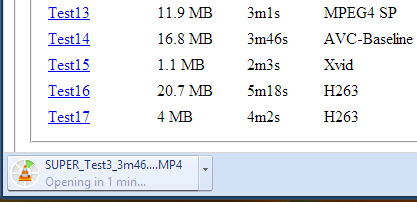
1. Do you want to open a file immediately after Chrome downloads it? You don't have to wait, just click the file in the download bar and you should see something like "opening in X minutes".


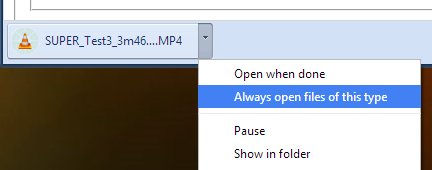
2. If you always want to open certain files after Chrome downloads them, click the arrow icon and check "always open files of this type". You can use this for .mp4 files or .torrent files, for example.


3. How to move to the desktop a file you've just downloaded? Just drag it from the download bar and drop it onto your desktop.

4. Some files open directly in Chrome: PDF documents, MP4 videos, MP3 songs. How to download them? Use a keyboard shortcut: Ctrl+S or Command-S for Mac. Another option is to right click and select "save as". You can also right click the link to the file and select "save link as".

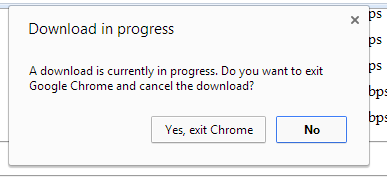
5. Don't worry about closing the Chrome window accidentally while downloading some files. Chrome shows a warning: "download in progress".


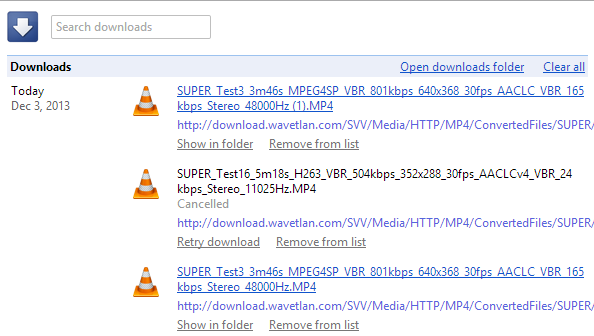
6. Manage your downloads by clicking "Downloads" in the Chrome or pressing Ctrl+J (Command-J for Mac). Use the search box to find a file you've downloaded last month, right-click the URL and you can copy it, click "Show in folder" to locate the file. You can also clear all the downloads.

Read More
Posted in Google Chrome, Tips | No comments

More Search Results in the New Google Maps

Posted on 14:29 by Unknown
The new Google Maps for desktop updated the local search card and now shows the top 3 results instead of only one. You can still go to the list of top results or check the results from the map, but the card is more convenient. Google is the king of search, so people expect to find a hierarchy. The list of top results is one click away, but many people will never find it.


{ via Jérôme }
Read More
Posted in Google Local, Google Maps | No comments

My Google?

Posted on 13:55 by Unknown
iGoogle has been discontinued, it's time for My Google. It's not clear what's behind this new service or if it will ever be released, but one thing it's clear: a Chromium bug report from a Google employee included a few links to some articles from Google's help centers. One of the links is: https://support.google.com/mygoogle/answer/3151281?hl=en&ref_topic=3148584 and there's a reference to "MyGoogle".


Clicking the link sends you to a 403 error page: "Your client does not have permission to get URL from this server". You get a 404 error page if the page doesn't exist, so this is different.


It's likely that the My Google help center is only available for Google employees, since the service hasn't been released yet. The Chromium bug report included links to the following Google help centers: MyGoogle, Google+, Google Maps, Google Search and YouTube, so the new service could be important.

"My" suggests that you'll be able to personalize Google. iGoogle, My Yahoo, My MSN focused on personalized homepages, but Google moved away from this model and started to focus on pushing content when it's likely to be useful (Google Now).

Maybe it's about Google Now, maybe it's another attempt at personalizing search results, maybe it's a way to manage preferences for all Google services. What's your take?

Update: Will Norris, from Google, says that it's "nothing quite that exciting. Just internal HR stuff."

{ Thanks, Florian K. }
Read More
Posted in | No comments
Newer Posts Older Posts Home
Subscribe to: Posts (Atom)

Popular Posts

  • Merge cells vertically in Google spreadsheets
    There are many times when you want to format your spreadsheets in a certain way to make your data easier to read and understand. Starting to...
  • What's The Right Answer?
    Sometimes the same question can have multiple answers, even when you're looking for a simple fact. I've searched for [ny population]...
  • A completely new look for Drive on iOS
    One of the features you’ve told us you want on Drive for iOS is the ability to effortlessly browse and preview files, just like you can on A...
  • Google Quick View
    Google Search for mobile has a new feature called " Quick View ". Right now, it only shows up for Wikipedia results and it allows ...
  • Upload and store your files in the cloud with Google Docs
    We're happy to announce that over the next few weeks we will be rolling out the ability to upload, store and organize any type of file i...
  • Summarize your data with pivot tables
    Starting today, we're rolling out pivot tables in Google spreadsheets. Pivot tables make it easy to process and summarize large data set...
  • Hosting a viewing party for the OSCARS®
    Last year, I planned an OSCARS® viewing party with my friends. To add some friendly competition and figure out who was coming, I collected p...
  • In-cell dropdown and validation in spreadsheets
    Today, we added in-cell dropdown and validation to spreadsheets. This makes it easy to constrain the values of an individual cell to a spec...
  • More In-Depth Articles in Google Search
    For general queries like [ global warming ], [ love ], [ Mandela ], [ China ], Google shows some in-depth news articles at the bottom of th...
  • The Google Docs for students page
    We recently launched the Google Docs for students page which highlights how various student populations can use Google Docs in their daily ...

Categories

  • Acquisitions
  • Ads
  • Android
  • Annoyances
  • April Fools Day
  • attachments
  • back to school
  • Blogger
  • charts
  • chat
  • Chrome
  • Chrome extensions
  • chrome web apps
  • Cloud Connect
  • collaboration
  • comments
  • community
  • discussions
  • DMCA
  • docs
  • document list
  • documents
  • documents list
  • drawings
  • drivebacktoschool
  • Easter Egg
  • education
  • Faces of Docs
  • forms
  • gmail
  • gone google
  • Google Alerts
  • Google Analytics
  • Google Apps Blog
  • Google Apps Script
  • Google Calendar
  • Google Cast
  • Google Checkout
  • Google Chrome
  • Google Chrome OS
  • Google Cloud Connect
  • Google Contacts
  • Google Dictionary
  • Google Docs
  • Google Docs Viewer
  • google documents
  • google drive
  • Google Earth
  • Google Goggles
  • Google Hangouts
  • Google Instant
  • Google Keep
  • Google Latitude
  • Google Local
  • Google Maps
  • Google Music
  • Google News
  • Google Notebook
  • Google Now
  • Google Pack
  • Google Photos
  • Google Play
  • Google Plus
  • Google Reader
  • Google Sites
  • Google Suggest
  • Google Takeout
  • Google Talk
  • Google Toolbar
  • Google Translate
  • Google Trends
  • Google Voice
  • Google Wallet
  • Google+
  • googlenew
  • Greasemonkey
  • Guest Post
  • holiday
  • iGoogle
  • Image Search
  • images
  • InOut
  • iOS
  • Keep
  • Knowledge
  • mobile
  • OCR
  • offline
  • OneBox
  • paperless
  • pdfs
  • photo
  • photos
  • Picasa Web Albums
  • presentations
  • product ideas
  • profiles
  • quickoffice
  • Reddit
  • research
  • save to drive
  • scripts
  • Security
  • sharing
  • sheets
  • shortcut
  • slides
  • spell check
  • spreadsheets
  • stock photos
  • storage
  • students
  • tables
  • teachers
  • templates
  • Tips
  • User interface
  • videos
  • Viewer
  • Visualization
  • Voice Search
  • Web Search
  • Yahoo
  • YouTube

Blog Archive

  • ▼  2013 (519)
    • ▼  December (33)
      • Google Maps Easter Egg for Christmas
      • Google Music to Add Upload Feature
      • Sound Search Playlist in Google Music
      • Google Zeitgeist 2013
      • Google Zeitgeist Quiz
      • Google's Christmas Carols Easter Egg
      • More About Gmail's Proxy
      • Custom Maps in the New Google Maps
      • Auto Awesome Snow Shake in Google+ for Android
      • Updated Google Settings Page
      • Google Uses a Proxy to Load Gmail Images
      • Google's Animated Decorations for Christmas
      • The New Google Sheets
      • Google's Video Duration Experiment
      • New Google Sheets: faster, more powerful, and work...
      • 9 New Languages in Google Translate
      • 10 New Chromecast Apps
      • Google Settings Page for Phone Numbers
      • Connect Google Photo Spheres
      • Google Open Gallery
      • More In-Depth Articles in Google Search
      • Google's Mobile Image Search Adds Menu
      • Auto Awesome, Winter Special
      • Export Gmail and Google Calendar Data
      • The Old Google Contacts, No Longer Available
      • Location Autocomplete in Google Calendar
      • Short URLs in the New Google Maps
      • Chromecast Game
      • Personalized Embedded Google Maps
      • Google Santa Tracker
      • Chrome Download Tips
      • More Search Results in the New Google Maps
      • My Google?
    • ►  November (44)
    • ►  October (64)
    • ►  September (50)
    • ►  August (63)
    • ►  July (60)
    • ►  June (57)
    • ►  May (62)
    • ►  April (49)
    • ►  March (33)
    • ►  February (1)
    • ►  January (3)
  • ►  2012 (34)
    • ►  December (4)
    • ►  November (4)
    • ►  October (5)
    • ►  September (4)
    • ►  August (2)
    • ►  July (1)
    • ►  June (3)
    • ►  May (2)
    • ►  April (2)
    • ►  March (2)
    • ►  February (5)
  • ►  2011 (80)
    • ►  December (4)
    • ►  November (1)
    • ►  October (7)
    • ►  September (10)
    • ►  August (11)
    • ►  July (8)
    • ►  June (9)
    • ►  May (1)
    • ►  April (8)
    • ►  March (8)
    • ►  February (8)
    • ►  January (5)
  • ►  2010 (118)
    • ►  December (11)
    • ►  November (16)
    • ►  October (6)
    • ►  September (13)
    • ►  August (13)
    • ►  July (7)
    • ►  June (15)
    • ►  May (11)
    • ►  April (7)
    • ►  March (7)
    • ►  February (6)
    • ►  January (6)
  • ►  2009 (82)
    • ►  December (14)
    • ►  November (4)
    • ►  October (10)
    • ►  September (10)
    • ►  August (4)
    • ►  July (6)
    • ►  June (6)
    • ►  May (5)
    • ►  April (4)
    • ►  March (8)
    • ►  February (7)
    • ►  January (4)
  • ►  2008 (97)
    • ►  December (6)
    • ►  November (4)
    • ►  October (6)
    • ►  September (8)
    • ►  August (5)
    • ►  July (7)
    • ►  June (11)
    • ►  May (20)
    • ►  April (13)
    • ►  March (6)
    • ►  February (6)
    • ►  January (5)
  • ►  2007 (25)
    • ►  December (1)
    • ►  November (1)
    • ►  October (2)
    • ►  September (3)
    • ►  August (3)
    • ►  July (4)
    • ►  June (3)
    • ►  May (2)
    • ►  April (2)
    • ►  March (1)
    • ►  February (2)
    • ►  January (1)
  • ►  2006 (10)
    • ►  December (2)
    • ►  November (4)
    • ►  October (4)
Powered by Blogger.

About Me

Unknown
View my complete profile