Free Online Storage

  • Subscribe to our RSS feed.
  • Twitter
  • StumbleUpon
  • Reddit
  • Facebook
  • Digg

Wednesday, 20 November 2013

Google Wallet Card

Posted on 12:55 by Unknown
Google Wallet users in the US can now get a physical card from Google. It's free, but you need to verify your identity, which means you'll have to provide more information to Google: the last four digits of Social Security Number (SSN) or Individual Taxpayer Identification Number (ITIN) and more.

"The Google Wallet Card is a physical prepaid debit card that allows you to access your Wallet Balance in the real world, at ATMs, banks, and wherever MasterCard® Debit is accepted. If you're in the US, and you have already verified your identity, you can request a Wallet Card from the desktop site at wallet.google.com, or from the mobile app. Once you receive and activate it, you'll be able to pay with the Wallet Card at online and physical stores that accept MasterCard® Debit, and make cash withdrawals at ATMs or banks."


Android Police reports that "Google says the card should be delivered to interested parties in 10-12 days". It's US-only, there are no fees to order or activate the card and the issuer of the card is The Bancorp Bank, which provides private label banking services.

Google provides a use case for the debit card: "Your roommate finally paid you back for dinner through Google Wallet, and you want to use that money right away to pay for groceries this week. Now, you can use the new Google Wallet Card to spend the money instantly, either by purchasing in stores or by withdrawing cash at ATMs, without having to wait for money to transfer from your Google Wallet Balance to your bank account."

Other advantages: free notifications on your mobile phone and no monthly/annual fees to use the card (there are some fees, though).

An important limitation: "you cannot use the Google Wallet Card outside the US right now".

Read More
Posted in Google Wallet | No comments

Tuesday, 19 November 2013

Google+ Shows Line Counter for Long Posts

Posted on 03:53 by Unknown
Google+ now shows the number of lines that are collapsed next to "read more", so you can see if the post is long. If the post has less than 10 lines, Google doesn't display the number of lines.


Here's an example of a long Google+ post: "read more (50 lines)".


Google+ shows a similar line counter for long comments:


These are only displayed in the stream and profile pages, not for the post pages.
Read More
Posted in Google Plus | No comments

Google Asks Users to Disable Ad Blocking for Its Sites

Posted on 02:30 by Unknown
It looks like Google started to show warnings if you use AdBlock or AdBlock Plus, the most popular ad blockers (they have more than 50 million users). A reader from Brazil noticed this message: "Oh no, it seems like you are blocking Google's ads. These ads pay for Google products that people use every day. It's easy to deactivate ad blocking just for Google. And it won't change your ad blocking settings or other settings".

The message links to a filter that includes a long list of exceptions like "@@||www.google.com^$document" and "@@||maps.google.com^$document".


Here's a screenshot of the Google whitelist filter (it actually includes more domains):


This is pretty weird, considering that the ads were not blocked, as you can see in the screenshot. Google ads are not blocked by default in AdBlock Plus, since they're considered "acceptable ads". Some sites have speculated that Google paid AdBlock Plus to whitelist its ads, but that's not very clear.

Google Discovery also reported about this back in May, so it looks like the experiment is limited to Google Brazil, at least for now.

{ Thanks, Marcos Alexandre. }
Read More
Posted in Ads, Web Search | No comments

Sunday, 17 November 2013

YouTube Tests Channel Cards

Posted on 14:43 by Unknown
After adding music cards and testing cards for shows, YouTube experiments with cards for channels. They're displayed in the right sidebar of the search results page and show the latest videos from the channel and some of its playlists.

Here's an example for Google Chrome. The channel is still included in the list of search results.


Here's how you can enable the experimental feature. If you use Chrome, Firefox, Opera, Safari or Internet Explorer 8+:

1. open youtube.com in a new tab

2. load your browser's developer console:

* Chrome or Opera 15+ - press Ctrl+Shift+J for Windows/Linux/ChromeOS or Command-Option-J for Mac

* Firefox - press Ctrl+Shift+K for Windows/Linux or Command-Option-K for Mac

* Internet Explorer 8+ - press F12 and select the "Console" tab

* Safari 6 - if you haven't enabled the Develop menu, open Preferences from the Safari menu, go to the Advanced tab and check "Show Develop menu in menu bar". Close Preferences and then press Command-Option-C to show the console.

* Opera 12 - press Ctrl+Shift+I for Windows/Linux or Command-Option-I for Mac, then click "Console".

3. paste the following code which changes a YouTube cookie:

document.cookie="VISITOR_INFO1_LIVE=2IS0PWox26Q; path=/; domain=.youtube.com";window.location.reload();

4. press Enter and close the console.

Some examples of searches: [google], [apple], [comedy central].

To go back to the regular interface, use the same instructions, but replace the code from step 3 with this one:

document.cookie="VISITOR_INFO1_LIVE=; path=/; domain=.youtube.com";window.location.reload();

{ via Rubén. }
Read More
Posted in User interface, YouTube | No comments

Friday, 15 November 2013

Blue YouTube

Posted on 14:49 by Unknown
I like blue, so I was pleasantly surprised to see that YouTube made some UI elements blue (#2793e6): the like button and the line below the number of views. Maybe someone was unhappy that Android KitKat removed all the blue icons and decided to compensate in other ways or maybe it's an attempt to calm YouTube users and make them stop posting silly comments.


Read More
Posted in User interface, YouTube | No comments

Folders in Chrome's App Launcher

Posted on 13:35 by Unknown
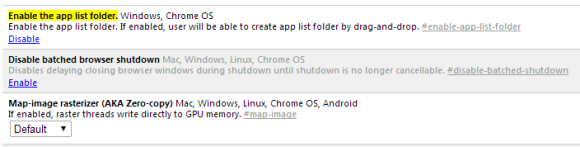
Chrome's latest Dev channel release lets you create folders in the app launcher. If you use Chrome 33 (Dev, Canary) or Chromium 33 for Windows, you can paste this in the address bar:

chrome://flags/#enable-app-list-folder

Then click "Enable" next to "Enable the app list folder" and then click the "Relaunch now" button at the bottom of the page to restart the browser and enable the experimental feature.


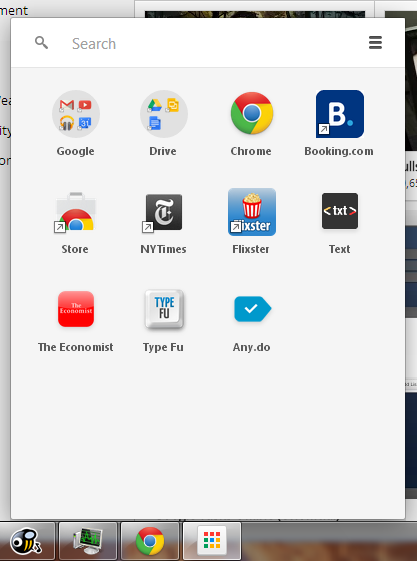
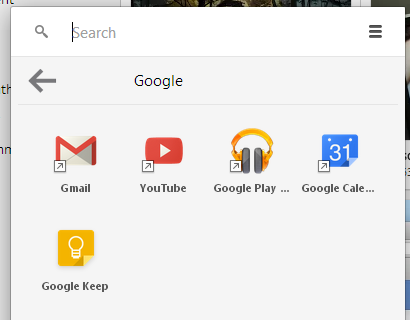
"If enabled, user will be able to create app list folder by drag-and-drop," informs Google. It works just like in Android: drag one app on top of another to create a folder, then drag other apps to the folder.


Here's the Google folder from the screenshot above:


It's a simple feature that lets you organize your apps and reduce clutter. Unfortunately, it doesn't work well, at least not for me. After creating the folders, Chrome quickly removed them. Maybe it has something to do with syncing or maybe there are other bugs. It's an experimental feature, so I can't complain.

"These experimental features may change, break, or disappear at any time. We make absolutely no guarantees about what may happen if you turn one of these experiments on, and your browser may even spontaneously combust. (...) Please proceed with caution."

{ Thanks, Silviu. }
Read More
Posted in Google Chrome | No comments

Mobile First

Posted on 12:50 by Unknown
A few years ago, many people complained that mobile sites and mobile apps are too limited. They couldn't include all the features from their desktop counterparts and some thought that was a bad thing.

Fast forward today and you'll notice that Google's desktop sites look more and more like Google's mobile apps. Most Google redesigns are all about taking mobile interfaces and adding them to the desktop. That's one of the reasons why many Google services drop advanced features and opt for simplified interfaces. This way, everything looks consistent and users can quickly switch from the mobile apps to the desktop apps.

Here are some examples:

1. The Google Maps redesign started with the iPhone app, continued with the desktop site and then the Android app.


2. The app launcher from the Google navigation bar was first available in the Google Search app for iOS.


3. Google Play's desktop interface had a lot of advanced features that were removed when Google updated the site to make it look more like the Android app.

4. The Google+ photo editor and Chrome Office editor are based on mobile apps that were ported to Native Client. You're now using the desktop to run mobile apps (only in Chrome).


5. Google Keep for Android has a lot more features than Google Keep for desktop. For example, you can't reorder notes or add more than one image in Google Keep for desktop.


Somehow, the most innovative and most interesting apps are now in the mobile space. That's where the users are moving and where things are constantly changing. Mobile is a flourishing testbed for new ideas.
Read More
Posted in mobile, User interface | No comments
Newer Posts Older Posts Home
Subscribe to: Posts (Atom)

Popular Posts

  • Merge cells vertically in Google spreadsheets
    There are many times when you want to format your spreadsheets in a certain way to make your data easier to read and understand. Starting to...
  • What's The Right Answer?
    Sometimes the same question can have multiple answers, even when you're looking for a simple fact. I've searched for [ny population]...
  • A completely new look for Drive on iOS
    One of the features you’ve told us you want on Drive for iOS is the ability to effortlessly browse and preview files, just like you can on A...
  • Google Quick View
    Google Search for mobile has a new feature called " Quick View ". Right now, it only shows up for Wikipedia results and it allows ...
  • Upload and store your files in the cloud with Google Docs
    We're happy to announce that over the next few weeks we will be rolling out the ability to upload, store and organize any type of file i...
  • Summarize your data with pivot tables
    Starting today, we're rolling out pivot tables in Google spreadsheets. Pivot tables make it easy to process and summarize large data set...
  • Hosting a viewing party for the OSCARS®
    Last year, I planned an OSCARS® viewing party with my friends. To add some friendly competition and figure out who was coming, I collected p...
  • In-cell dropdown and validation in spreadsheets
    Today, we added in-cell dropdown and validation to spreadsheets. This makes it easy to constrain the values of an individual cell to a spec...
  • More In-Depth Articles in Google Search
    For general queries like [ global warming ], [ love ], [ Mandela ], [ China ], Google shows some in-depth news articles at the bottom of th...
  • The Google Docs for students page
    We recently launched the Google Docs for students page which highlights how various student populations can use Google Docs in their daily ...

Categories

  • Acquisitions
  • Ads
  • Android
  • Annoyances
  • April Fools Day
  • attachments
  • back to school
  • Blogger
  • charts
  • chat
  • Chrome
  • Chrome extensions
  • chrome web apps
  • Cloud Connect
  • collaboration
  • comments
  • community
  • discussions
  • DMCA
  • docs
  • document list
  • documents
  • documents list
  • drawings
  • drivebacktoschool
  • Easter Egg
  • education
  • Faces of Docs
  • forms
  • gmail
  • gone google
  • Google Alerts
  • Google Analytics
  • Google Apps Blog
  • Google Apps Script
  • Google Calendar
  • Google Cast
  • Google Checkout
  • Google Chrome
  • Google Chrome OS
  • Google Cloud Connect
  • Google Contacts
  • Google Dictionary
  • Google Docs
  • Google Docs Viewer
  • google documents
  • google drive
  • Google Earth
  • Google Goggles
  • Google Hangouts
  • Google Instant
  • Google Keep
  • Google Latitude
  • Google Local
  • Google Maps
  • Google Music
  • Google News
  • Google Notebook
  • Google Now
  • Google Pack
  • Google Photos
  • Google Play
  • Google Plus
  • Google Reader
  • Google Sites
  • Google Suggest
  • Google Takeout
  • Google Talk
  • Google Toolbar
  • Google Translate
  • Google Trends
  • Google Voice
  • Google Wallet
  • Google+
  • googlenew
  • Greasemonkey
  • Guest Post
  • holiday
  • iGoogle
  • Image Search
  • images
  • InOut
  • iOS
  • Keep
  • Knowledge
  • mobile
  • OCR
  • offline
  • OneBox
  • paperless
  • pdfs
  • photo
  • photos
  • Picasa Web Albums
  • presentations
  • product ideas
  • profiles
  • quickoffice
  • Reddit
  • research
  • save to drive
  • scripts
  • Security
  • sharing
  • sheets
  • shortcut
  • slides
  • spell check
  • spreadsheets
  • stock photos
  • storage
  • students
  • tables
  • teachers
  • templates
  • Tips
  • User interface
  • videos
  • Viewer
  • Visualization
  • Voice Search
  • Web Search
  • Yahoo
  • YouTube

Blog Archive

  • ▼  2013 (519)
    • ▼  December (33)
      • Google Maps Easter Egg for Christmas
      • Google Music to Add Upload Feature
      • Sound Search Playlist in Google Music
      • Google Zeitgeist 2013
      • Google Zeitgeist Quiz
      • Google's Christmas Carols Easter Egg
      • More About Gmail's Proxy
      • Custom Maps in the New Google Maps
      • Auto Awesome Snow Shake in Google+ for Android
      • Updated Google Settings Page
      • Google Uses a Proxy to Load Gmail Images
      • Google's Animated Decorations for Christmas
      • The New Google Sheets
      • Google's Video Duration Experiment
      • New Google Sheets: faster, more powerful, and work...
      • 9 New Languages in Google Translate
      • 10 New Chromecast Apps
      • Google Settings Page for Phone Numbers
      • Connect Google Photo Spheres
      • Google Open Gallery
      • More In-Depth Articles in Google Search
      • Google's Mobile Image Search Adds Menu
      • Auto Awesome, Winter Special
      • Export Gmail and Google Calendar Data
      • The Old Google Contacts, No Longer Available
      • Location Autocomplete in Google Calendar
      • Short URLs in the New Google Maps
      • Chromecast Game
      • Personalized Embedded Google Maps
      • Google Santa Tracker
      • Chrome Download Tips
      • More Search Results in the New Google Maps
      • My Google?
    • ►  November (44)
    • ►  October (64)
    • ►  September (50)
    • ►  August (63)
    • ►  July (60)
    • ►  June (57)
    • ►  May (62)
    • ►  April (49)
    • ►  March (33)
    • ►  February (1)
    • ►  January (3)
  • ►  2012 (34)
    • ►  December (4)
    • ►  November (4)
    • ►  October (5)
    • ►  September (4)
    • ►  August (2)
    • ►  July (1)
    • ►  June (3)
    • ►  May (2)
    • ►  April (2)
    • ►  March (2)
    • ►  February (5)
  • ►  2011 (80)
    • ►  December (4)
    • ►  November (1)
    • ►  October (7)
    • ►  September (10)
    • ►  August (11)
    • ►  July (8)
    • ►  June (9)
    • ►  May (1)
    • ►  April (8)
    • ►  March (8)
    • ►  February (8)
    • ►  January (5)
  • ►  2010 (118)
    • ►  December (11)
    • ►  November (16)
    • ►  October (6)
    • ►  September (13)
    • ►  August (13)
    • ►  July (7)
    • ►  June (15)
    • ►  May (11)
    • ►  April (7)
    • ►  March (7)
    • ►  February (6)
    • ►  January (6)
  • ►  2009 (82)
    • ►  December (14)
    • ►  November (4)
    • ►  October (10)
    • ►  September (10)
    • ►  August (4)
    • ►  July (6)
    • ►  June (6)
    • ►  May (5)
    • ►  April (4)
    • ►  March (8)
    • ►  February (7)
    • ►  January (4)
  • ►  2008 (97)
    • ►  December (6)
    • ►  November (4)
    • ►  October (6)
    • ►  September (8)
    • ►  August (5)
    • ►  July (7)
    • ►  June (11)
    • ►  May (20)
    • ►  April (13)
    • ►  March (6)
    • ►  February (6)
    • ►  January (5)
  • ►  2007 (25)
    • ►  December (1)
    • ►  November (1)
    • ►  October (2)
    • ►  September (3)
    • ►  August (3)
    • ►  July (4)
    • ►  June (3)
    • ►  May (2)
    • ►  April (2)
    • ►  March (1)
    • ►  February (2)
    • ►  January (1)
  • ►  2006 (10)
    • ►  December (2)
    • ►  November (4)
    • ►  October (4)
Powered by Blogger.

About Me

Unknown
View my complete profile